


Feature Stores from Scratch: A Minimal Working Implementation
Build the five components every feature store needs, then see where AI changes the design.
# Introduction
Most teams discover they need a feature store the hard way. A fraud model works in the notebook and quietly breaks in production. A support agent gives a generic answer because it has no idea who the user is. A recommender pipeline duplicates the same "30-day spend" calculation across three jobs, and two of them disagree.
A feature store is the piece of infrastructure that fixes those problems. It defines features once, stores them in two shapes (one for training, one for serving), and keeps both in sync. We are going to build a minimal one from scratch in Python, using DuckDB, Parquet, Redis, and FastAPI. Then we will look at how AI applications change what we actually use it for.
The full code is short enough that we will walk through every component.
# What a Feature Store Actually Solves
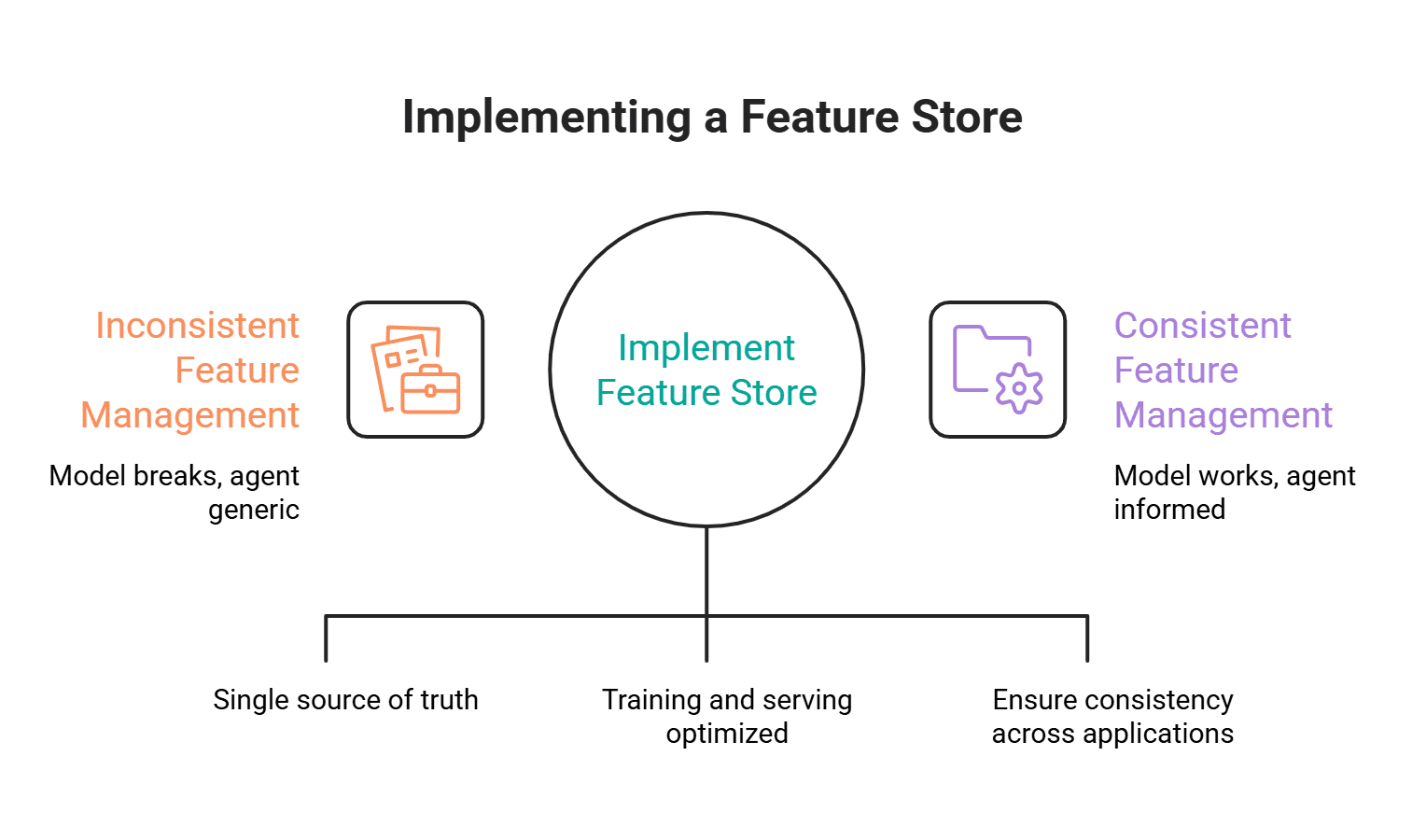
The classic pitch is training-serving skew: the SQL that built your training set is not the same code path that runs at inference, so the values drift. That problem is real, and the offline plus online split is the standard fix.
The modern pitch is broader. Large language model (LLM) agents and retrieval-augmented generation (RAG) pipelines need structured user context at inference time, on every request, in under 10ms. An LLM has no memory of who the user is. If we want personalized output, we have to inject the user's plan tier, recent activity, and account state into the prompt, and we need a system that can return those values fast and consistently. That is exactly what a feature store's online store and retrieval API give us.
So we build for both. The same five components handle the predictive machine learning use case and the LLM context use case.
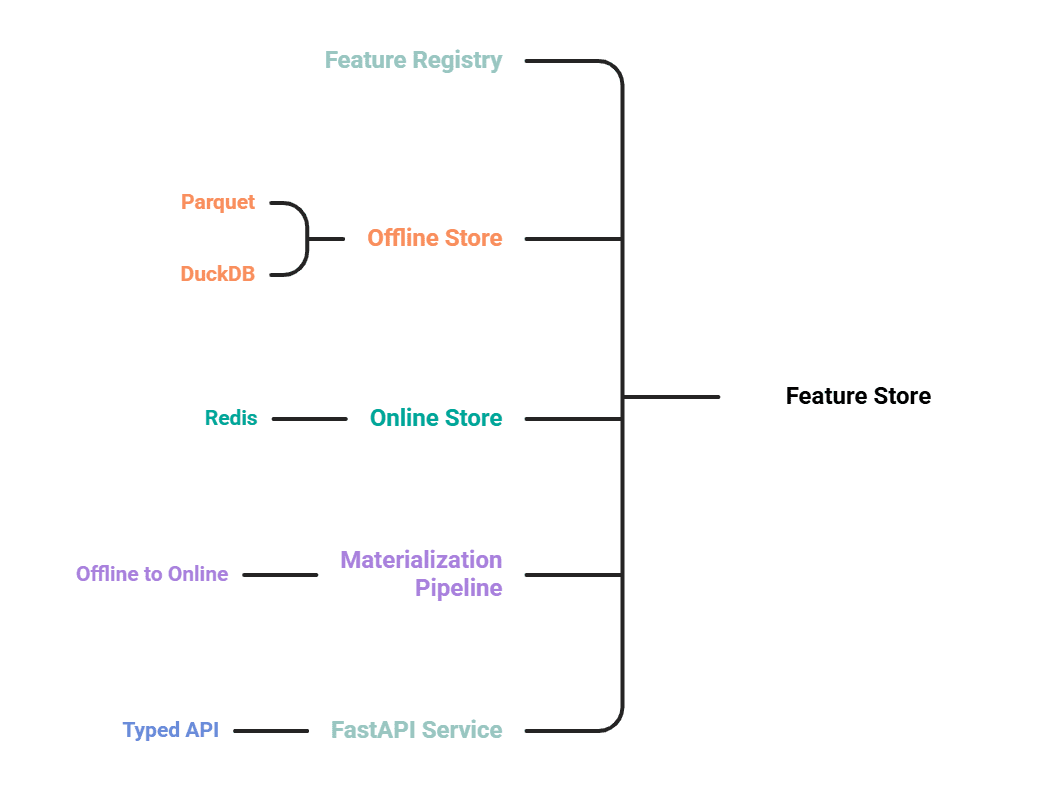
# The Five Components
- A feature registry that defines features as code.
- An offline store on Parquet, queried with DuckDB, for training and backfills.
- An online store on Redis for low-latency lookups at inference.
- A materialization pipeline that pushes the latest values from offline to online.
- A FastAPI service that exposes a typed retrieval API.
# Running Example: A Personalized LLM Recommender
We are running a streaming service. When a user opens the app, an LLM generates a short, personalized "what to watch next" message. The LLM needs three things about the user:
| Feature | Type | Freshness |
|---|---|---|
user_segment |
string | daily |
watch_count_30d |
int | hourly |
last_genre |
string | per-event |
The entity is user_id. We will register these three features, materialize them, and serve them to the LLM at request time.
// 1. Defining the Feature Registry
A registry is just a place where features are declared once, with their entity, dtype, and source. We use a dataclass.
from dataclasses import dataclass
from typing import Literal

@dataclass(frozen=True)
class Feature:
    name: str
    entity: str
    dtype: Literal["int", "float", "str"]
    source: str  # path to a Parquet file or a SQL view

REGISTRY: dict[str, Feature] = {
    "user_segment": Feature("user_segment", "user_id", "str", "data/user_segment.parquet"),
    "watch_count_30d": Feature("watch_count_30d", "user_id", "int", "data/watch_count_30d.parquet"),
    "last_genre": Feature("last_genre", "user_id", "str", "data/last_genre.parquet"),
}
The full code can be found here.
When you run it, the output shows:
Registered features:
user_segment  entity=user_id  dtype=str  source=data/user_segment.parquet
watch_count_30d  entity=user_id  dtype=int  source=data/watch_count_30d.parquet
last_genre  entity=user_id  dtype=str  source=data/last_genre.parquet
This is the contract. Every other component reads from REGISTRY, so renaming a feature, changing its dtype, or pointing it at a new source happens in one place. In production systems, this would be YAML or a Python module checked into a Git repo, with code review on every change.
// 2. Building the Offline Store with DuckDB and Parquet
The offline store holds the full history of every feature value. We use Parquet files as the storage layer and DuckDB as the query engine. DuckDB reads Parquet directly, which means no separate database to run.
Here is a sample of the code:
import duckdb
import pandas as pd

def get_historical_features(
    entity_df: pd.DataFrame, features: list[str]
) -> pd.DataFrame:
    con = duckdb.connect()
    con.register("entities", entity_df)
    base = "SELECT * FROM entities"
    for fname in features:
        f = REGISTRY[fname]
        src = f.source.replace("'", "''")
        con.execute(f"CREATE VIEW {fname}_src AS SELECT * FROM '{src}'")
        base = f"""
            SELECT t.*, s.{fname}
            FROM ({base}) t
            ASOF LEFT JOIN {fname}_src s
              ON t.user_id = s.user_id
             AND t.event_timestamp >= s.event_timestamp
        """
    return con.execute(base).df()
The full code can be found here.
When you run it, the output shows:
| user_id | event_timestamp | user_segment | watch_count_30d | last_genre |
|---|---|---|---|---|
| 8a2f | 2026-05-05 12:00:00 | casual | 22 | NaN |
| b13c | 2026-05-07 20:00:00 | casual | 5 | thriller |
| 8a2f | 2026-05-07 22:00:00 | power_user | 47 | documentary |
The AsOf join is the point-in-time join. For every entity row, it picks the most recent feature value where the feature's timestamp is at or before the event timestamp. That is what prevents leakage — where a training row is built with a feature value that did not exist yet at the moment we are predicting for.
Point-in-time joins are still the right answer for any model we plan to train or fine-tune. For a pure inference-time LLM use case, we may never call this function. We still want the offline store, since it is where backfills, evaluation datasets, and audits come from.
// 3. Setting Up the Online Store on Redis
The online store keeps only the latest value per entity. Redis is the standard choice because hash lookups are sub-millisecond.
import json
import fakeredis  # use redis.Redis() against a real server in production

r = fakeredis.FakeRedis(decode_responses=True)

def write_online(entity: str, entity_id: str, values: dict) -> None:
    r.hset(
        f"{entity}:{entity_id}",
        mapping={k: json.dumps(v) for k, v in values.items()},
    )

def read_online(entity: str, entity_id: str, features: list[str]) -> dict:
    raw = r.hmget(f"{entity}:{entity_id}", features)
    return {f: json.loads(v) if v else None for f, v in zip(features, raw)}
The full code can be found here.
When you run it, the output shows:
read_online -> {'user_segment': 'power_user', 'watch_count_30d': 47, 'last_genre': 'documentary'}
missing key -> {'user_segment': None}
The key shape is entity:entity_id. The value is a hash with one field per feature. A single HMGET returns all the features we asked for in one round trip. On a local Redis instance with three features, this finishes in well under 1ms.
// 4. Running the Materialization Pipeline
Materialization moves values from offline to online. In a real system this runs on a schedule (Airflow, cron, a streaming job). Here it is a function.
def materialize(features: list[str]) -> None:
    by_entity: dict[str, dict] = {}
    for fname in features:
        f = REGISTRY[fname]
        src = f.source.replace("'", "''")
        df = duckdb.sql(f"""
            SELECT {f.entity}, {fname}
            FROM '{src}'
            QUALIFY ROW_NUMBER() OVER (
                PARTITION BY {f.entity}
                ORDER BY event_timestamp DESC
            ) = 1
        """).df()
        for _, row in df.iterrows():
            by_entity.setdefault(row[f.entity], {})[fname] = row[fname]
    for entity_id, values in by_entity.items():
        write_online("user_id", entity_id, values)
The full code can be found here.
When you run it, the output shows:
user_id:8a2f -> {'user_segment': 'power_user', 'watch_count_30d': 47, 'last_genre': 'documentary'}
user_id:b13c -> {'user_segment': 'casual', 'watch_count_30d': 5, 'last_genre': 'thriller'}
The QUALIFY clause keeps the latest row per entity. We group all features for the same user into one Redis write to cut round trips. Run this on the cadence each feature needs: hourly for watch_count_30d, near-real-time for last_genre, daily for user_segment. The registry is the right place to encode that cadence in a real implementation.
// 5. Exposing the FastAPI Retrieval Service
The retrieval service is the production surface. It is what the LLM application calls.
f = resp.json()["features"]
print("\nPrompt the LLM would receive:")
print(
    f"  System: You recommend shows for a streaming service.\n"
    f"  User context: segment={f['user_segment']}, "
    f"watched {f['watch_count_30d']} titles in last 30 days, "
    f"last genre watched: {f['last_genre']}.\n"
    f"  Task: suggest 3 titles in a friendly, short message."
)
The full code can be found here.
When you run it, the output shows:
POST /get-online-features -> 200
body: {'user_id': '8a2f', 'features': {'user_segment': 'power_user', 'watch_count_30d': 47, 'last_genre': 'documentary'}}
Prompt the LLM would receive:
  System: You recommend shows for a streaming service.
  User context: segment=power_user, watched 47 titles in last 30 days, last genre watched: documentary.
  Task: suggest 3 titles in a friendly, short message.
The feature store is the piece that turns "user 8a2f" into a structured context the LLM can use.
# Where the Feature Store Ends and the Vector Database Begins
A vector database (Pinecone, Weaviate, pgvector) is not a feature store, even though both sit in front of a model at inference. They solve different retrieval problems.
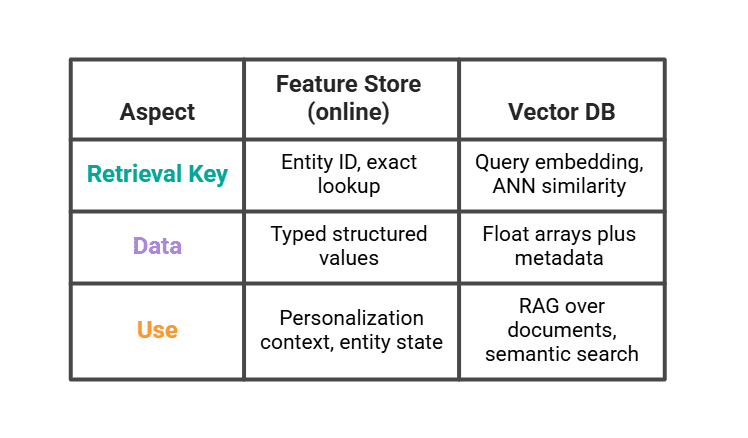
A real LLM stack uses both. The vector database returns the three most similar past viewing sessions. The feature store returns the user's segment and recent counts. The prompt combines them.
# Common Anti-Patterns
A few patterns that we keep seeing fail:
- Computing features inside the model service. The same logic ends up in the training notebook and the API, and the two definitions drift within a quarter.
- Treating the online store as the source of truth. Redis loses data on a bad restart. The offline store is canonical; the online store is a cache.
- Skipping the registry. Three teams independently define
active_userand the dashboards stop matching the model. - Calling a vector database a feature store. It cannot do entity-keyed structured lookups, and a prompt that needs both will end up wired to two systems anyway.
- Backfilling without point-in-time joins. The training set looks great, the production model looks broken, and the gap is the leakage.
# Comparing This to Feast, Tecton, and Databricks
Our ~200 lines do the same job in miniature.
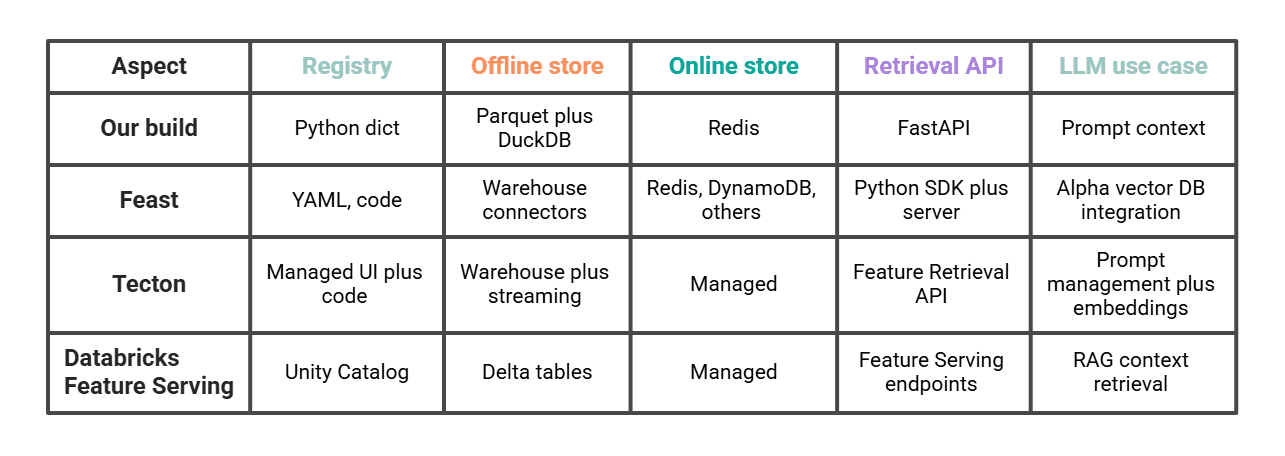
Feast is the closest comparison if we want to go further on the same pattern, self-hosted. Tecton and Databricks are the managed paths and have explicit LLM features (Tecton's Feature Retrieval API for LLMs, Databricks Feature Serving for compound generative AI systems). Picking between them is mostly a question of how much we want to operate ourselves and whether the rest of our stack already lives in Databricks.
# Conclusion
A working feature store fits in five components: a registry, an offline store, an online store, a materialization step, and a retrieval API. Building it once teaches us why the production systems look the way they do. It also shows where the design changes for AI: the online retrieval path is the surface the LLM hits, point-in-time joins matter when we train or evaluate, and the vector database sits next to the feature store, not inside it.
Once we have these pieces, swapping our minimal version for Feast, Tecton, or Databricks is mostly a migration of the registry. The shape of the system stays the same.
Nate Rosidi is a data scientist and in product strategy. He's also an adjunct professor teaching analytics, and is the founder of StrataScratch, a platform helping data scientists prepare for their interviews with real interview questions from top companies. Nate writes on the latest trends in the career market, gives interview advice, shares data science projects, and covers everything SQL.