


Abacus AI Honest Review: Key Criticisms, Facts & What Users Should Know
This review highlights the main critiques of Abacus AI, its price, user reviews, reliability of workflows, and real-life use cases to assist you in evaluating its advantages and disadvantages.
Quick Overview Of This Abacus AI Review
- What does Abacus AI provide?: A comprehensive platform based on ChatLLM, numerous AI engines, agents, programming utilities, software development, data analytics, and content creation.
- Problems mentioned by users: Feedback from users highlights issues with difficult interfaces, unexpected spending of credits, mistakes of agents, delays in support responses, and unclear bills.
- What is evident from the facts?: The platform provides information about prices, limits on credits, integrations, and enterprise features. The cost per operation and typical support response time remain unclear.
- Reliability of workflows: The agents will perform complicated tasks, but you will need to troubleshoot, test, and verify the results for production use.
- Who is going to benefit more from Abacus AI?: Industry professionals like analysts, developers, startup founders and IT professionals who heavily rely on varied AI tools and workflows.
- The Bottom Line: Consider trying Abacus AI if its pricing and other aspects match your requirements.
A Closer Evaluation Of Abacus AI:
Online reviews and competitor reviews of Abacus AI present two distinct perspectives on the platform. Generally speaking, positive reviews can be found among those users who make extensive use of the platform and value the wide variety of AI models, agents, and cost-effectiveness of the platform. However, negative reviews can highlight the challenges and confusion associated with using credits, pricing, learning curve, and some workflow-related issues. Analysis of both perspectives will allow one to get a better understanding of the strengths and weaknesses of the platform.
This article studies Abacus AI through Reddit discussions, positive and negative user reviews, and video walkthroughs to find out how users perceive and utilize the platform. In addition, the review of the platform's features, pricing, credit system, and product ecosystem is conducted to add depth to the analysis.
It is necessary to conduct an honest review of Abacus AI that will cover its main strengths and weaknesses and answer the most common criticisms.
About Abacus AI - A Brief Note :
Abacus AI is a technical workspace that combines various AI models and functions under one umbrella. One can use this workspace for writing, data analysis, generating images and videos, coding, and much more.
ChatLLM makes a great start for beginners in AI technology. The app basically gives you access to various models of providers like OpenAI, Anthropic, and Google through one interface so that you can toggle between these models without accessing multiple applications.
Even though many people draw comparisons between Abacus AI, ChatGPT, and Claude, it should be kept in mind that these two platforms are designed to serve different purposes. While ChatGPT and Claude specialize in conversational AI, Abacus AI covers a broader area of individual and commercial needs in the form of various AI capabilities.
The ideal option would depend on your needs: if you seek assistance in conversational AI, you might go for ChatGPT and Claude; however, if you are looking for multiple AI capabilities and models in one place, then you should consider Abacus AI.
The following table explains the ecosystem of Abacus AI and their respective uses.
The Ecosystem: Core Tools & Services
| Product | What It Does |
|---|---|
| ChatLLM | Provides users with access to a varied range of AI models all at once, with intelligent routing powered by RouteLLM. |
| Abacus AI Agent | Performs multi-step actions including research, coding, web work, and app development. |
| Claw | AI-agent performing multi-step actions through messaging channels like Slack, WhatsApp, and Telegram without losing context between sessions. |
| Hermes | AI agent capable of performing multi-step actions and learning reusable skills from prior experience with the task. |
| Abacus AI Desktop | Desktop coding environment for coding, pair programming, and editing local files. |
| Studio | Image, video, and audio creation with the help of a variety of AI models. |
| AppLLM / Vibe Coding | Assists users in creating and deploying web apps by describing what they want. |
| SuperComputer | Cloud environment enabling users to run AI agents, code, and services which continue working after the browser session is over. |
| Agent Swarms | Enables coordination of several AI agents to perform different aspects of the complex task simultaneously. |
| Abacus AI Smaug | Family of AI models specifically made for reasoning, coding, and agent-based workflows. Open weight models included. |
| Abacus AI Bot | Open source coding agent and desktop app helping users to interact with AI agents. |
An Evidence Based Assessment Of Abacus AI
Several common complaints about its user interface, pricing, credit system, and suitability for various kinds of tasks are noted both in reviews and on forums. Here are the significant criticisms to consider.
1. Complex Interface & Usage Difficulty
Complex interface: Some users find the platform difficult to navigate because it offers many tools and features in one place.
Fact Checked & Evidence
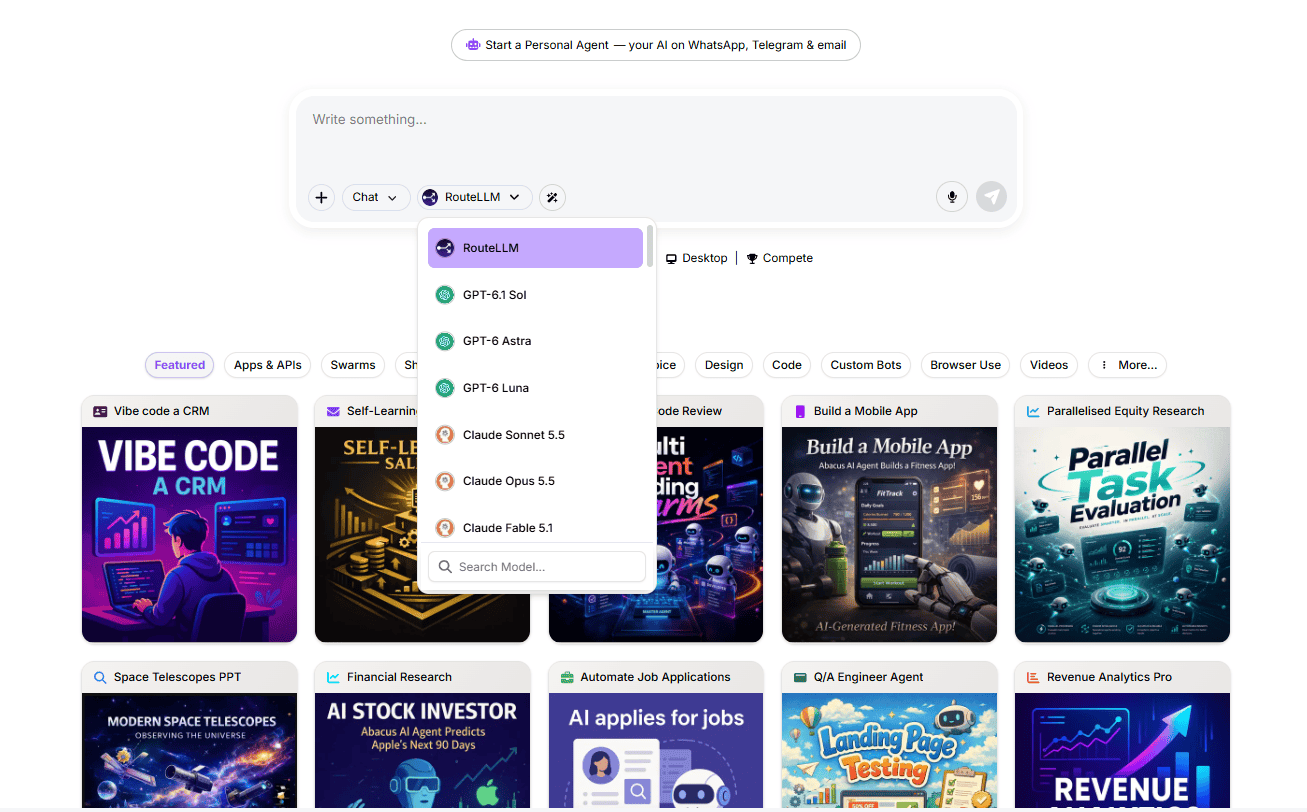
- The platform contains distinct, separately accessible layers: ChatLLM (daily chat), the Agent layer (automation and workflows), Studio (media generation), Desktop (code editor), and AppLLM (app builder). These are not a single cluttered screen; they are separated surfaces accessible from a sidebar. Users who stay in ChatLLM for writing, research, or document analysis consistently report a low-friction experience.
- The April 2026 platform update introduced Effort Levels — a Low / Auto / High toggle that simplifies the most common decision a new user faces (how much compute to use), removing one of the primary sources of interface overwhelm for first-time users.
- Comparable multi-layer platforms — Notion, Salesforce, and n8n — all have orientation phases. A denser interface reflects the breadth of what is possible, not a fundamental design failure.
Model identification: Switching between AI models can make it harder to track which model was used in previous conversations.
Fact Checked & Evidence
- The current ChatLLM interface displays the active model name in the conversation header and preserves that attribution in the conversation history view. Users can see which model handled any prior response without navigating to settings.
- RouteLLM, the platform's intelligent routing layer, automatically selects the appropriate model for a task type. For users who want manual control, the model selector is a visible dropdown that persists across the session and is labelled in each conversation record.
- Per the Abacus AI ChatLLM FAQ, the platform supports model switching mid-conversation, and each switch is reflected in the interface display.
Steep learning curve: Advanced features, particularly AI agents and workflow creation, may take time to understand.
Fact Checked & Evidence
- The learning curve applies specifically to the agent-building layer, not to the ChatLLM interface.
- Conversation-Level Skills, documented in Abacus AI's own help pages, allow users to pre-select which agent capabilities are active for a specific run. This reduces setup complexity and makes agent behavior more predictable from the first run.
- Abacus Design, introduced in early 2026, lets users prototype a workflow or UI before the agent starts building, which reduces wasted effort on poorly specified tasks and shortens the learning-by-doing cycle.
- Comparable agent tools — n8n, Make, and Salesforce Flow — all have meaningful learning curves for advanced automation.
Developer-focused experience: Some tools are easier to use if you have technical knowledge, although basic ChatLLM features are accessible to general users.
Fact Checked & Evidence
- ChatLLM requires no technical knowledge for everyday use. Uploading documents, running web searches, generating images, switching models, and comparing outputs side by side are all achievable without coding or configuration skills. This is confirmed by the ChatLLM FAQs.
- Vibe Coding via AppLLM allows non-developers to describe an application in plain English and have the agent build, host, and deploy it. This is documented at appllm. It is a direct, working pathway for non-technical users to create production-grade applications.
- Claw, the always-on messaging agent, is deployed inside Slack, WhatsApp, and Telegram — tools that non-technical users operate daily. The Slack connector documentation shows setup via a mention-based command (@Abacus.AI register) that requires no code.
2. Abacus AI Pricing and Credit Usage
Uncertainty around credit consumption: Users sometimes find it difficult to predict how many credits a task will require, particularly for complex agent workflows.
Fact Checked & Evidence
- Credits represent computational resources, not a fixed count of replies. Per the ChatLLM FAQ: text conversations consume minimal credits; the Basic plan caps media generation at 2,500 credits per conversation while the Pro plan is unrestricted; and compute-intensive tasks like video generation and Agent Swarms consume significantly more.
- The April 2026 platform update introduced Effort Levels specifically to address this. Selecting Low effort routes tasks to cheaper models with lower reasoning overhead; High effort routes to more capable, more intensive models. Auto is the recommended default and balances cost against task demands without manual input.
- The platform provides a real-time credit usage dashboard, so users can monitor consumption live rather than discovering shortfalls at the end of a billing cycle.
- One genuine transparency gap: Abacus AI does not publish per-model or per-operation credit consumption rates (for example, exactly how many credits one video generation run costs). This makes exact pre-planning harder than it needs to be, and it is a fair criticism.
Credits running out quickly: Tasks involving extensive research, coding, or multiple agent steps can consume credits faster than expected.
Fact Checked & Evidence
- This accurately describes how compute-based pricing works — a model that applies to every cloud AI platform, including OpenAI's API and Google Vertex AI. Intensive compute at frontier-model quality costs more than simple text chat.
- Per the ChatLLM FAQ: the platform claims users can send thousands of text messages without hitting usage limits on SOTA LLMs. Media generation, large attachment analysis, and continuous Agent Swarm runs are the categories that consume credits rapidly.
- The Reddit thread Honest review after extended use reflects this: users doing primarily text work rarely exhaust credits; users running sustained agent builds or daily video pipelines do.
- Practical mitigations: set Agent Swarm tasks to Low Effort for exploratory runs, reserve High Effort for final executions, and monitor the credit dashboard pace. Per the April 2026 update, Agent Swarms specifically carry a caution note about token intensity even in low-effort mode.
Usage pacing limits: The platform's credit pacing rules can affect how users access their remaining monthly allowance throughout the billing cycle.
Fact Checked & Evidence
- When a user reaches 75% of their monthly credit allocation, Abacus AI sends a usage alert. The remaining 25% is distributed across the final week of the billing cycle.
- This is a user protection mechanism, not an arbitrary restriction. Without it, a user running intensive Agent Swarms in the first week of a billing cycle could exhaust the entire monthly allocation before day 10, leaving no access for three weeks. Pacing prevents that scenario.
- Users who maintain moderate, consistent usage throughout the month are unlikely to encounter pacing at all. The mechanism is primarily triggered by power users running intensive, front-loaded workloads.
Budgeting concerns: Unpredictable usage can make it harder for individuals and businesses to estimate their monthly costs.
Fact Checked & Evidence
- Three concrete tools address this: (1) a real-time credit dashboard showing current consumption and pace, (2) a 75% usage alert sent by the platform before credits are paced, and (3) Effort Levels, which let users assign a compute tier to each task and control per-task cost. Source: April 2026 platform update.
- Abacus AI Enterprise offers enterprise-focused security and deployment options, while its LLM API describes service-level agreements (SLAs). Businesses should confirm enterprise pricing, usage commitments, and SLA terms directly with Abacus.AI. Unlike enterprise arrangements, self-serve plans publish subscription prices and monthly credit allowances.
- Honest position: for the first month of using intensive features (Agent Swarms, video generation, sustained SuperComputer runtimes), actual consumption may differ from estimates. Running a calibration month against typical workloads before treating the plan as a fixed operational cost is the practical approach, and it applies equally to any metered AI platform.
Pricing changes: Changes between introductory offers and regular subscription prices can create confusion if users do not review the billing terms.
Fact Checked & Evidence
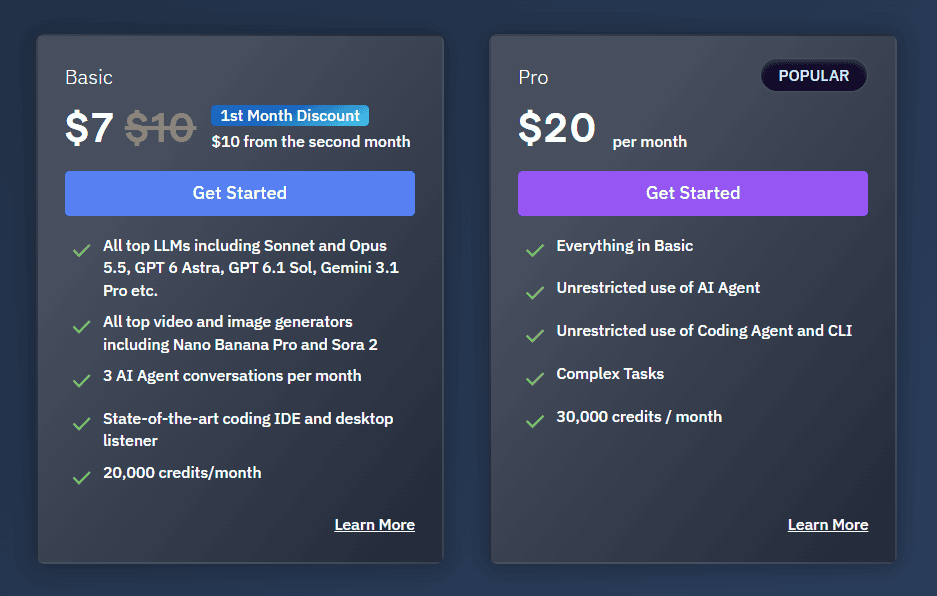
- The Basic plan carries a \$7 first-month promotional rate before reverting to the standard \$10/month. Per the Abacus AI pricing page, both prices are displayed side by side. The transition is stated, not buried.
- The \$7 → \$10 transition appears in Reddit discussions as a source of surprise for users who did not read the pricing page before signing up. This is a communication issue, not a structural billing problem.
- The Pro plan at \$20/month carries no introductory discount. Team seat pricing at \$10 per user per month is additive to the base plan, which is worth noting before scaling to multiple seats. Both are documented on the pricing page.
- Recommendation: review the billing terms page, check the renewal date before the next billing cycle, and confirm whether team seat costs apply to your use case.
3. Abacus AI Workflow Reliability and Performance
Incomplete tasks: AI agents may occasionally stop before completing a workflow or produce results that need further work.
Fact Checked & Evidence
- General agent limitations: Complex agent runs can encounter errors, produce inaccurate results, or require additional refinement. A Deeper Insights review of Abacus.AI notes occasional agent glitches, including issues with complex web searches and agent runs. These observations should not be treated as proof that all platforms experience failures at the same rate.
- Agent Swarms: Abacus.AI's April 2026 platform update introduced multi-agent collaboration, in which a master conversation manages multiple task-specific conversations. This architecture helps divide complex work into subtasks, but it does not guarantee that a failed branch will not affect the final result.
- Conversation-Level Skills: Users can select specific skills for a task rather than relying entirely on automatic skill selection. This can help reduce uncertainty when multiple similar skills are available.
- Practical approach: Break complex workflows into manageable stages, review intermediate outputs, and validate important results before proceeding. For app-building tasks, Abacus Design lets users create UI designs and wireframes before moving on to full application development.
Credits consumed during failed runs: Users may be concerned about credit usage when an agent encounters an error or fails to complete a task.
Fact Checked & Evidence
- Credit usage is worth monitoring when running complex agent tasks. Abacus.AI states that it does not offer refunds based on model output or performance, although this does not establish the billing treatment of every type of technical failure.
- The April 2026 platform update warns that Agent Swarms can consume substantial tokens, even in low-effort mode, and advises users to use them carefully.
- Abacus.AI offers Low, Auto, and High effort settings to help users balance cost and performance. Low Effort routes suitable tasks to cheaper models, while Auto is the recommended default.
- For complex tasks, users can help manage credit usage by providing clear requirements, starting with a simpler approach where appropriate, and checking credit consumption before running resource-intensive workflows.
Complex workflows: Multi-step tasks can require additional instructions, monitoring, and troubleshooting to achieve the expected result.
Fact Checked & Evidence
- This is a general consideration for multi-step automation tools. Tasks with many interdependent steps may require iterative refinement, regardless of the platform.
- Conversation-Level Skills let users preconfigure which skills an agent can activate, helping tailor its behavior to the requirements of a task.
4. Abacus AI Business Features and Integrations
Integration requirements: Businesses may need to check whether their existing tools and preferred integrations are supported before adopting the platform.
Fact Checked & Evidence

- Abacus AI's documented native connector ecosystem includes: Slack (documented connector), Microsoft Teams, Google Workspace (Drive, Gmail, Google Calendar), Jira (documented connector), Confluence, GitHub, Snowflake, and AWS S3 (application connectors page).
- These are pre-configured connectors, not custom API builds.
- WhatsApp and Telegram are also supported through the Claw persistent agent layer, with setup documentation in the Slack connector guide and the Personal Agents FAQ.
- Regarding Zendesk: Abacus AI does not position itself as a Zendesk replacement. For teams whose support workflows route through Slack or Jira, those connectors provide a functional bridge. Direct Zendesk API integration is achievable via the platform's developer API layer for teams that require it.
Limited ready-made workflows for some use cases: Teams looking for preconfigured solutions for customer support, IT, or other specialized functions may need to configure their own workflows.
Fact Checked & Evidence
- Abacus AI provides several preconfigured workflow starting points: RAG chatbots built from internal documentation (Confluence, Google Drive, or uploaded PDFs), Jira ticket summarisation via Hermes with Slack posting, daily briefing automation, and document analysis pipelines. Sources: Abacus AI DeepAgent documentation.
- Vibe Coding via AppLLM allows any user to describe a workflow or application in plain English and have the agent build and deploy it, which significantly reduces the configuration burden for teams without AI engineers.
- Hermes handles recurring tasks through its Solve → Distill → Reuse skill loop: it completes a task once, distills the successful workflow into a reusable Skill file, and applies it on subsequent similar tasks automatically. This creates functional automation without manual workflow configuration.
- Where Abacus AI differs from dedicated vertical tools is in the degree of out-of-the-box configuration for specific narrow use cases. Teams that need deeply pre-built support ticketing automation may invest more setup time. Teams that need automation across multiple functions will find the platform's flexibility more valuable.
Analytics and monitoring: Businesses with specific reporting requirements should evaluate whether the available monitoring and analytics features meet their needs.
Fact Checked & Evidence
- The Abacus.AI Enterprise platform includes MLOps capabilities such as model performance monitoring, drift detection, real-time prediction analytics, and anomaly detection. These tools help organizations monitor deployed models, identify changes in data patterns, and detect unusual activity. See the official MLOps and LLMOps overview and Model Monitoring documentation for details.
- Self-serve plans (Basic and Pro) include a credit usage dashboard and per-run activity logs. These provide operational monitoring rather than business intelligence dashboards with custom metrics.
- Teams with specific reporting requirements around workflow completion rates, model performance over time, or cross-departmental usage patterns should evaluate the Enterprise tier, where custom reporting can be configured through dedicated support.
- The Abacus AI security page confirms that every infrastructure change and access event is logged to an immutable audit trail — a compliance-relevant feature distinct from operational usage dashboards.
Different business requirements: A platform designed to support many types of AI work may not offer the same specialised experience as a tool built for one particular function.
Fact Checked & Evidence
- This is an accurate and honest observation. A platform that handles text chat, autonomous agents, media generation, coding, and enterprise ML pipelines is not a single-purpose product, and that is by design.
- The tradeoff is real: a tool built exclusively for one function will have deeper out-of-the-box configuration for that specific function. Abacus AI trades that narrow specialisation for breadth and flexibility across many functions.
- The Abacus AI About page reports over 3 million professionals, small businesses, and enterprises using the platform, including dozens of Fortune 500 companies. That breadth of adoption across industries indicates the generalist model works for a wide range of business contexts.
- This review rates the platform at 8 to 9 out of 10 for developers, founders, analysts, and teams that work across multiple AI functions. For organisations that need exactly one narrow capability with no configuration, a purpose-built vertical tool may be the better fit. Both can be true simultaneously.
- Some reviews characterise this as a "jack of all trades, master of none." The case studies documented show production use across engineering, finance, healthcare, and media — genuine capability across multiple domains rather than superficial coverage of many.
"Only suitable for hobbyists and developers, not business teams" (criticism appearing in some comparative reviews)
Fact Checked & Evidence
- Abacus AI's Enterprise platform operates under SOC 2 Type II and HIPAA compliance, with in-VPC deployment, role-based access controls, and AES-256 data encryption. Source: abacus.ai security. These are not hobbyist features; they are requirements for regulated industries including healthcare, finance, and insurance.
- The About page documents over 3 million total users including Fortune 500 enterprises.
- The App-Only Role in the Enterprise plan, shipped in 2026, allows organisations to deploy AI-powered applications to employees without exposing the underlying development environment. This is an IT governance feature for business administrators, not individual hobbyists.
- Team seat pricing (\$10 per user per month) and shared project workspaces are explicitly business-team features built into the Pro tier, documented on the pricing page.
5. Abacus AI Customer Support and Billing Concerns
Support response times: Some users report delays or responses that do not fully resolve their issues.
Fact-Checked Evidence
- User-reported delays: Some customer reviews describe slow responses or unresolved support requests. These reports highlight potential frustrations, but they should not be treated as proof of a systemic support issue without broader evidence.
- Available support channels: Abacus.AI directs users to support@abacus.ai for billing errors, technical issues, and account-related requests. Its Billing FAQ explains how to request assistance, cancel subscriptions, and delete accounts. However, the published documentation does not specify a standard response time for Basic or Pro subscribers.
Cancellation and billing: Online discussions include complaints about subscription cancellations and unexpected charges. These reports should be assessed individually rather than treated as evidence of a widespread problem.
Fact Checked & Evidence
- Cancellation is managed through the account billing settings page, accessible from the platform dashboard without contacting support. This is standard for SaaS subscriptions.
- The complaints appearing in online discussions most commonly trace to: the \$7 → \$10 promotional pricing transition (addressed in Section 2), team seat billing where additional seats were added mid-cycle, and a smaller number of cases where subscription renewal happened before the user noted the date. These are individually distinct situations, not evidence of systematic overbilling.
- Practical steps: confirm a cancellation confirmation email is received, note the next renewal date, and screenshot the cancellation confirmation in the dashboard. These apply as standard practice for any subscription product.
Understanding subscription terms: Users should check renewal dates, credit allowances, plan limits, and cancellation policies before subscribing.
Fact Checked & Evidence
- The Abacus AI pricing page documents the following: Basic (\$10/month, 20,000 credits/month, 3 Agent conversations/month, 20/month, 30,000 credits/month, unrestricted Agent access), Team seats (\$10 per user/month additive), and Enterprise (custom pricing through sales).
- The distinction between Basic and Pro on agent access is significant and worth checking before subscribing: Basic limits users to 3 Agent conversations per month, while Pro provides unrestricted access. Source: abacus.ai pricing.
- The credit pacing mechanism (25% held for the final week after 75% usage) is documented in the platform FAQ.
Agent hallucinations during web search or research tasks: Some users report that the agent retrieves inaccurate information during autonomous web research runs.
Fact Checked & Evidence
- Hallucinations during web searches and occasional agent errors remain potential limitations of AI-powered research tools. The Deeper Insights review of Abacus AI notes that complex web searches and agent runs can sometimes produce hallucinations or encounter bugs. Users should therefore verify important claims against original sources before relying on agent-generated research.
- RouteLLM routes research tasks to models with stronger factual grounding based on task type, which reduces (but does not eliminate) hallucination risk.
- Hermes builds reusable skills from past performance through its Distill step, which can reduce repeated errors on the same task type over time.
- Practical mitigation: use the agent for research synthesis and drafting, cross-check specific claims in final outputs, and use the platform's activity logs to see which sources the agent retrieved during a run.
"Scam" or "deceptive billing" language in some reviews:
Fact Checked & Evidence
- The credit system is documented, not hidden. Credits are defined as computational resources, intensive operations cost more, a 75% alert exists, and pacing is explained in the Billing FAQ. The pricing page states both the introductory and standard price.
- Reviews that describe Abacus AI as a "scam" often raise concerns about promotional pricing, higher-than-expected credit consumption, or billing and cancellation experiences. These concerns should be evaluated individually rather than treated as proof of systemic problems. A Reddit discussion explaining Abacus AI's credit system provides additional context on why the credit model can be confusing for some users.
Exploring Abacus AI Via Real-World Use Cases – Examples & Video-Demos:
The following are some examples that show how Abacus AI can be used in real-world scenarios such as website creation, mobile application development, automation of processes, invoicing, analytics, software testing, and even research. Some of the capabilities of Abacus AI, possible uses, and crucial considerations prior to using its generated output have been highlighted below.
Stripe Integration Website
It is a multiple-page website with a built-in payment feature, capable of assisting businesses launch offers and testing consumer demand.
A similar example. “App with Stripe Payments” is related to workshop sign-ups and payment processing.
- What it does: Generates a website which links a business proposal with the process of payment.
- Possible uses: Selling workshops, validating a business concept, or introducing a new product.
- What needs to be verified: Payments made successfully and unsuccessfully, confirmation emails, and correct order data.
- The cost factor: The cost of generating the website, making changes to the website and its further hosting is not provided by the example given.
Generating a checkout page is just one part of building a working payment-enabled website. It must also handle successful , failed or post payment functions.
Mobile App Development
The Build a Mobile App example showcases a fitness application with daily objectives, workouts, and progress monitoring.
Some other examples in the catalog are: Running Coach, Meditation Coach, Expense Tracker, and Mobile Games.
- Functionality: Makes mobile applications that have interactive elements and the capability of storing user data.
- Use cases: Testing out an idea for a mobile application or making a prototype before undertaking a full-scale development effort.
- What to test: Permissions, storage, background processing, and installation.
- Release: Making an application or packaging one into an executable form doesn’t mean the app will be compliant with requirements of app stores or will pass through their review.
For instance, the Running Coach app claims to support live GPS tracking and background mode. It should be tested on a real device to prove that it functions as expected beyond a demo.
Vibe Code a CRM
Example of Vibe Code CRM involves creating a customer relationship management.
Catalog contains such features as employee directories, vacation tracking, and apps with user roles and permissions.
- Features description: Creation of business applications for management of business records, contacts, and workflow.
- Applications areas: Development of custom solutions for small companies or teams.
- What needs to be checked: Creation and modification of records, search functions, persistence of information, and access restrictions.
- Business aspects: Basic contact and deal management app cannot be equated to an advanced enterprise-level CRM system.
Development of CRM is a good example because the core workflows in this type of software can be clearly outlined. As the number of integrations, permissions, and business rules increases, more thorough testing of the application is needed.
Invoice Processing API
Invoice Processing API example shows how to extract the vendor information, amounts, due dates, and details for each item in a PDF document or image.
Another example, Invoice Data Extractor, gives a description of the process of conversion of the extracted information to a validated CSV file.
- What it does: Conversion of invoice information to structured data which can be used further by other systems.
- Practical applications: Preparation of accounting data, financial reporting, organization of invoices for an internal audit.
- What to check: Currency values, tax computations, date format, duplicate invoices, unclear and empty fields.
- Accuracy requirements: The extracted information must be consistent with the original invoice.
The key benefit of invoice automation is not only the extraction of text from the PDF but the creation of consistent information with some questionable fields for further human validation.
Revenue Analytics & Business Intelligence:
Revenue Analytics Pro offers automated Excel analytics aimed at finding patterns and growth opportunities in revenue.
Other examples are financial modeling, churn analysis, product classification, and annual report dashboards.
- What it does: Analyzes data about businesses and displays results using spreadsheets, graphs, or dashboards.
- Use cases: Examining business performance, finding trends, and reporting.
- Things to check: Missing rows, duplicate entries, dates, formulas, and definitions of metrics.
- Accuracy requirements: The calculations and conclusions should be based on the original data.
For instance, the definition of revenue needs to be specified prior to any analysis. Invoiced revenue, recognized revenue, and collected revenue are different things. Even a perfectly made chart will be misinterpreted if the wrong metric is used. Consequently, the quality of AI-supported analytics depends on the precision of the calculations and the information provided.
Multi Agent Code Review
Multi-Agent Code Review is a case when several AI agents check the latest ten pull requests simultaneously. These agents find potential bugs, inefficiencies, missing tests and security flaws in order to prepare their suggestions for improvement and corresponding pull requests.
- What it does: Code change review and generation of results or suggestions.
- Practical use: Offering another layer of code change review for the teams developing several code changes.
- What to check: Validity of the reported problems, sufficient coverage by tests of the suggested fixes, and the absence of unintended functionality of the changes.
- Approval process: Software developers must examine and test the suggested changes before their incorporation into the main code.
The parallel processing may help in reviewing several changes at once and increasing the range of automated reviews. Still, the problem of resolving contradictory suggestions and verification of the right functioning of the suggested patch with other parts of the software remains.
AI QA Engineer & Automated Software Testing
An example of the AI QA Engineer showcases how to test an application through emulated user interactions and create reports on possible broken workflow.
There are also individual samples for navigating, submitting forms, permissions testing, and evaluating user interface.
- What it does: Finds possible bugs for particular application features and user flows.
- Use cases: Testing of a software after its first build, feature release or design update.
- What to check: Reproduction steps, intended behavior, actual behavior and level of coverage.
- Limitations of testing: Passing a test means only confirmation of the behavior of the tested scenario, but not necessarily all the possibilities of interaction in the application.
The example of Landing Page Testing gives us a more concrete sample as it tests form submission, email verification and creation of issues in Jira. Such type of testing can give more valuable information than just stating that the application works.
Scheduled Browser Workflows & Routine Automation
Example of the Automated Browser Workflow involves scheduled processes such as logging in, downloading invoices, and uploading information into Google Sheets.
A second example is the E-Commerce Price Watch that mainly revolves around price watching of competitors, taking screenshots, identifying any change, and emailing CSV reports.
- What it does: Automates regular browser-related tasks as well as creating records/reports.
- Use cases: Regular administrative tasks, downloading of invoices, price watching, and collecting information.
- What needs verification: Login timeouts, changes in website structure, lack of data, and alerts for failure to complete the task.
- Reliability criteria: Multiple successful attempts are much better than one successful attempt.
These workflows need to have an error handling process defined in advance. For instance, if the automatic login procedure does not succeed, there needs to be a mechanism that raises the alert about the issue instead of generating an empty spreadsheet as the result.
Research, Reports & Presentations
Some of the entries in the catalog relate to robotics research into investment, market entry presentations, education reports, and scientific research.
The Parallelised Equity Research example is an analysis of 50 companies within the S&P 500 index and the creation of a portfolio of ten stocks.
- What it does: Generates research, reports, presentations, and proposed investment portfolios.
- Use cases: Preparation of initial research, organization of data, and preparation of materials for further research.
- What to check: Proper citations, dates of publications, assumptions, calculations, and unwarranted conclusions.
- Important caveat: The investment recommendations generated by AI do not guarantee future performance of the recommended portfolio.
The same applies to presentations and research reports. Creating presentation slides or information summaries is not equivalent to verification of all claims made in the generated output. It is up to users to verify underlying sources and ensure that the information is up-to-date and distinguish between the facts and assumptions or AI interpretation.
Who Should Use Abacus AI?
Abacus AI would suit individuals and organizations who want to go beyond just text generation and question answering using AI technology. The unique features of multiple models, AI agents, application development, data analytics, and workflow automation make this platform an ideal choice for those who wish to integrate multiple AI functions on a single platform.
Who Can Gain the Most from Abacus AI?
- Entrepreneurs/Founders: Entrepreneurs can leverage the AI-powered tools on Abacus.AI to create working prototypes, develop internal tools and products without always having to start afresh. Although not a tool that will solve all problems, its AI-based app development tools can come in handy in helping to create apps that range from basic business utilities to more advanced apps, but testing and refinement before launching is inevitable.
- Software Developers/Engineers: Developers can make use of the AI agents to develop and test codes, solve errors, learn about different technical approaches, and even save time in repetitive processes through coding. This is ideal for those who would like to combine coding assistance with the agent process rather than switching between different tools to do all the work.
- Data Analysts/Researchers: Those users who work on spreadsheets, reports, and data sets can make use of the AI-assisted features such as analytics, visualization, and language models. It can help in analyzing and summarizing data findings, but the essential calculations/research results need to be verified.
- Business Processes and Professional Teams: Repetitive administrative tasks can be managed by AI agents, who will help them manage information, process documents, and perform tasks related to email. Businesses can also look at developing custom AI solutions and knowledge-based assistants linked to their business information depending on what they need.
- Businesses Building AI Products: For businesses requiring more than just a simple chatbot, the ability to build and deploy AI apps may offer some benefits. Based on the product being built and which plan is used, teams can build AI apps, agents, and workflows.
Who Are Looking Elsewhere?
- Users Seeking a Basic AI Chatbot: The basic requirement of writing, brainstorming, or asking questions may suit you better with a simple chat subscription. In case you do not plan to use any more features of Abacus.AI like agents or developers, its advanced nature may be too complex.
- Those Who Like Fixed, Unlimited Usage: The credit system is used by Abacus.AI for most of the functions and their usage depends upon the models as well as tasks. If you run heavy agent workflows and produce images and videos, you should check the cost and limits at the moment.
- The People Who Wish Complete Automation: The code or application created by AI is subject to some errors and modifications. Developers and teams have to test the applications and verify them before using them for real business purposes.
- Organizations With Guaranteed Support Requirements: In case you need guarantees regarding the response time and other service level agreements, it is necessary for you to discuss them with Abacus.AI before taking any plans.
Conclusion: Is Abacus AI Worth It?
Abacus AI provides a multifunctional AI platform, where one can find such functionalities as access to models, autonomous agents, code support, applications, data analysis, and media creation. All these features may be helpful for users who need to use various tools provided by artificial intelligence in their work.
Flexibility in terms of functionalities offered is the main advantage of this platform. However, it also means that some functionalities need to be learned for using the platform. The pay-by-the-credit system enables the usage of various features; however, people working with intensive agent workflows or media generation need to control their expenses.
Some issues raised in public reviews also indicate areas where improvement is needed. They are related to unpredictability in costs, workflow, and client support. These factors should be considered along with the positive experiences of some people.
To have the best experience, begin with those that apply to your work, try out complicated functions before depending on them, and check on the present subscription plan. This will make it easy for you to appreciate both strengths and weaknesses of the platform.
In conclusion, Abacus AI is a good choice for people who require a general AI working environment. The strength of the product will depend on whether the tools and workflow meet your needs.
See It Working Before You Commit
This user-led demo shows how the whole platform works with live demonstrations of ChatLLM model switching, task performance by the agents, creation of images and videos, and the API access layer including live credit monitoring:
The review explains not only where the platform excelled, but also where the platform needed work. This is more helpful than a staged presentation, and gives you a true idea of what it is really like to use the platform on a daily basis.
Frequently Asked Questions About Abacus AI
1. What are the key benefits of using Abacus AI?
Many different kinds of AI exist, including models like ChatLLM, AI agents, programming skills, application development, data analysis, and media production. All of these kinds of AI may prove useful for people who wish to control several workflows using AI in one platform.
2. Is it worth paying for an Abacus AI subscription?
It can be considered testing it out for those who frequently use different capabilities of this application. It will depend on how often you use it and whether your monthly credits are enough.
3. What do Abacus AI credits stand for?
Credits are the amount used on the platform, which varies based on the actions that one takes. Certain basic text actions will consume less credits than complex coding, interacting with AI agents or creating media.
4. Is Abacus AI beginner-friendly?
Yes. Novices can use ChatLLM for their everyday writing, research, and documentation. As the user gets acquainted with the tool, he can experiment with agents, coding, and workflow automation. Moreover, additional capabilities might need further experimentation.
5. How reliable is Abacus AI agent?
The agents could be utilized to execute complex tasks, coding, doing research work, and developing applications. The dependability of the agents will depend on the complexity of the task, the instructions, the tools at hand, and the quality of the outcome. It is also important to test intermediate and final outcomes.
6. Why do some users have issues with Abacus AI?
People provide their own reviews regarding the services; some of them like the diversity of offered instruments, but other people have troubles with spending of credit, processing of workflows or any other help. Reviews can be useful for revealing weaknesses, but personal experience is not a universal one.
7. Can Abacus AI assist organizations in automating workflow processes?
Yes. Agents and applications can be helpful in accomplishing various tasks like document processing, research, and data analysis. Organizations need to define what they require from an integration and then test it out along with making sure that there are enough security measures in place..
8. How can one achieve the best results using Abacus AI?
The first step is to define the job at hand, provide proper context for it, and divide the complex workflow into smaller steps. Credit usage monitoring would also be beneficial, along with the selection of the proper level of effort required to complete the job.
9. What do users need to consider before choosing Abacus AI?
The user will need to assess the number of tools needed, the cost of subscription, number of credits per month, Agent restrictions, the integration list, and the degree of workflow analysis required. It might be more helpful for companies that need diverse capabilities from AI compared to those who just need the chatbots occasionally.
10. Who will benefit the most from Abacus AI?
Those who create and have applications for AI will perhaps get more out of the rich ecosystem of AI than those who simply use it. There may be people who would be helped by a specific platform for finding a chatbot.