

5 Best AI Tools for Data Analysis You Should Try in 2026
Discover five of the best AI tools for data analysis that can clean data, write code, create visualizations, and generate insights faster.
# Introduction
Gone are the days when you had to write Python code for every step of data cleaning, analysis, and visualization. Today, a new generation of AI-powered data tools is making the entire process faster and much easier.
These platforms can inspect your files, clean messy data, write and run code, generate charts, explain patterns, and even help you build reusable analysis workflows. Instead of spending hours on repetitive tasks, you can focus more on asking the right questions and getting useful results faster.
In this article, I have selected five of the best AI tools for data analysis in 2026. Whether you work with Python, SQL, notebooks, local projects, or connected data sources, these tools can help you move from raw data to useful insights much faster.
# 1. Deepnote
Deepnote is an AI-powered data workspace built around collaborative notebooks. Its Deepnote Agent can understand your project context, create a plan, and add, edit, or remove Python, SQL, and text blocks across the notebook to complete multi-step analysis tasks.
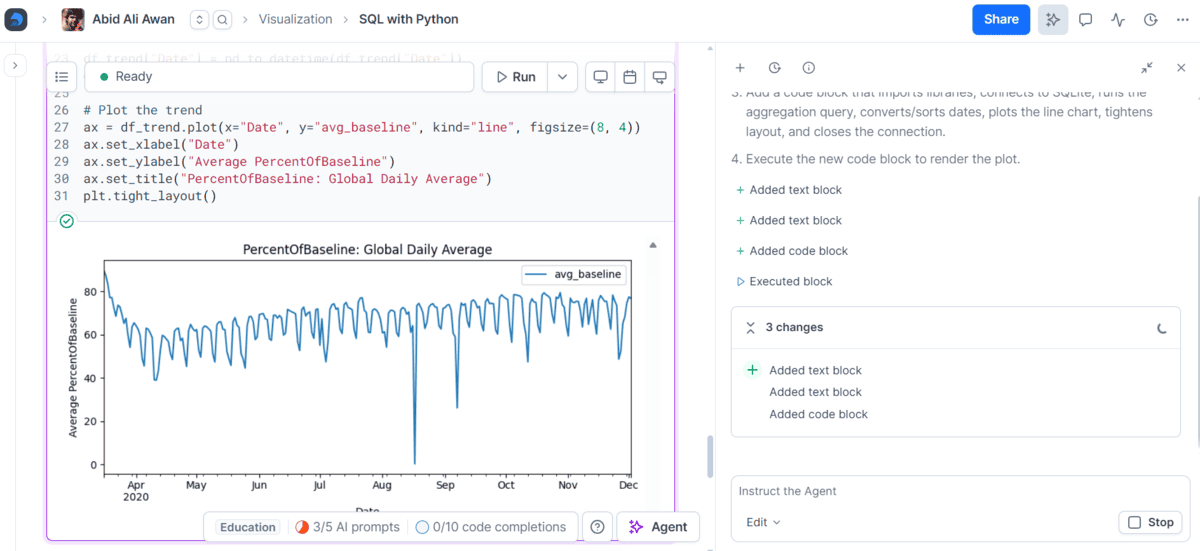
It also includes AI tools for generative analysis, SQL generation, code completion, code editing, data visualization, error fixing, and explaining code. You can ask questions in plain English and review or edit the generated work directly inside the notebook.
Deepnote also supports custom OpenAI-compatible AI models for Enterprise workspaces and provides Deepnote MCP, which lets tools such as Codex, Claude, Cursor, and VS Code work with Deepnote projects and notebooks.
Best for: AI-powered data analysis, collaborative notebooks, Python and SQL workflows, and teams that want AI to work directly inside their analysis environment.
# 2. ChatGPT
ChatGPT is one of the easiest AI tools for data analysis. You can upload a CSV or Excel file and simply ask it to clean the data, explore trends, find outliers, run Python-based calculations, create tables and charts, and summarize the main findings in plain English.
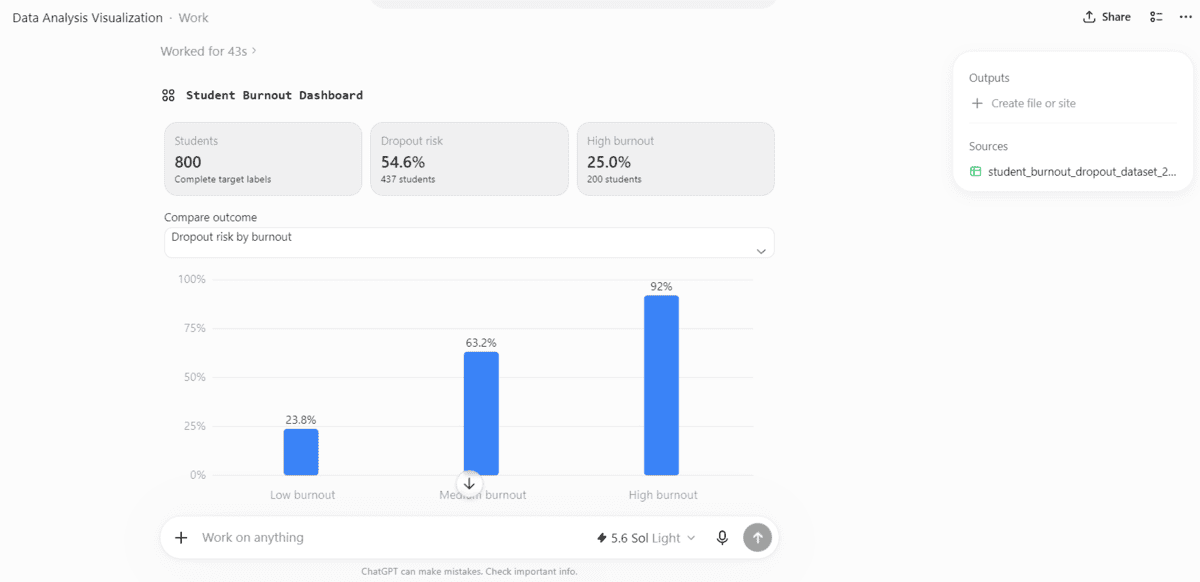
In my test, I uploaded a student burnout dataset and asked ChatGPT to analyze it and create visualizations. It generated a dashboard-style result with key metrics, charts, and a clear summary without me having to write the analysis code myself.
The new ChatGPT Work experience takes this further. You can give it files and a final goal, then ask it to analyze the information and produce a report, spreadsheet, presentation, or even a Site. GPT-5.6 is also now available across ChatGPT, with Sol, Terra, and Luna available in Work depending on your plan; OpenAI says the new model family improves professional analysis and spreadsheet outputs.
Best for: Uploading datasets, exploratory data analysis, visualizations, quick insights, and turning raw data into clear summaries and reports.
# 3. Claude Code
Claude Code is not a traditional data analysis platform, but I have found it surprisingly useful for data science tasks and report generation. You can place a dataset in your project folder, open Claude Code's terminal interface, and ask it to inspect the data, write Python scripts, run the analysis, fix errors, generate visualizations, and produce a final report.
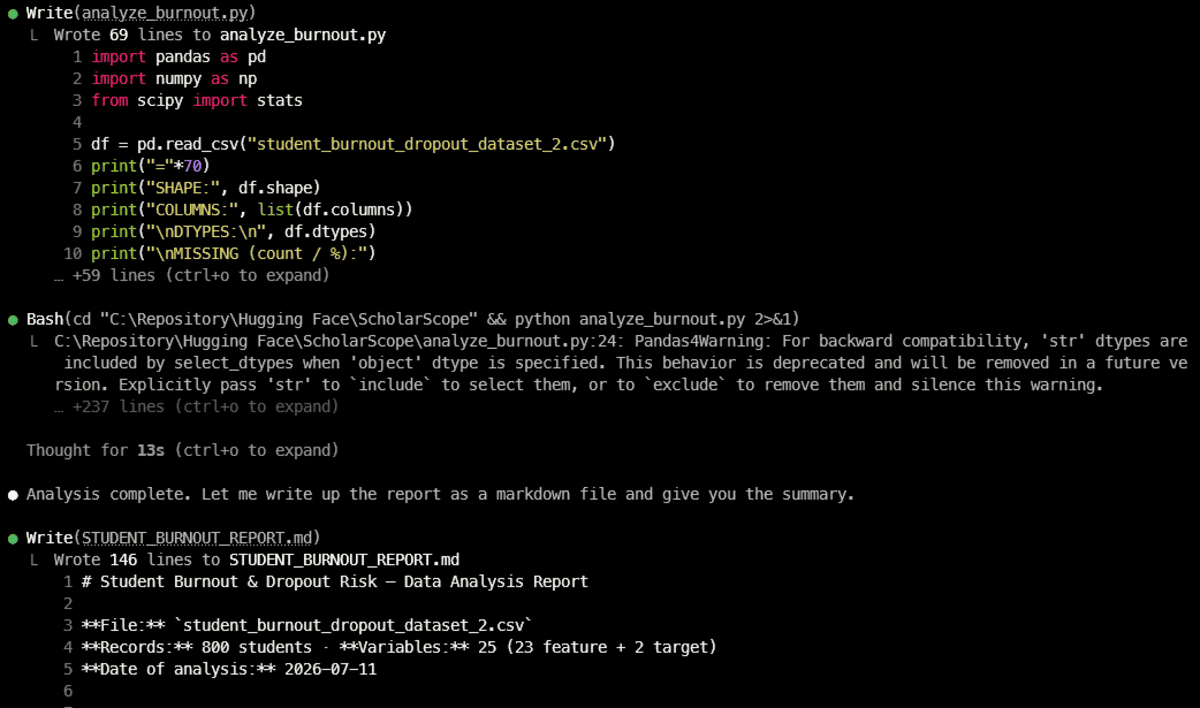
In my test, Claude Code created a complete analysis script, ran it against a student burnout dataset, checked the results, and generated a 146-line Markdown report. This workflow feels easy because Claude Code can read files, edit code, and run terminal commands directly.
You are also no longer limited to the terminal. Claude Code is available through its terminal interface, desktop app, VS Code extension, and the web. The VS Code extension provides inline diffs and plan reviews, the desktop app can run multiple local and remote sessions in parallel, and the web version lets you delegate tasks from the browser.
Best for: Python-based data analysis, automated data science workflows, reusable scripts, and generating detailed reports from datasets.
# 4. DataLab
DataLab by DataCamp is an AI-powered data notebook with a ChatGPT-like AI Assistant built directly into the analysis workspace. You can attach a data source, explain what you want in plain English, and the AI can generate Python, R, or SQL code, analyze the results, and explain the findings.
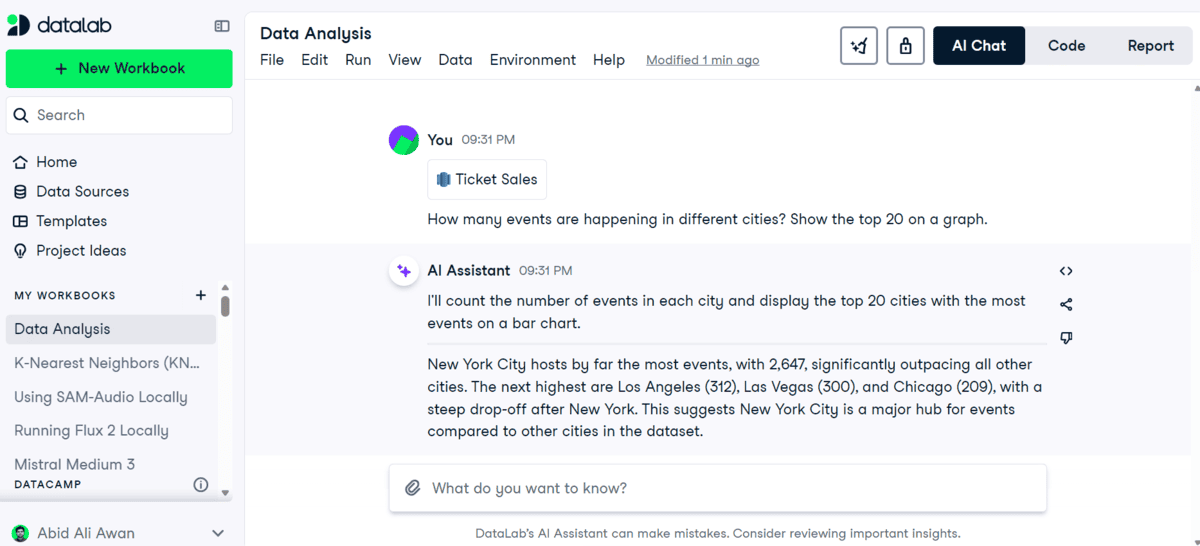
In my test, I connected a Google BigQuery data source and asked a simple question about ticket sales. DataLab inspected the data, generated the analysis, created the visualization, and explained the key result for me.
The AI features go beyond chat. You can generate and edit code with prompts, get inline code completion, debug errors, and ask the assistant to fix or explain code. The generated work stays visible, so you can inspect, edit, and rerun it.
In many ways, DataLab feels quite similar to Deepnote. Both combine collaborative notebooks, connected data sources, AI chat, code generation, and reporting in one workspace. DataLab, however, feels especially approachable for people learning data analysis through DataCamp.
Best for: Conversational data analysis, Python and SQL beginners, connected database analysis, debugging, and turning AI-generated work into editable notebooks and reports.
# 5. VS Code with Codex
Codex is available through the ChatGPT desktop app, CLI, IDE extension, and cloud/web workflows. The desktop experience is useful for managing longer tasks, the CLI works directly with local files and terminal tools, and Codex cloud can run tasks in parallel in isolated environments.
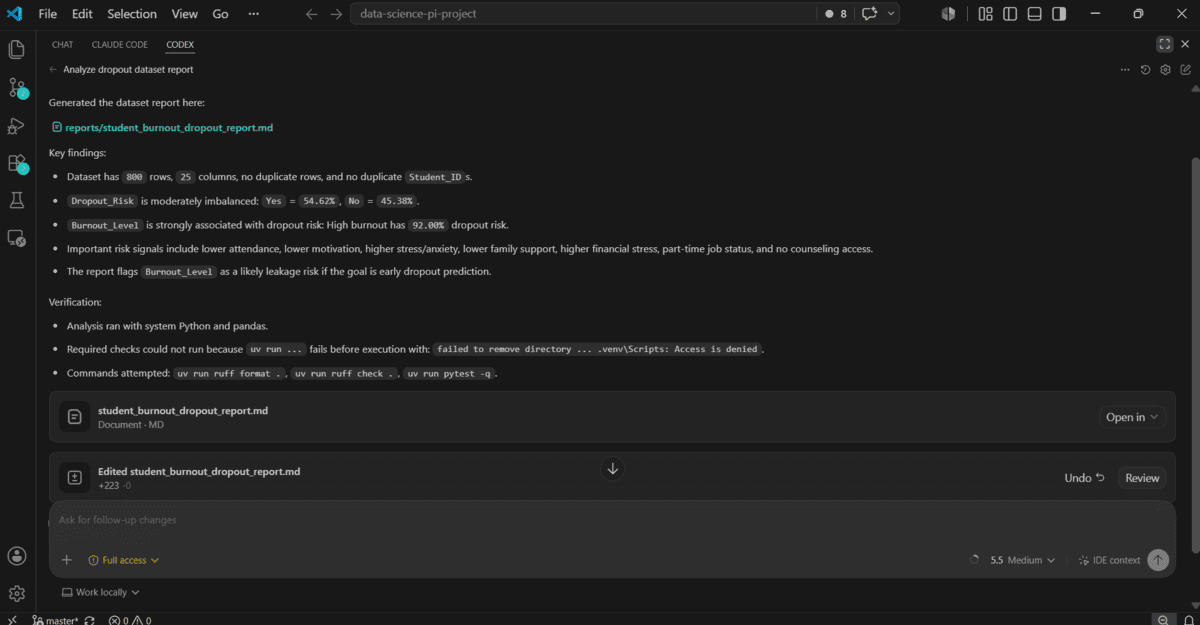
However, for data analysis, I find the Codex extension in VS Code much more natural. I can open my notebook, Python scripts, CSV files, and reports in the same project, then ask Codex to inspect the context, edit files, run the analysis, debug issues, and make follow-up changes. The IDE extension can use open files or selected code as context and lets you review edits directly beside the source.
For me, this makes data analysis more interactive and iterative. Instead of only getting an answer in a chat window, I end up with the actual scripts, notebooks, charts, and reports inside my project.
Best for: Python-based data analysis, notebooks, reproducible projects, debugging, and analysts who already work in VS Code.
# Final Thoughts
AI has completely changed how I approach data analysis. I no longer need to write every cleaning step, chart, or report from scratch. I can upload or connect my data, explain the task, and let the AI handle most of the repetitive work.
For quick analysis, I would use ChatGPT. Deepnote and DataLab are great when I want an AI-powered notebook experience. For larger Python projects and automated reports, Claude Code works really well.
Personally, I find VS Code with Codex the most natural for serious data analysis. I can keep my notebooks, scripts, data, and reports in one place and continue improving the analysis through follow-up prompts.
My only advice is simple: use AI to move faster, but always check the code, calculations, and final conclusions.
Abid Ali Awan (@1abidaliawan) is a certified data scientist professional who loves building machine learning models. Currently, he is focusing on content creation and writing technical blogs on machine learning and data science technologies. Abid holds a Master's degree in technology management and a bachelor's degree in telecommunication engineering. His vision is to build an AI product using a graph neural network for students struggling with mental illness.