


1Password Business Review 2025: Features, Pros & Cons



updated
|EditorUpdated: Jan 3, 2025, 5:18 pm
Our Verdict
Our Verdict
1Password Business is a top-tier password management solution, offering robust security features, ease of use, and dedicated customer support. It’s designed to help teams securely store, share, and manage sensitive information with confidence. The platform’s intuitive interface and extensive feature set make it a standout choice for businesses of all sizes, from small startups to large enterprises.
While 1Password Business might not be the least expensive option, its value lies in its comprehensive security protocols, customizable access controls, and exceptional customer support. For organizations that prioritize data security and seamless integration with other tools, 1Password Business is an investment that pays off in peace of mind and operational efficiency.


Pros
- Strong encryption and security features, including AES-256 and biometric authentication
- User-friendly interface that's easy to navigate for teams of all sizes
- Custom roles and permissions for granular access control
- Excellent 24/7 customer support and extensive onboarding resources
- Watchtower feature for real-time dark web monitoring and alerts
- Scalable per-user pricing model suitable for teams of any size
Cons
- Per-user pricing can become costly for larger teams
- Advanced features may be overwhelming for simpler use cases
- Custom branding and reporting are only available in the Enterprise plan
- Learning curve for new users without dedicated IT support
What Is 1Password Business?
1Password Business is a comprehensive password management solution designed to help businesses securely store, share, and manage their sensitive information. Built on the foundation of robust security and ease of use, 1Password Business allows teams to protect their accounts, vaults, and confidential data while ensuring smooth access control across the organization.
Founded in 2005, 1Password has become a trusted name in the cybersecurity space, known for its strong encryption standards and user-friendly interface. With millions of users globally, 1Password has been a leader in empowering businesses to manage their digital security with confidence.
1Password Business offers a clean, intuitive interface that is simple to navigate, making it easy for teams of all sizes to get started quickly. The platform’s core features, such as secure vaults, password generation, and multifactor authentication, are available across all plans, with advanced options available for businesses requiring more extensive security measures.

What Is 1Password Business Used For?
1Password Business is a versatile tool that can be integrated into various workflows, particularly where security and password management are critical. Here are some of the primary use cases
- Password Management: 1Password Business allows teams to securely store and share passwords across the organization, ensuring that sensitive credentials are protected and accessible only to authorized users.
- Access Control: The platform enables granular access control, allowing administrators to assign permissions, manage user roles, and ensure that team members have access to only the information they need.
- Secure Document Storage: 1Password Business provides a secure environment for storing sensitive documents, such as contracts, licenses, and identification documents, ensuring they are protected and easily retrievable.
- Two-Factor Authentication (2FA): 1Password Business supports 2FA, adding an extra layer of security to the login process and ensuring that accounts are further protected from unauthorized access.
Featured Partners
1
1Password
From $7.99 per user per month, billed annually.
24/7 customer support
Advanced encryption
2
Monday.com

Multiple tiers including free to enterprise
Enterprise grade and GDPR compliant
Support for several third party apps
3
deel

From $49 per month per seat
Knowledge base, 24/7 customer support, setup support
Included
1
monday sales CRM

On monday.com's Website
Free; $9 per user per month for basic features
14 days
Yes
2
monday sales CRM
On monday.com's Website
Free; $9 per user per month for basic features
14 days
Yes
3
monday sales CRM
On monday.com's Website
Free; $9 per user per month for basic features
14 days
Yes
What Sets 1Password Business Apart
1Password Business distinguishes itself through its strong security features, ease of use, and dedicated customer support. The platform’s security protocols are top-notch, including AES-256 encryption, biometric authentication, and SOC 2 compliance. Moreover, 1Password offers dedicated customer support and onboarding assistance, making it easier for teams to adopt and integrate the platform into their daily operations.
While these features make 1Password Business a standout option, the choice of password management solution should ultimately depend on your team’s specific needs. For organizations prioritizing security, ease of use, and seamless integration with other tools, 1Password Business is an excellent choice. However, businesses that prioritize cost above all else might find other solutions more appealing.
Pros
In addition to robust encryption and dedicated customer support, 1Password Business offers extensive onboarding resources and live webinars. These resources help teams understand the platform’s more complex features, ensuring they can get the most out of the software.
1Password Business also allows for secure sharing of credentials within teams, with granular control over who can access specific information, which helps maintain security while fostering collaboration.
Cons
1Password Business is priced on a per-user basis, which might become costly for larger teams. Additionally, while the platform’s security features are robust, some businesses with simpler needs might find the extensive features more than what is necessary for their operations.
1Password Business Core Features
1Password Business offers a range of powerful features that help teams manage their digital security effectively. Below are some of its core features:
Two-Factor Authentication (2FA): 1Password Business supports 2FA, providing an additional layer of security to protect accounts from unauthorized access.
Role Assignment: Administrators can assign roles and permissions to team members, ensuring that each user has access only to the data and tools they need. This feature is crucial for maintaining organizational security and accountability.
Vault Management: 1Password Business allows for the creation and management of multiple vaults, each with its own set of permissions. This enables teams to organize and secure their passwords and documents in a way that aligns with their specific needs.
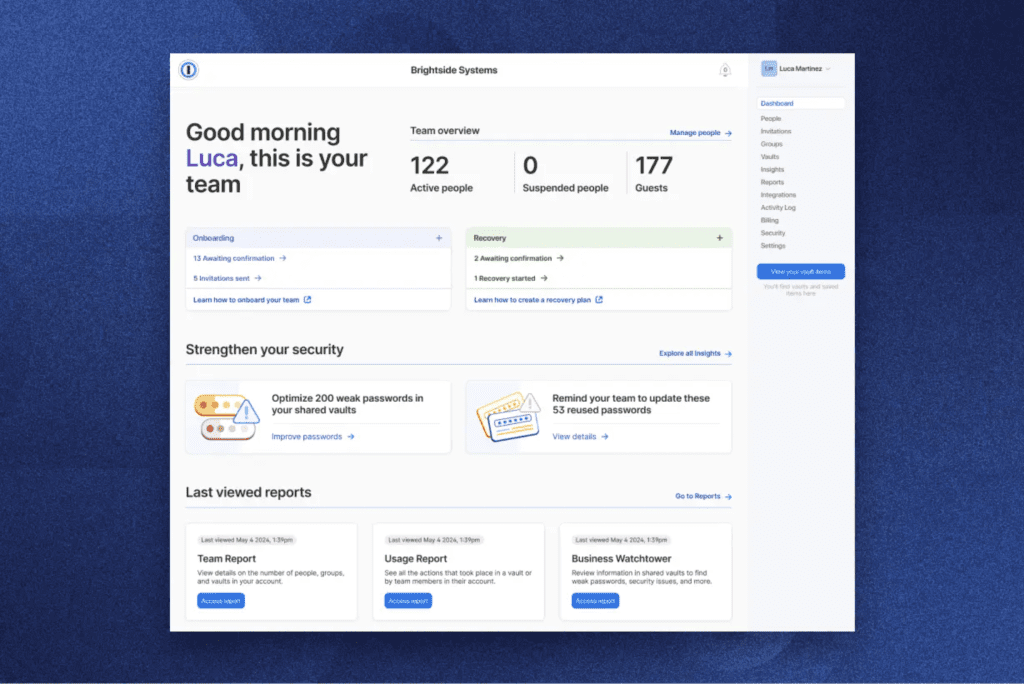
Watchtower: This feature continuously monitors the dark web for compromised accounts and alerts users if any of their passwords have been exposed. It also provides recommendations for strengthening weak or reused passwords.
| Feature | |
|---|---|
| Free trial | 14 days |
| Free plan | Yes |
| Paid plans start at | $7.99 per user per month, billed annually |
| Password management | Yes |
| Security dashboard | Yes |
| Third-party integrations | Yes |
| Mobile and desktop app | Yes |
| Custom policies | Yes |
| Document storage | Yes |
| Advanced reporting | Yes |
| Compliance tools | Yes |
| GetApp rating | 4.7/5 stars (1,350+ reviews) |
| G2 rating | 4.6/5 stars (1,100+ reviews) |
| TrustRadius rating | 8.8/10 stars (900+ reviews) |
Project Management Features
While 1Password Business is primarily a password manager, it also supports various project management functions, particularly in the context of security and access control:
- Security Audits: Administrators can conduct security audits to ensure that team members are following best practices for password management and access control.
- Activity Logs: The platform provides detailed logs of user activity, enabling administrators to monitor access and detect any potential security breaches.
Customer Support and Onboarding
1Password Business offers 24/7 customer support via email and chat. The platform also provides a rich knowledge base and regular live webinars to help users understand and utilize its features effectively. For larger organizations or those with specific needs, 1Password offers tailored onboarding services to ensure a smooth transition to the platform.
1Password Business Setup and Customization
1Password Business is known for its ease of setup and customization. The platform offers various templates to help businesses get started quickly, and its intuitive interface allows for easy navigation and customization according to team-specific needs.
1Password Business Ease of Use
1Password Business’s interface is designed to be user-friendly, with drag-and-drop functionality and clear navigation paths. The platform’s visual approach to password management makes it easy for teams to see which accounts and documents are secure and accessible.
While some users may find the advanced features overwhelming, 1Password Business provides ample documentation, webinars, and tutorials to assist users in mastering the platform.
1Password Business Security
Security is at the core of 1Password Business. The platform adheres to strict security standards, including SOC 2 compliance, GDPR, and AES-256 encryption. All data is encrypted both in transit and at rest, ensuring that sensitive information remains secure. Additionally, 1Password Business supports biometric authentication, adding another layer of security to user accounts.
1Password Business Pricing and Plans
| Features | Team Starter Pack Plan | Business Plan | Enterprise Plan |
|---|---|---|---|
| Price per user per month (if billed annually)* | 19.95/month | $7.99/month | Custom pricing |
| Number of Users | Up to 10 | Pay per user | Pay per user |
| Unlimited Shared Vaults | ✓ | ✓ | ✓ |
| Advanced User Management | - | ✓ | ✓ |
| Activity Log | ✓ | ✓ | ✓ |
| Usage Reports | ✓ | ✓ | ✓ |
| Advanced Security Features | - | ✓ | ✓ |
| Custom Branding | - | - | ✓ |
| Custom Reports | - | - | ✓ |
| Uptime SLA (Service Level Agreement) | - | - | ✓ |
| Support type | Email Support | Priority Support | Dedicated Account Manager |
1Password Business offers straightforward and transparent pricing based on a per-user model, making it accessible to teams of all sizes. Unlike some platforms that require a minimum number of seats, 1Password Business allows you to start with as few or as many users as your team needs, making it a flexible option for both small startups and large enterprises.
1Password Business Plan
1Password Business is priced at $7.99 per user per month, billed annually. This plan provides all the essential features necessary for secure password management, including unlimited shared vaults, advanced access controls, activity logs, and 1GB of document storage per user. It also includes standard support and access to the 1Password apps across all devices.
Enterprise Plan
For larger organizations with more complex needs, 1Password offers an Enterprise plan with custom pricing. This plan includes everything in the Business plan, plus additional features such as custom roles, advanced security policies, VIP support, and a dedicated account manager. The Enterprise plan also offers more extensive reporting and analytics, SCIM provisioning, and the ability to integrate with single sign-on (SSO) providers. To get started, businesses need to contact 1Password’s sales team for a tailored quote.
1Password Business Free Trial
1Password Business offers a 14-day free trial, allowing teams to explore all the features and see how the platform fits into their workflow. This trial is fully featured, giving potential customers a comprehensive understanding of what 1Password Business has to offer before committing to a paid plan.
Overall Value
1Password Business provides excellent value for its pricing, particularly for companies that prioritize security and ease of use. The per-user pricing model ensures that businesses of all sizes can access the platform without paying for unnecessary seats, and the robust feature set makes it a strong contender in the password management space. While the Enterprise plan requires a custom quote, the additional features and support available make it a worthwhile investment for larger organizations.
Top 1Password Business Alternatives
| 1Password Business | Lastpass Business | Dashlane Business | Bitwarden Teams | |
|---|---|---|---|---|
| Star rating |  |  | | |
| Forever free plan available | No | No | No | No |
| Multi-factor Authentication | Yes | Yes | Yes | Yes |
| Advanced Access Controls | Yes | Yes | Yes | Yes |
| Paid plan starting price | $7.99 per user per month, billed annually | $6 per user per month, billed annually | $5 per user per month, billed annually | $3 per user per month, billed annually |
| Support | 24/7 customer support, comprehensive knowledge base, live webinars | 24/7 support, knowledge base | Priority support, live chat, knowledge base | Email support, community forum |
| Security Monitoring | Watchtower dark web monitoring | Security challenge, dark web monitoring | Dark web monitoring, VPN included | Basic breach monitoring |
1Password Business holds its own against competitors like LastPass, Dashlane, and Bitwarden. Here's how it compares:
1Password vs. Bitwarden
Bitwarden is known for its affordability and open-source nature. However, 1Password Business offers more advanced features, especially in terms of enterprise-grade security and customer support.
1Password vs. LastPass
Both platforms offer robust security features and ease of use. However, 1Password’s user interface is often praised for being more intuitive, and it provides more comprehensive customer support options.
1Password vs. Dashlane
While Dashlane offers a VPN as part of its service, 1Password Business is focused on delivering a streamlined password management experience with superior security features.
Who Is 1Password Business Best For?
1Password Business is ideal for teams of all sizes that prioritize security and need a reliable way to manage and share passwords. Whether you’re a startup, a small business, or a large enterprise, 1Password Business offers the tools and features necessary to protect your digital assets and maintain organizational security.
Our Expert Take
1Password Business is a powerful password management tool with an emphasis on security, ease of use, and customer support. It offers a range of features that make it suitable for teams of all sizes, from small startups to large enterprises. While the platform’s pricing might be a consideration for some, the value it provides in terms of security and functionality makes it a worthwhile investment for most businesses.
Frequently Asked Questions (FAQs)
Matthew Mayo (@mattmayo13) holds a master's degree in computer science and a graduate diploma in data mining. As managing editor of KDnuggets & Statology, and contributing editor at Machine Learning Mastery, Matthew aims to make complex data science concepts accessible. His professional interests include natural language processing, language models, machine learning algorithms, and exploring emerging AI. He is driven by a mission to democratize knowledge in the data science community. Matthew has been coding since he was 6 years old.