


Keeper Security Review 2025: Features, Pros & Cons


Updated: Jan 3, 2025, 5:17 pm
Our Verdict
Our Verdict
Keeper Security is a password management and cybersecurity platform designed for individuals and businesses. It stores passwords, credentials, and files in an encrypted vault, ensuring data security with zero-knowledge encryption. Key benefits include enhanced password security, dark web monitoring, secure file sharing, and compliance with regulations like GDPR and HIPAA. Keeper improves efficiency through cross-device syncing, two-factor authentication, and role-based access controls for businesses, providing robust protection against cyber threats for users of all sizes.


Pros
- Strong zero-knowledge encryption security.
- User-friendly interface and easy setup.
- Cross-device syncing for seamless access.
- Dark web monitoring alerts for breaches.
- Excellent customer support and onboarding.
Cons
- Higher cost compared to some competitors.
- Learning curve for advanced features.
- Autofill feature occasionally lags.
- Limited customization on lower-tier plans.
- Premium features locked behind higher pricing tiers.
What Is Keeper Security?
Keeper Security is a leading password management and cybersecurity software designed to help individuals and organizations protect their sensitive data. It securely stores passwords, files, and other credentials in an encrypted vault. The platform also offers features such as two-factor authentication (2FA), dark web monitoring, and secure file sharing.
Key Benefits:
- Enhanced Security: Keeper encrypts sensitive data, protecting against breaches and cyberattacks.
- Improved Password Management: It generates strong passwords and autofills them across devices.
- Multi-Device Sync: Allows secure access across multiple devices.
- Dark Web Monitoring: Alerts users if their credentials are compromised.
- Compliance Support: Helps businesses meet regulatory requirements like GDPR and HIPAA.

What Is Keeper Security Used For?
Keeper Security is primarily used for the following key functions:
- Password Management: Keeper securely stores and manages passwords in an encrypted vault. It also generates strong passwords and autofills credentials across devices, enhancing security and convenience for users.
- Dark Web Monitoring: The platform monitors the dark web for compromised credentials and alerts users when their passwords or personal information have been exposed, enabling timely action.
- Secure File Storage and Sharing: Keeper provides a secure vault for storing sensitive files, documents, and credentials, ensuring safe file sharing with strong encryption and access control.
These functions help individuals and businesses maintain strong security practices, reduce the risk of breaches, and protect sensitive data from cyber threats.
What Sets Keeper Security Apart
What sets Keeper Security apart from its competitors is its focus on advanced encryption, user-friendly design, and comprehensive features for both individuals and businesses. Keeper employs zero-knowledge encryption, ensuring that only users have access to their stored data. It also integrates dark web monitoring and breach alerts, offering proactive protection. Additionally, Keeper supports compliance with regulations like GDPR and HIPAA, making it suitable for highly regulated industries. Its seamless multi-device syncing and secure file sharing further enhance its value compared to other password managers.
Keeper Security Core Features
| Feature | Description |
|---|---|
| Password Management | Securely stores, generates, and autofills strong passwords across devices, protected by zero-knowledge encryption. |
| Dark Web Monitoring | Monitors the dark web for breached credentials and alerts users if their data is compromised. |
| Two-Factor Authentication (2FA) | Supports 2FA for enhanced login security, including biometric, SMS, and TOTP options. |
| Secure File Storage and Sharing | Encrypts files for secure storage and allows encrypted sharing of sensitive documents. |
| Compliance Support | Helps businesses meet regulatory standards such as GDPR, HIPAA, and SOC 2 by providing robust security features. |
| Breach Alerts | Provides real-time alerts if passwords or sensitive information are detected in a breach. |
| Multi-Device Syncing | Syncs data across all devices, ensuring access to passwords and files from anywhere. |
| Role-Based Permissions | For businesses, admins can assign specific roles and permissions for user management and access control. |
| Zero-Knowledge Encryption | Ensures that only the user can access their stored data; even Keeper cannot access or decrypt user information. |
| Emergency Access | Allows users to assign trusted individuals for access to their vault in case of emergencies. |
Keeper Security Pricing and Plans
| Plan | Individual | Family | Business | Enterprise |
|---|---|---|---|---|
| Price | $34.99/year | $74.99/year | $45/user/year | Custom Pricing |
| Free Trial | 30 days | 30 days | 14 days | 14 days |
| Password Storage | Unlimited | Unlimited (for up to 5 users) | Unlimited | Unlimited |
| Dark Web Monitoring | ✔ | ✔ | ✔ | ✔ |
| Secure File Storage | 10GB | 10GB (shared) | 10GB/user | 100GB + customizable |
| Two-Factor Authentication (2FA) | ✔ | ✔ | ✔ | ✔ |
| Admin Console | ✖ | ✖ | ✔ | ✔ |
| Role-Based Access Control | ✖ | ✖ | ✔ | ✔ |
| Compliance Reporting | ✖ | ✖ | ✔ | ✔ |
| SSO Integration | ✖ | ✖ | ✖ | ✔ |
Security Features
Keeper Security offers top-tier security through its zero-knowledge encryption model, meaning only users can access their stored data, not even Keeper. Passwords, files, and other sensitive information are stored in an encrypted vault, ensuring data protection against breaches. Two-factor authentication (2FA) further enhances login security. Keeper also provides dark web monitoring, alerting users if their credentials have been compromised. Compliance features help businesses adhere to regulations such as GDPR and HIPAA, making it a reliable choice for organizations that require stringent security protocols.
Setup and Configuration
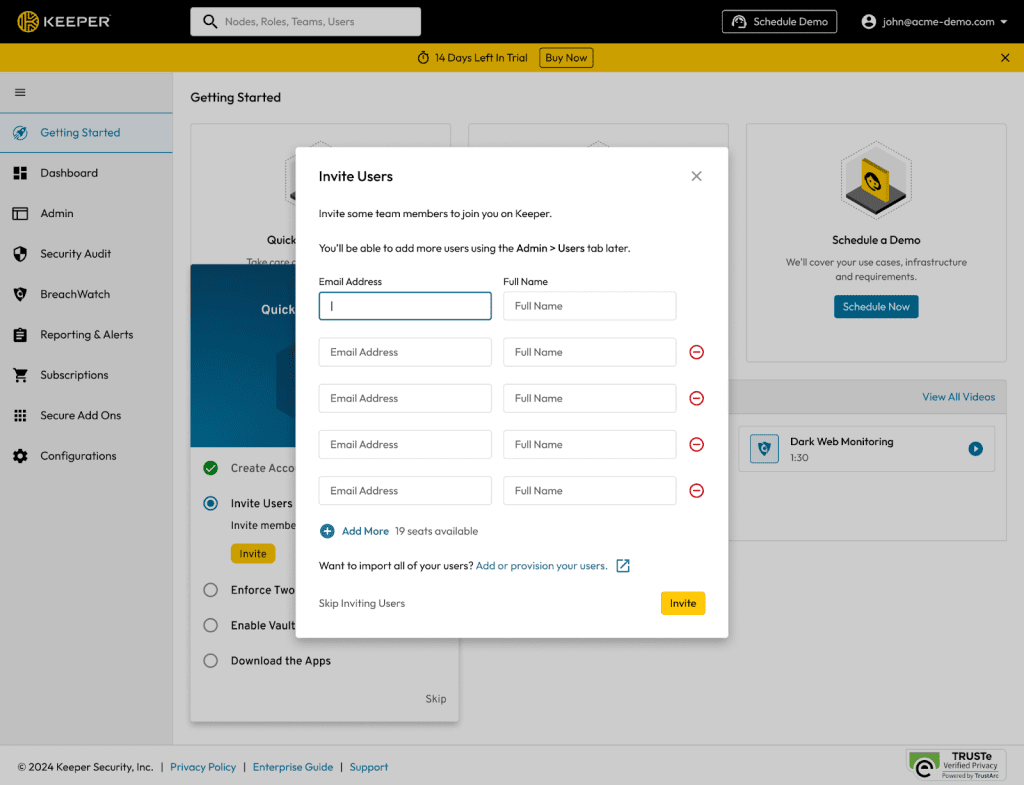
Keeper Security is designed for easy setup and configuration, making it accessible for both individuals and businesses. Users can quickly install and sync their accounts across multiple devices, enabling seamless access to their encrypted vault. For business users, Keeper’s admin console allows centralized control, including user management, role-based permissions, and compliance reporting. It integrates with various platforms, including Single Sign-On (SSO) services, making the setup process highly flexible and adaptable to different organizational needs, ensuring a smooth and secure configuration.
Customer Support
Keeper Security provides strong customer support through multiple channels, including 24/7 live chat, email, and phone support. The platform offers a detailed knowledge base with helpful articles, FAQs, and video tutorials for self-service. For businesses, Keeper’s customer success team helps with onboarding, configuration, and ongoing support to ensure users get the most out of the platform. Additionally, higher-tier plans offer dedicated account managers to assist with implementation and provide personalized support, making it easy for customers to resolve issues and maintain strong security practices.
Who Is Keeper Security Best For?
Keeper Security is best suited for a wide range of users and companies:
Enterprises and Regulated Industries: Large organizations benefit from role-based access control, audit reporting, and advanced security features, making it perfect for industries requiring high levels of security, such as healthcare, finance, and government institutions.
Individuals and Families: Ideal for people who need secure password management, dark web monitoring, and encrypted file storage across multiple devices.
Small to Mid-Sized Businesses (SMBs): Keeper helps businesses securely manage credentials, protect sensitive data, and maintain compliance with industry standards like GDPR and HIPAA.
What Users Are Saying
Users generally highlight several pros and cons of Keeper Security:
Positives:
- Security: Users highly praise Keeper's zero-knowledge encryption, which ensures only the user can access their data.
- Ease of Use: Its intuitive interface and cross-device syncing make it easy to manage passwords and files.
- Customer Support: Users appreciate responsive and helpful 24/7 support.
Negatives:
Occasional Performance Issues: A few users report occasional lag with the autofill feature.
Pricing: Some users feel that Keeper's pricing, especially for premium features, is relatively high.
Learning Curve: A few users mention that certain advanced features, such as role-based permissions, may require time to fully understand.
Matthew Mayo (@mattmayo13) holds a master's degree in computer science and a graduate diploma in data mining. As managing editor of KDnuggets & Statology, and contributing editor at Machine Learning Mastery, Matthew aims to make complex data science concepts accessible. His professional interests include natural language processing, language models, machine learning algorithms, and exploring emerging AI. He is driven by a mission to democratize knowledge in the data science community. Matthew has been coding since he was 6 years old.