


Why Most Data Science Notebooks Die After Day One: How to Build Ones That Survive
Six habits that keep a notebook runnable after you close the laptop.

A notebook dies the moment "Restart Kernel and Run All" stops working.
Nobody notices for a week. The analysis was finished, the chart went into a deck, the file got pushed. Then someone asks where a number came from; you open the notebook, run it from the top, and cell 12 throws a KeyError on a column you renamed in cell 31 and deleted in cell 44. The output cells still show the old numbers, so the notebook looks fine while being unrunnable.
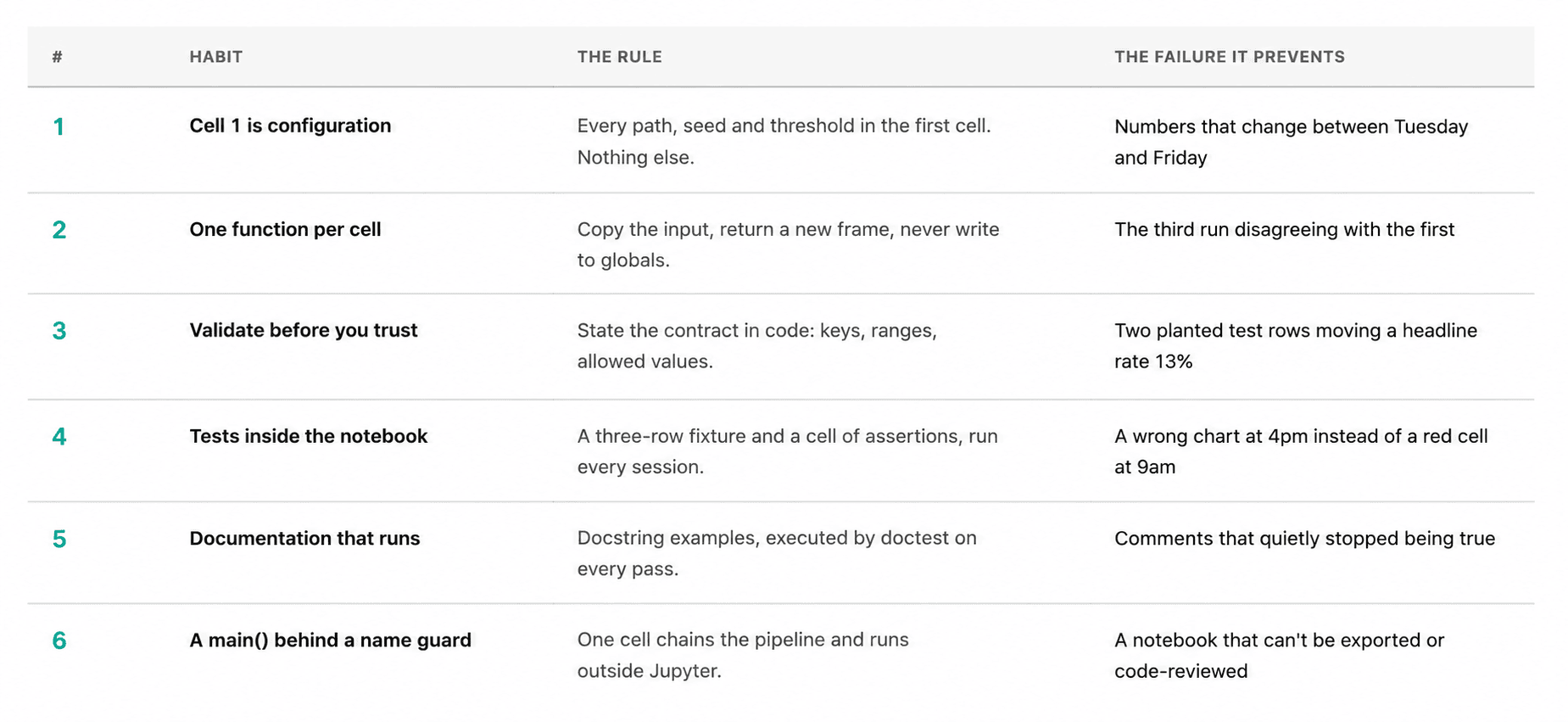
The habits that prevent this are cheap. We are going to apply all of them to one real dataset and keep the whole thing under 100 lines of Pandas.
The Data
In this article, we are using a table called olympics_athletes_events, used in this interview question.
olympics_athletes_events is one row per athlete per event, which is the detail that matters later. Its 352 rows cover 336 athletes across 15 Games and 167 events, so 11 athletes appear more than once and one appears 6 times. The medal column is filled for 120 rows, and a blank means that athlete did not win a medal in that event.
Here is a sample:
| id | name | sex | age | height | team | noc | year | sport | medal |
|---|---|---|---|---|---|---|---|---|---|
| 3520 | Guillermo J. Amparan | M | Mexico | MEX | 1924 | Athletics | |||
| 35394 | Henry John Finchett | M | Great Britain | GBR | 1924 | Gymnastics | |||
| 21918 | Georg Frederik Ahrensborg Clausen | M | 28.0 | Denmark | DEN | 1924 | Cycling | ||
| 110345 | Marinus Cornelis Dick Sigmond | M | 26.0 | Netherlands | NED | 1924 | Football | ||
| … | … | … | … | … | … | … | … | … | … |
| 999998 | John Testman | M | 30.0 | 180.0 | Canada | CAN | 2004 | Athletics | Bronze |
Let's now explore the habits that keep your notebook alive.
Habit 1: Adding Configurations to the First Cell
Every path, seed, threshold, and magic number goes in the first cell. Nothing else does.
from pathlib import Path
import pandas as pd

DATA_PATH = Path("olympics_athletes_events.csv")
RANDOM_SEED = 42

NATURAL_KEY = ["id", "games", "event"]
SENTINEL_ID_FLOOR = 900_000   # real athlete ids in this extract stop at 134205
VALID_SEXES = {"M", "F"}
VALID_MEDALS = {"Gold", "Silver", "Bronze"}
AGE_RANGE = (10, 75)
HEIGHT_RANGE_CM = (120, 230)
WEIGHT_RANGE_KG = (25, 220)
MIN_ATHLETES_PER_SPORT = 5
Two important things happen here. Someone reading the notebook six months later can see every assumption in 15 lines without scrolling. And when the file moves or the threshold changes, there is exactly one place to edit.
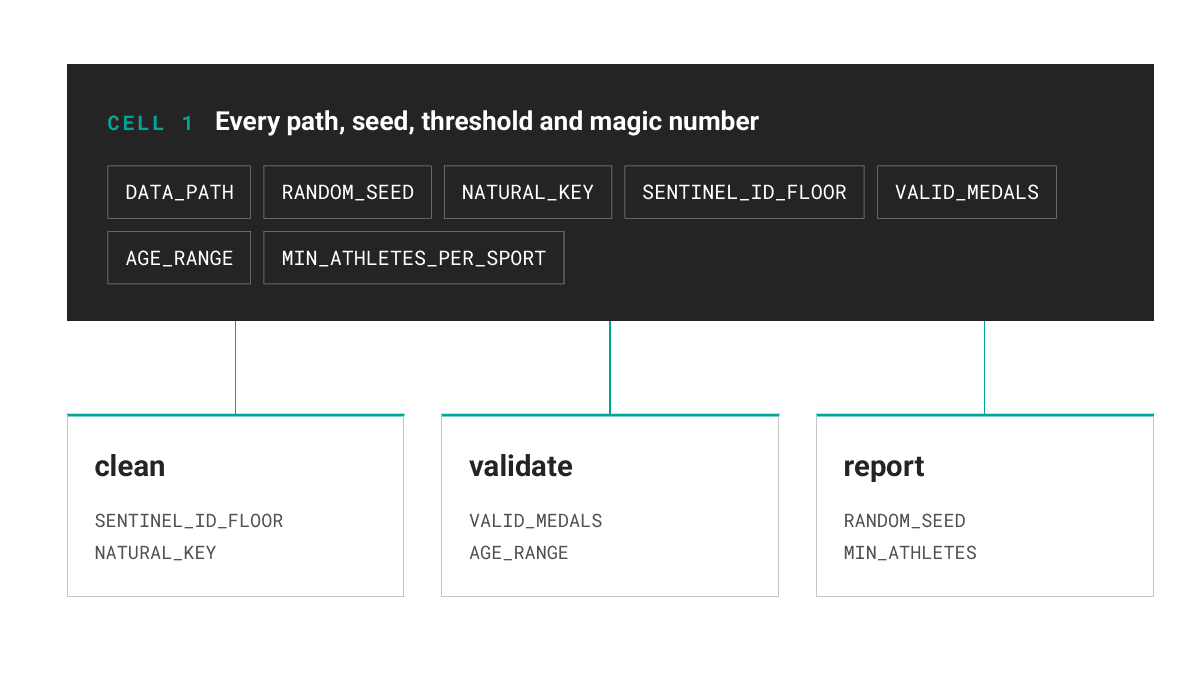
The seed matters even when we think we are not sampling. Any df.sample(), any train/test split, any k-means init draws from the global random state. A notebook that gives different numbers on Tuesday is a notebook nobody trusts.
Habit 2: Writing One Function per Cell
The rule that saves notebooks: a cell defines a function or calls one. It does not do both, and it never modifies a variable another cell has already created.
def load_raw(path: Path) -> pd.DataFrame:
    """Read the Olympics CSV with no cleaning applied."""
    return pd.read_csv(path)


def clean(df: pd.DataFrame) -> pd.DataFrame:
    """Drop test rows and duplicate entries, then encode 'no medal' explicitly."""
    out = df[df["id"] < SENTINEL_ID_FLOOR].copy()
    out = out.drop_duplicates(subset=NATURAL_KEY, keep="first")
    out["medal"] = out["medal"].fillna("None")
    out["sex"] = out["sex"].astype("category")
    out["season"] = out["season"].astype("category")
    return out.reset_index(drop=True)


def add_features(df: pd.DataFrame) -> pd.DataFrame:
    """Add decade, is_medalist and bmi. Never mutates the input frame."""
    out = df.copy()
    out["decade"] = (out["year"] // 10) * 10
    out["is_medalist"] = out["medal"].ne("None")
    out["bmi"] = bmi(out["weight"], out["height"])
    return out
The .copy() on the first line of each function is the whole trick. Once no function writes to its argument, cell order stops mattering. Re-running add_features five times gives the same frame five times, so the classic notebook failure where the third execution produces different numbers than the first cannot happen.
Note what clean does with medal. Pandas reads the blank as NaN, but a blank medal means the athlete competed and did not place. That is a real value, so we write "None" and stop treating it as missing data.
Habit 3: Validating the Data Before You Trust It
Write down what we believe about the data, then let the notebook check it.
def validate_raw(df: pd.DataFrame) -> list[str]:
    """Return a list of contract violations. An empty list means the data is usable."""
    problems = []

    expected = {"id", "sex", "age", "height", "weight", "year", "sport", "event",
                "medal", "games", "team"}
    missing = expected - set(df.columns)
    if missing:
        problems.append(f"missing columns: {sorted(missing)}")
        return problems

    dupes = df.duplicated(subset=NATURAL_KEY).sum()
    if dupes:
        problems.append(f"{dupes} duplicate rows on {NATURAL_KEY}")

    sentinels = df.loc[df["id"] >= SENTINEL_ID_FLOOR, "id"]
    if len(sentinels):
        found = sorted(int(i) for i in sentinels.unique())
        problems.append(f"{len(sentinels)} sentinel ids: {found}")

    bad_sex = set(df["sex"].dropna().unique()) - VALID_SEXES
    if bad_sex:
        problems.append(f"unexpected sex values: {bad_sex}")

    bad_medal = set(df["medal"].dropna().unique()) - VALID_MEDALS
    if bad_medal:
        problems.append(f"unexpected medal values: {bad_medal}")

    for col, (lo, hi) in [("age", AGE_RANGE),
                          ("height", HEIGHT_RANGE_CM),
                          ("weight", WEIGHT_RANGE_KG)]:
        out = df[col].dropna()
        n = ((out < lo) | (out > hi)).sum()
        if n:
            problems.append(f"{n} {col} values outside {lo}-{hi}")

    return problems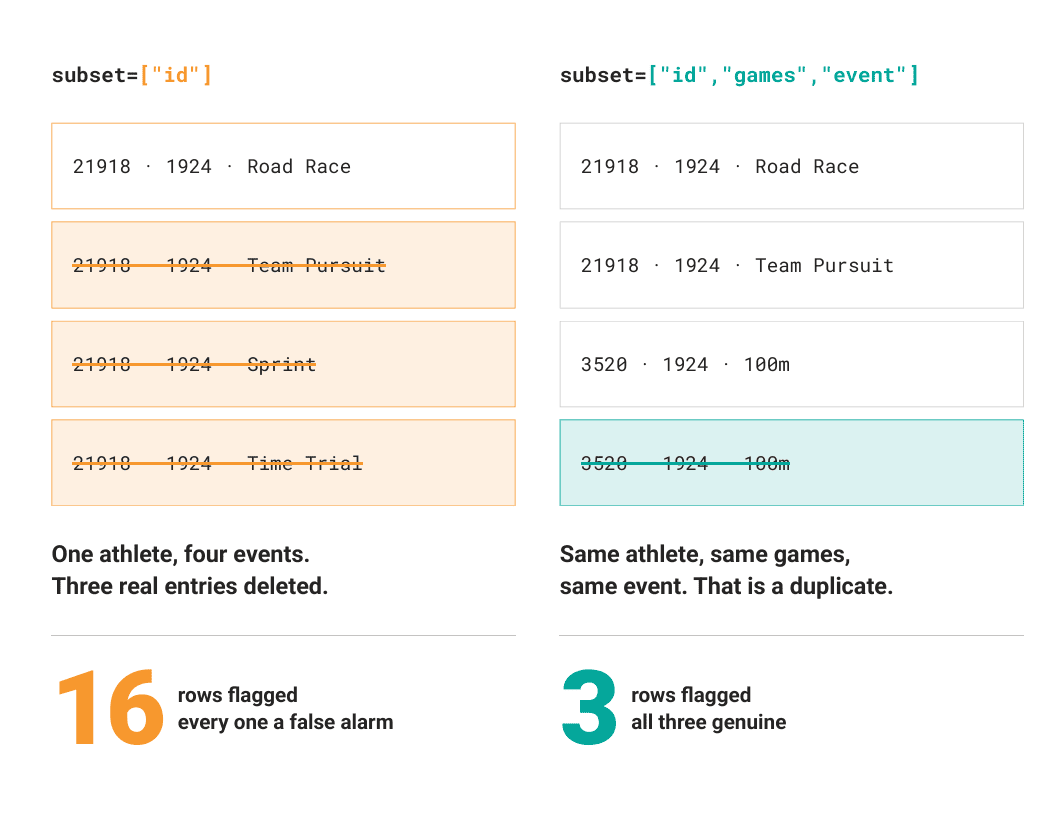
Running it on the raw file:
loaded 352 rows, 15 columns
validation: ["3 duplicate rows on ['id', 'games', 'event']", '2 sentinel ids: [999998, 999999]']
after cleaning: 347 rows
Both findings are worth a minute.
The duplicate check runs on ["id", "games", "event"], not on id. Checking id alone flags 16 rows, and every one of them is a false alarm, because id identifies an athlete and an athlete enters several events at the same games. Picking the wrong key would have deleted 16 legitimate entries. Getting the natural key right is most of what data validation is.
The sentinel ids are the planted rows. Two records for "John Testman", ids 999998 and 999999, 30 years old, 180cm, 75kg, one Gold in 2000 and one Bronze in 2004. Somebody's test fixture shipped with the extract. They are 0.6% of the file and they are invisible in df.head(), df.describe(), and every null count. They also both won medals in Athletics, which moves the Athletics medal rate from 0.245 to 0.213. A check that takes 3 lines caught a 13% error in the headline number.
Habit 4: Writing Tests That Live in the Notebook
We do not need pytest to test a notebook. We need a fixture small enough to reason about and a cell full of assertions.
def _fixture() -> pd.DataFrame:
    return pd.DataFrame({
        "id": [1, 1, 2],
        "games": ["1924 Summer"] * 3,
        "event": ["Rings", "Rings", "Rings"],
        "sex": ["M", "M", "F"],
        "age": [24.0, 24.0, None],
        "height": [180.0, 180.0, 165.0],
        "weight": [81.0, 81.0, 55.0],
        "year": [1924, 1924, 1924],
        "season": ["Summer"] * 3,
        "sport": ["Gymnastics"] * 3,
        "medal": ["Gold", "Gold", None],
        "team": ["Denmark"] * 3,
    })


def run_tests() -> None:
    fx = _fixture()

    assert len(clean(fx)) == 2, "clean() must drop the duplicate entry"
    assert clean(fx)["medal"].tolist() == ["Gold", "None"], "missing medal becomes 'None'"

    before = fx.copy()
    add_features(fx)
    pd.testing.assert_frame_equal(fx, before)   # add_features must not mutate

    feat = add_features(clean(fx))
    assert feat["is_medalist"].tolist() == [True, False]
    assert round(feat.loc[0, "bmi"], 1) == 25.0
    assert feat["decade"].unique().tolist() == [1920]

    assert validate_raw(fx) == [f"1 duplicate rows on {NATURAL_KEY}"]
    assert "missing columns" in validate_raw(pd.DataFrame({"id": [1]}))[0]

    planted = pd.concat([fx, fx.iloc[[2]].assign(id=999999)], ignore_index=True)
    assert any("sentinel" in p for p in validate_raw(planted))
    assert 999999 not in clean(planted)["id"].values

    print("all 10 checks passed")
all 10 checks passed
Three rows of fake data, 10 assertions, under a second to run. The assert_frame_equal check is the one that earns its keep: it fails loudly the day someone adds a line to add_features that writes to df instead of out.
Put this cell directly under the function definitions and run it every session. A red assertion at 9am is cheaper than a wrong chart at 4pm.
Habit 5: Writing Documentation That Runs
Comments rot because nothing checks them. Docstring examples do not, because doctest executes them.
def bmi(weight_kg: float, height_cm: float) -> float:
    """Body mass index in kg/m2.

    >>> round(bmi(81.0, 180.0), 1)
    25.0
    >>> round(bmi(55.0, 165.0), 1)
    20.2
    """
    return weight_kg / (height_cm / 100) ** 2
In a notebook, doctest.testmod() finds nothing, so call the function-level version:
import doctest

doctest.run_docstring_examples(bmi, globals(), name="bmi", verbose=True)
Finding tests in bmi
Trying:
    round(bmi(81.0, 180.0), 1)
Expecting:
    25.0
ok
Trying:
    round(bmi(55.0, 165.0), 1)
Expecting:
    20.2
ok
Now the documentation and the behavior cannot disagree. Change the formula to use metres and the docstring fails on the next run.
Habit 6: Making the Notebook Run as a Script
The last cell chains the functions together. This is the cell that proves the notebook still works.
def medal_rate_by_sport(df: pd.DataFrame,
                        min_athletes: int = MIN_ATHLETES_PER_SPORT) -> pd.DataFrame:
    """Medal rate per sport, restricted to sports with enough entries."""
    grouped = (df.groupby("sport", observed=True)
                 .agg(entries=("id", "size"),
                      medals=("is_medalist", "sum"),
                      mean_age=("age", "mean"))
                 .query("entries >= @min_athletes"))
    grouped["medal_rate"] = (grouped["medals"] / grouped["entries"]).round(3)
    grouped["mean_age"] = grouped["mean_age"].round(1)
    return grouped.sort_values("medal_rate", ascending=False)


def main() -> pd.DataFrame:
    raw = load_raw(DATA_PATH)
    print(f"loaded {len(raw)} rows, {raw.shape[1]} columns")

    problems = validate_raw(raw)
    print("validation:", problems or "clean")

    df = add_features(clean(raw))
    print(f"after cleaning: {len(df)} rows")

    print("\nspot check:")
    print(df.sample(3, random_state=RANDOM_SEED)[["name", "year", "sport", "medal", "bmi"]])

    report = medal_rate_by_sport(df)
    print(f"\nmedal rate by sport ({len(report)} sports):")
    print(report)
    return report


if __name__ == "__main__":
    run_tests()
    doctest.run_docstring_examples(bmi, globals(), name="bmi", verbose=True)
    main()
medal rate by sport (22 sports):
                  entries  medals  mean_age  medal_rate
sport
Canoeing                5       5      29.6       1.000
Judo                    5       5      24.6       1.000
Rugby                   9       9      26.0       1.000
Hockey                  5       4      23.0       0.800
...
Speed Skating           6       0      24.3       0.000
That if __name__ == "__main__" block is the part people skip. With it, jupyter nbconvert --to script analysis.ipynb gives a file that imports cleanly and gets code-reviewed as a normal diff. Without it, every top-level statement fires on import.
The spot check matters too. Printing 3 seeded rows next to the aggregate means we see actual values, and a NaN bmi in that sample tells us immediately that height and weight are missing for most of the older records. 226 of 352 rows have no height.
Conclusion
Six habits, and the total cost is maybe 30 minutes on the first notebook and 5 on every one after:
- Configuration in cell 1, including the seed.
- Functions that copy their inputs and never write to globals.
- A validation cell that states what we believe and checks it.
- A tiny fixture and a cell of assertions, run every session.
- Docstring examples, so the docs get executed.
- A
main()behind a name guard, so the notebook exports to a script.
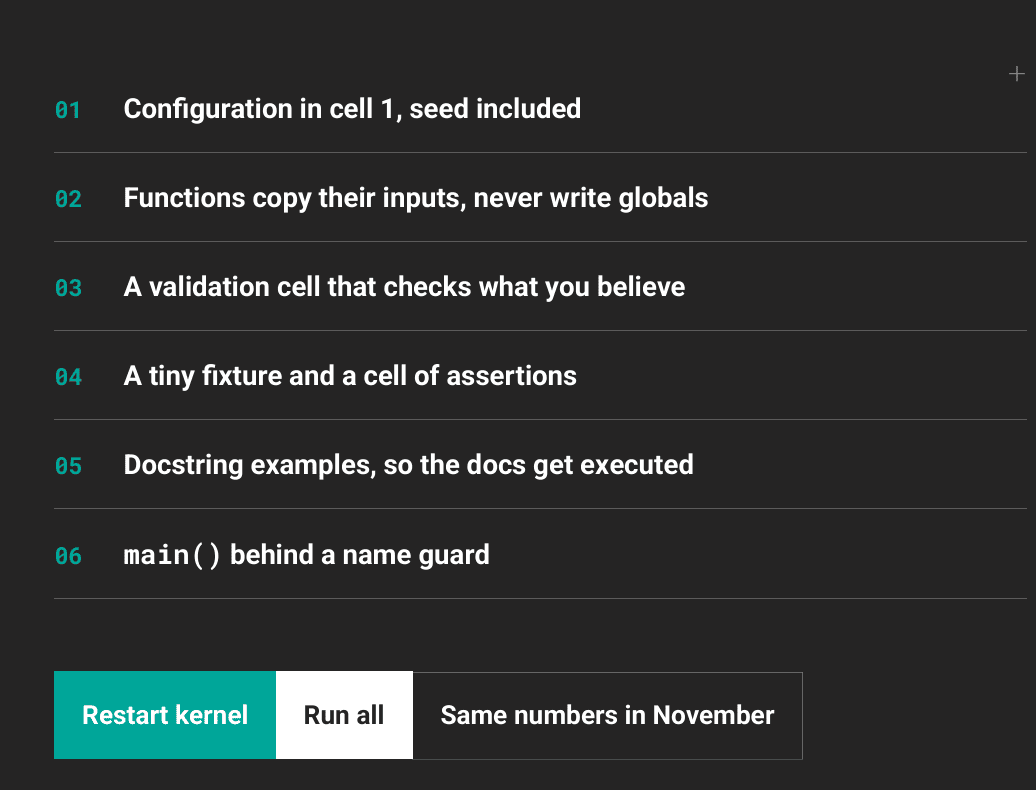
All of it exists so the notebook still produces the same numbers when someone opens it in November. The Olympics file we started with looked clean and had 3 duplicate entries and 2 planted test athletes in it, and the only reason we know that is a cell that took 3 minutes to write.

Restart the kernel. Run all. If it works, the notebook is alive!
Nate Rosidi is a data scientist and in product strategy. He's also an adjunct professor teaching analytics, and is the founder of StrataScratch, a platform helping data scientists prepare for their interviews with real interview questions from top companies. Nate writes on the latest trends in the career market, gives interview advice, shares data science projects, and covers everything SQL.