


Agentic System Design: A Self-Study Roadmap
Learn agentic system design with this 7-step roadmap covering tools, memory, control loops, multi-agent coordination, evaluation, and deployment.
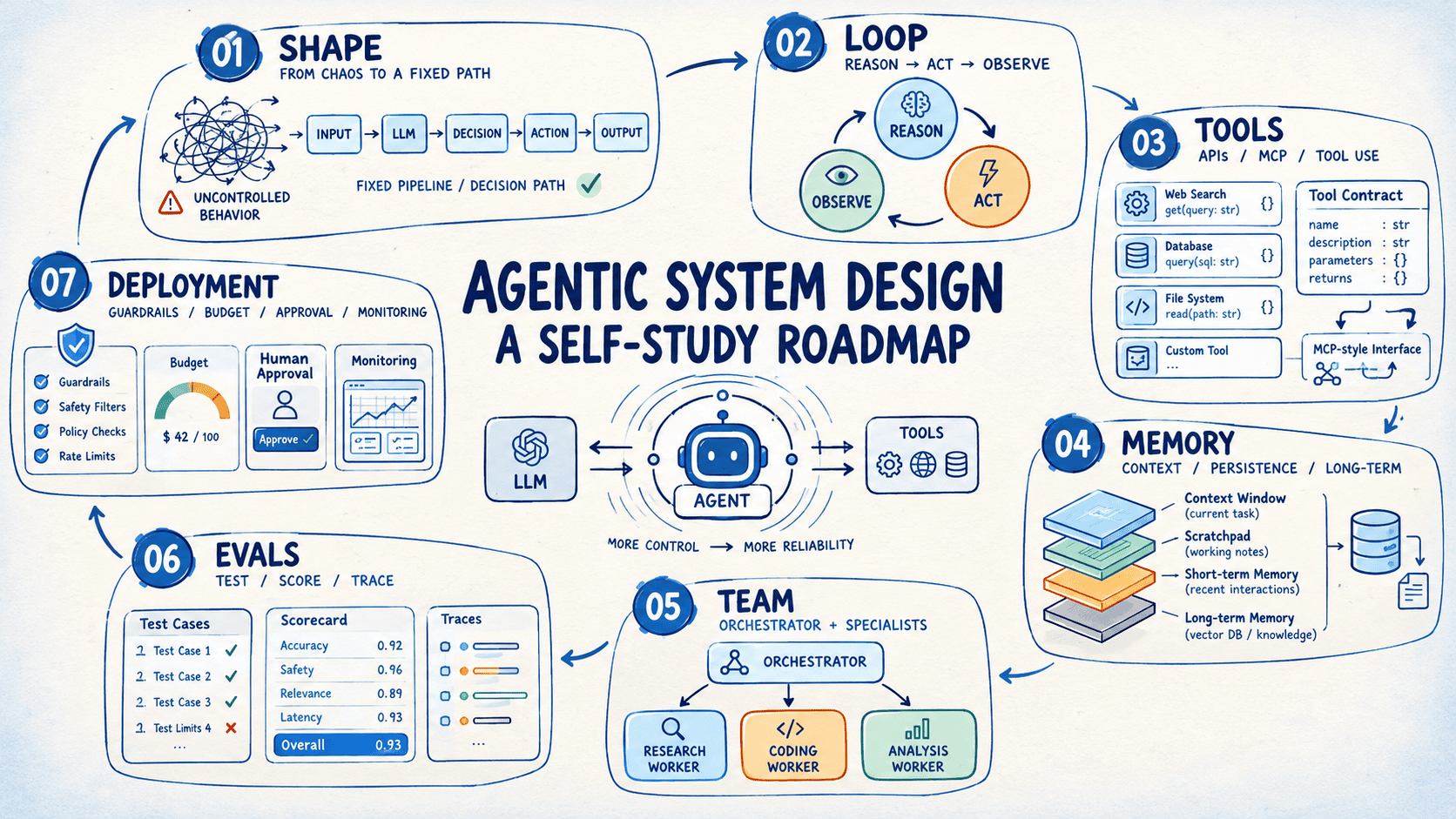
Introduction
If you're learning to build agents, start by learning how they fail. An agent is a language model with a few tools and a goal. It chooses its own path through the task, and that freedom is what makes it useful. It also means the agent will sometimes repeat a call, invent an argument, or lose a detail the task depended on. These failures are ordinary, and you can plan for them.
Agentic system design is the practice of planning for them. You give the agent a control loop to work inside, tool contracts it can be held to, and a response to each kind of failure, all decided before the first run.
This roadmap teaches that practice through one project, built in seven steps. The project is an incident investigator, an agent that finds the root cause of a production alert. Each step adds one piece, so every idea lands on code you've already written. You'll learn how to:
- Decide which steps your code controls and which steps the model controls
- Trace the reasoning-action loop through a full multi-turn tool interaction
- Design tools, memory, and multi-agent coordination that hold up under real use
- Evaluate and deploy an agent so it makes the jump from demo to daily use
We'll try to wrap up each step with a few resources and one addition to the project.
The Project: An Incident Investigator
You'll build an incident investigator. It receives an alert, gathers evidence from logs, metrics, deploy history, and runbooks, and returns a root-cause report with cited evidence and a proposed fix. A human approves any action.
Note: Every step works with any agent orchestration framework. You'll build the loop by hand in Step 2 to see the mechanics. Then you can carry the same design into LangGraph, CrewAI, Google's Agent Development Kit, or whichever framework you already use.
| Step | You add to the project |
|---|---|
| Shape | Ten synthetic incidents and a fixed triage pipeline |
| Loop | A tool-calling loop that investigates one incident |
| Tools | Six well-specified tools behind a Model Context Protocol (MCP) server |
| Memory | A scratchpad, output compaction, and a history of solved incidents |
| Team | An orchestrator with three parallel workers |
| Evals | A thirty-incident replay suite with graders |
| Deployment | Budgets, read-only access, an approval gate, and tracing |
Step 1: Choosing Between a Workflow and an Agent
Every agentic system starts with one decision about control: who picks the next step? In a workflow, your code fixes the sequence of steps and the model fills in the content at each step. In an agent, the model chooses its next action from a set of tools, based on what it has seen so far.
Autonomy is a spectrum, and each move along it adds cost, latency, and variability. So start with the simplest shape that meets the goal, and move up when a measured failure calls for more flexibility. The table lists the common shapes in order of increasing autonomy:
| Shape | How it works | Fits tasks that |
|---|---|---|
| Single prompt | One model call with clear instructions and examples | Have one input and one output |
| Prompt chain | A fixed sequence of calls, each using the previous output | Split into stable steps, such as draft then translate |
| Routing | A classifier call sends the input to a specialized handler | Fall into distinct categories |
| Parallelization | Independent calls run at once and the results merge | Contain independent subtasks |
| Orchestrator-workers | A lead model splits the work and delegates it at runtime | Have subtasks that emerge while the work proceeds |
| Evaluator-optimizer | One call generates, another critiques, and the pair repeats | Have clear quality criteria and gain from revision |
| Agent | The model picks tools in a loop until it finishes | Have open-ended paths shaped by what each step reveals |
Task decomposition is the design skill behind this choice. Write the task as numbered steps a person would follow, then mark each step as fixed or open-ended. Fixed steps stay in code, and open-ended steps go to the model.
Resources
- Building Effective AI Agents | Anthropic
- Choose a design pattern for your agentic AI system | Cloud Architecture Center
- Agentic AI | Coursera
Adding to Your Project
Set up the foundation. Ask a large language model (LLM) to generate ten synthetic incidents, each with an alert, an application log, a metrics CSV, a deploy list, and a hidden root cause. Build a fixed pipeline that classifies severity, loads the files, and writes a summary with one LLM call. Run it on all ten and list the incidents it misjudges, because those blind spots justify the agent in Step 2.
Step 2: Building the Reasoning-Action Loop
The loop sits at the center of every agent: reason, act, observe, repeat. The model emits a structured tool request, your code executes it, and the result returns as the next message. The loop ends when the model gives a final answer or a step cap triggers.
Let's trace one example. A support agent that's asked "Where is my order?" runs like this:
- The model reasons that it needs the order record and calls
order_lookup - The result shows the order shipped Tuesday with a tracking number
- The model calls
carrier_trackingwith that number - The result shows a delay at a regional hub and a new estimate for Friday
- The model answers with the status and the new estimate
That's two tool calls and three rounds of reasoning, and the second call depends on the result of the first.
Build this loop by hand once before you switch to a framework. It teaches you what every framework automates: the message list, the tool registry, the dispatcher, and the stop conditions. You'll also run into these failure modes:
| Failure mode | Symptom | First fix |
|---|---|---|
| Malformed arguments | The tool call fails schema validation | Tighten the schema and return an error the model can act on |
| Repeated identical calls | The agent circles one tool | Keep call history in context and cap identical calls |
| Early final answer | The agent answers before gathering evidence | Require the answer to cite tool results |
| Runaway loop | The run continues past its useful life | Set a step cap and a time budget |
Resources
- Tool use with Claude
- AI Agents in LangGraph | DeepLearning.AI
- Building Your First LLM Agent Application | NVIDIA Technical Blog
Adding to Your Project
Replace the fixed gathering stage with a loop. Start with two tools, deploys_list and logs_get, cap the loop at 12 steps, and save every message to a trace file. Compare the agent's summaries with the Step 1 pipeline on the incidents in your blind-spot list.
Step 3: Designing Tools the Model Can Use
A tool definition is a contract, and the model follows what the schema and description say. Most agent quality problems trace back to ambiguous descriptions, mismatched parameter names, and tools that try to do multiple jobs at once. Write each description to include what the tool does, when to use it, and what it returns:
| Design choice | Suggestion | Example |
|---|---|---|
| Scope | Give each tool one purpose | search_customer_by_email with one required parameter |
| Naming | Namespace by domain | logs_search, metrics_query |
| Output | Return compact, useful context and mark truncation | A [312 more lines] marker |
| Errors | State the fix in the message | "start must be an ISO 8601 timestamp" |
| Selection | Present a focused set of tools per agent | Give a billing agent the billing tools |
The MCP standardizes how agents discover and call tools, so one tool server can serve many agents and applications.
Test each description by handing the schema alone to a model and checking the call it makes. If the call is wrong, the description needs work.
Resources
- Writing effective tools for AI agents — using AI agents | Anthropic
- MCP: Build Rich-Context AI Apps with Anthropic | DeepLearning.AI
- What is the Model Context Protocol (MCP)?
Adding to Your Project
Grow the toolset to six: deploys_list, logs_get, logs_search, metrics_query, git_diff, and runbook_read. Cap each result at about 2,000 tokens with a truncation marker, write error messages that suggest a valid retry, and wrap the set in an MCP server so any MCP client can call it.
Step 4: Giving the Agent Memory
Memory decides what the agent knows at each turn. It comes in three layers:
| Layer | Holds | Implementation options |
|---|---|---|
| Working memory | The current context window: instructions, tool results, message history | Trimming, summarizing, clearing old tool output |
| Session memory | State for the current task: plan, findings, open questions | A scratchpad file or state object the agent updates |
| Long-term memory | Knowledge that persists across runs | A database with keyword or embedding search |
Context engineering is the practice of curating which tokens enter the window on each turn. Tool results accumulate fast, so summarize or clear raw output once the model has extracted what it needs.
Long-term memory raises two design questions: what to store and when to retrieve it. A small, curated store keeps the context focused on what the task needs. Three kinds of long-term memory cover most designs. Semantic memory holds facts about users and domains, episodic memory holds past interactions and their outcomes, and procedural memory holds instructions that evolve with feedback.
Resources
- Effective context engineering for AI agents
- Long-Term Agentic Memory With LangGraph
- Effective harnesses for long-running agents
- Choosing the Right AI Agent Memory Strategy: A Decision-Tree Approach
Adding to Your Project
Give the investigator a scratchpad file for hypotheses and ruled-out causes, and compact large log output into short digests. Save each solved incident (symptoms, root cause, fix) to a small SQLite store, and retrieve the three most similar past incidents at the start of every run.
Step 5: Coordinating Multiple Agents
Some tasks split into independent lines of inquiry, and a team of agents can pursue them in parallel. The orchestrator-worker pattern fits most of them: a lead agent plans, workers execute scoped subtasks in their own context windows, and the lead synthesizes the results.
Each worker needs a clear brief. A good brief contains:
- An objective stated in one or two sentences
- An output format, ideally structured JSON
- The tools the worker may use
- Boundaries on scope and effort
Multi-agent runs multiply token use several times over, so reserve them for tasks with parallel structure and enough value to justify the cost. Scale effort to the task: a simple query gets one worker and a complex one gets several. Build with two agents first and add more only when a measured need appears.
Resources
- How we built our multi-agent research system | Anthropic
- Multi AI Agent Systems with crewAI | DeepLearning.AI
Adding to Your Project
Split the investigator into three workers: logs_analyst, metrics_analyst, and change_analyst, each holding a subset of the tools. Have the orchestrator launch them concurrently, collect JSON findings with evidence and a confidence level, and write one report with citations.
Step 6: Evaluating Agent Behavior
Evals turn agent quality into a number you can improve. Build a test set of representative tasks with known-good outcomes before you tune anything, and check each layer of behavior:
| What to check | Grader | Example for a support agent |
|---|---|---|
| Tool selection | Code | The agent called order_lookup for a status question |
| Arguments | Code | The order ID matches the customer's messages |
| Final answer | Code for exact match, LLM judge for quality | The answer states the correct delivery estimate |
| Trajectory | Code or LLM judge | The run finished within six steps and avoided repeated calls |
Outputs vary between runs, so run each task several times and track the pass rate. When a task fails, read the full trace and sort the failure into a category: tool selection, arguments, memory, or synthesis. Each category points to a different fix: a tool description, a prompt, a memory change, or a different model.
Resources
Adding to Your Project
Grow the incidents to thirty with variants such as expired certificates, disk exhaustion, and DNS failures. Write a script that replays each incident three times, records tool calls, tokens, and the reported root cause, and scores root-cause accuracy and evidence citations. Keep a scoreboard and rerun it after every change.
Step 7: Deploying with Guardrails
The last step wraps the agent in limits, permissions, and visibility so a team can rely on it. The table lists the controls to add:
| Control | What it does | Example setting |
|---|---|---|
| Step cap | Ends runaway loops | 25 tool calls per run |
| Time and cost budget | Bounds latency and spend | 5 minutes and \$0.50 |
| Least-privilege tools | Limits what a wrong call can affect | Read-only credentials, allowlisted commands |
| Approval gate | Places a human ahead of state-changing actions | A confirmation message before a restart |
| Tracing | Records every model call and tool call | JSONL traces and a cost dashboard |
| Eval gate | Scores every change before release | A continuous integration (CI) job that blocks a merge on a score drop |
Text that tools return comes from other systems, so treat it as data. Fence tool output with delimiters and tell the model that content inside the fence is data. Then roll out in stages:
- Shadow mode: the agent runs beside people and its output gets reviewed
- Assist mode: the agent's output reaches people as suggestions
- Wider use: the agent handles a defined slice of work under monitoring
Resources
- Governing AI Agents | DeepLearning.AI
- Making Claude Code more secure and autonomous with sandboxing | Anthropic
Adding to Your Project
Wrap the investigator for daily use. Add the budgets from the table, give the tools read-only access, list remediation as suggested commands behind an approval message, fence log text as data, emit traces, and trigger runs from your alerting webhook. Run it beside on-call engineers for two weeks and compare its reports with their write-ups.
Wrapping Up
By Step 7, your incident investigator is a working service with a test suite behind it. You have a loop you built by hand, tools specified well enough to trust, memory that carries context across incidents, workers that split the investigation when it helps, evals that catch regressions, and guardrails that keep it safe to run unattended.
This sequence carries over to the next agent you build. A few directions you can explore from here:
- Swap the synthetic incidents for a feed from your own logging or alerting stack, and see where the Step 3 tool descriptions stop holding up against real formats
- Pick one orchestration framework and reimplement the loop in it, now that you know what it automates
- Build a second project with a different shape from Step 1, such as a routing workflow or an evaluator-optimizer loop, to learn the difference between a workflow and an agent in your own code
- Put the Step 6 eval suite into CI before changing the agent again, so every later change gets measured against your scoreboard
Happy learning!
Bala Priya is a developer, educator, and technical writer based in India. She writes about programming, data science, machine learning, and AI, with a focus on making complex technical ideas practical and approachable. She creates tutorials, how-to guides, and deep dives that help developers build, solve problems, and understand complex technical concepts. Her technical interests include LLM applications, agentic AI, graph algorithms, computer vision, explainable AI, and ML systems. When she’s not writing or coding, Bala is usually reading classic literature, epic fantasy, or speculative fiction. She also enjoys talking about books, learning new things, and sharing what she learns with the developer community.