


Analytics Patterns Every Data Scientist Should Master
Learn the analytics pattern you can use in most business analytics tasks.

Image by Author | Canva
# Introduction
Data analysis problems aren’t really unique. However, “though your problems are non-unique, that doesn’t make them go away,” to paraphrase Neil Young. What will make them go away? Realizing that, beneath the surface, most of them rely on a handful of reusable patterns.
I’ll show you those patterns, so you can then reuse them in your work or job interview, no matter the data or industry. Data is always just that — data. All the patterns will be in PostgreSQL based on the coding interview questions on StrataScratch. Then I’ll tie them to real business situations.

# 1. Joins + Filters: Finding the Right Subset
Question: Movie Duration Match from Amazon
Task: Developing a feature that suggests individual movies from Amazon's content database that fit within a given flight's duration.
For flight 101, find movies whose runtime is less than or equal to the flight's duration. The output should list suggested movies for the flight, including flight_id, movie_id, and movie_duration.
Solution:
SELECT fs.flight_id,
       ec.movie_id,
       ec.duration AS movie_duration
FROM flight_schedule fs
JOIN entertainment_catalog ec ON ec.duration <= fs.flight_duration
WHERE fs.flight_id = 101
ORDER BY ec.duration;
Output:
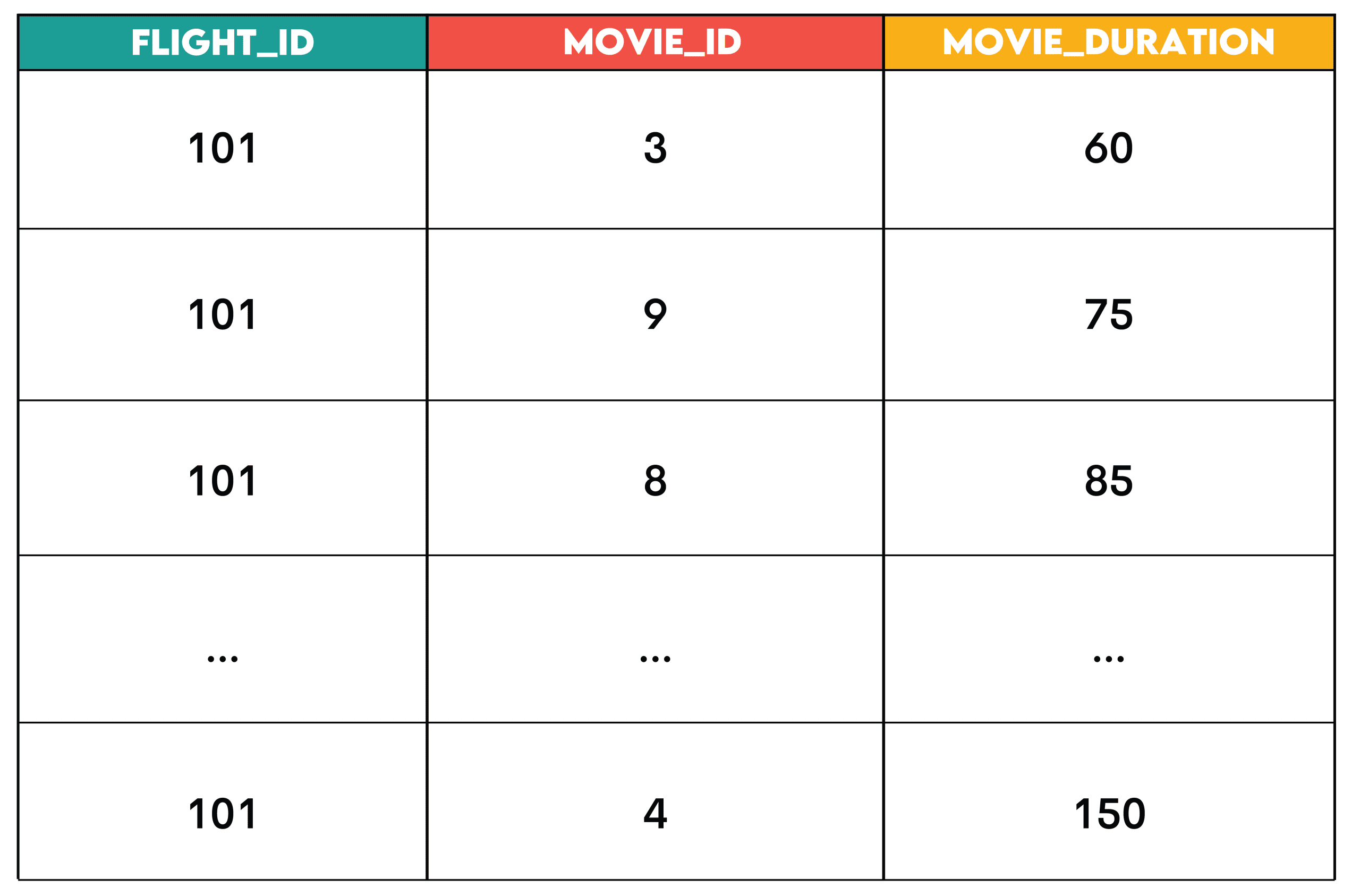
Pattern: The join + filter is the pattern where you join two datasets and filter rows (in WHERE before aggregation or in HAVING after aggregation) based on conditions.
This is the sequence.

- Identify the primary table: The dataset that defines what you’re analyzing (
flight_schedule) - Join supplementary data: The dataset(s) that add context or attributes (
entertainment_catalog) - Apply filters: Remove the rows you don’t need (
WHERE fs.flight_id = 101)
// Business Uses
- HR: Joining employees with their working hours to identify overtime
- Retail: Joining orders with product details to analyze product category performance
- Streaming: Joining users with their sessions to find active viewers
# 2. Window Functions: Ranking & Ordering
Question: Top Posts Per Channel from Meta
Task: Identify the top 3 posts with the highest like counts for each channel. Assign a rank to each post based on its like count, allowing for gaps in ranking when posts have the same number of likes.
The output should display the channel name, post ID, post creation date, and the like count for each post.
Solution:
WITH ranked_posts AS
  (SELECT post_id,
          channel_id,
          created_at,
          likes,
          RANK() OVER (PARTITION BY channel_id ORDER BY likes DESC) AS post_rank
   FROM posts
   WHERE likes > 0)

SELECT c.channel_name,
       r.post_id,
       r.created_at,
       r.likes
FROM ranked_posts AS r
JOIN channels AS c ON r.channel_id = c.channel_id
WHERE r.post_rank <= 3;
Output:
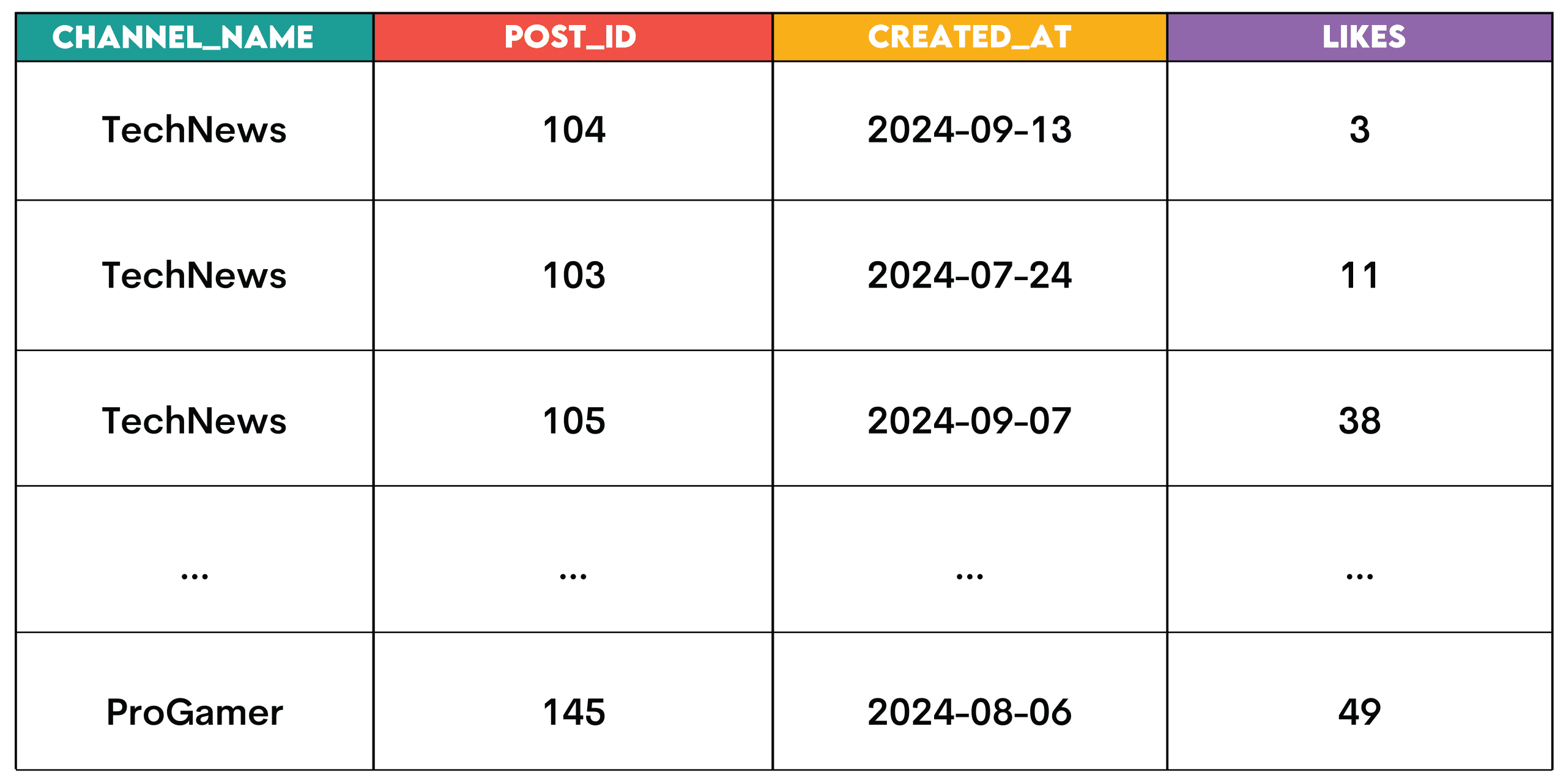
Pattern: These are the window functions used for ranking.
RANK(): Ranking with gapsDENSE_RANK(): Ranking without gapsROW_NUMBER(): Unique ordering with no ties
When ranking, follow this pattern.
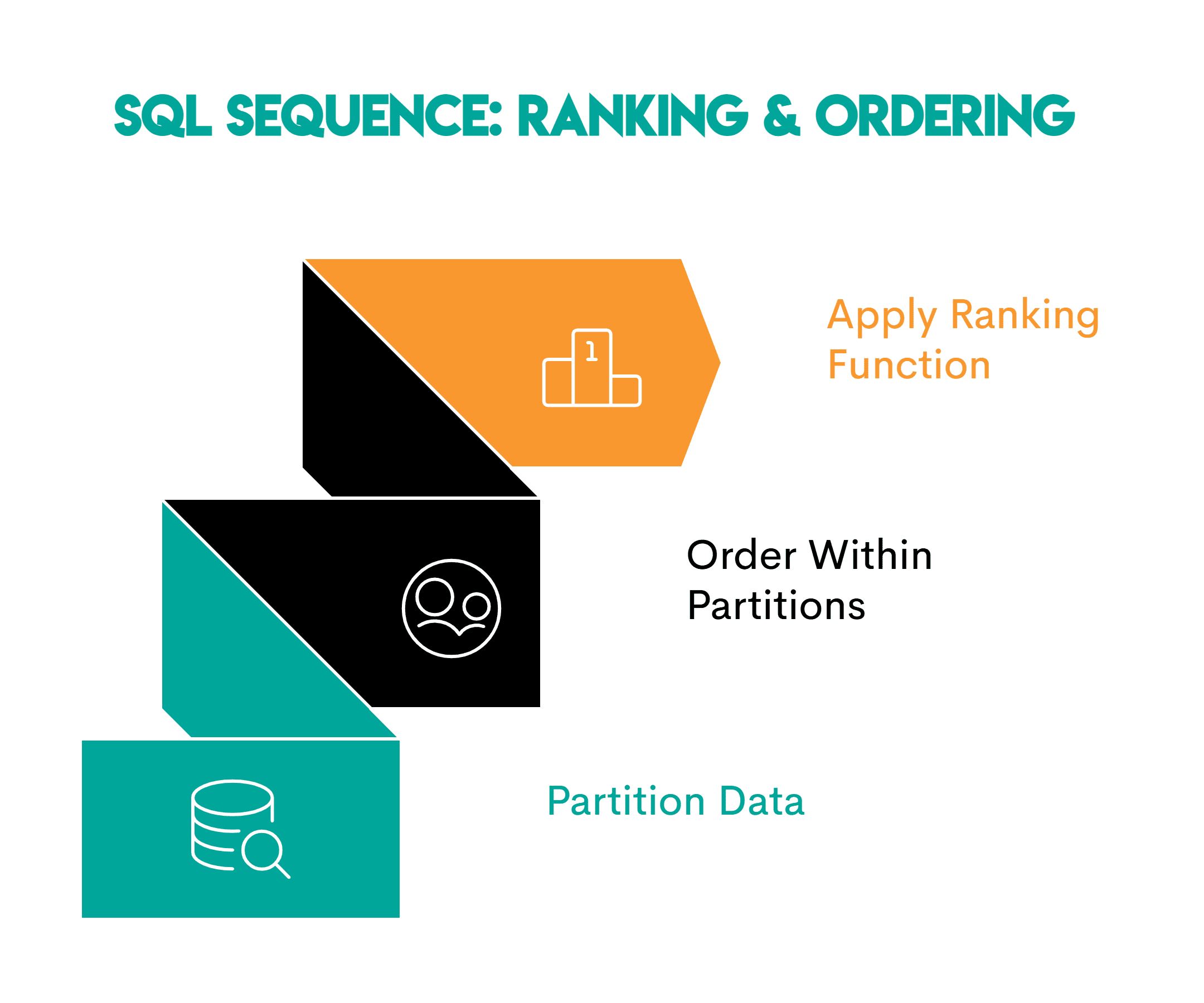
- Partition the data: Define the logical group you’re analyzing (
PARTITION BY channel_id) - Order within each partition: Specify the ranking or time sequence (
ORDER BY likes DESC) - Apply the ranking window function —
RANK(),DENSE_RANK()orROW_NUMBER() OVER()depending on the task
// Business Uses
This pattern is used to identify top performers, for example:
- Sales: Top sales representatives per region
- Education: Ranking students by test scores within each class
- Logistics: Ranking delivery drivers by completed deliveries within each region
# 3. Aggregation + Grouping: The Roll-Up Pattern
Question: Same-Day Orders from Walmart
Task: Find users who started a session and placed an order on the same day. Calculate the total number of orders placed on that day and the total order value for that day.
Solution:
SELECT s.user_id,
       s.session_date,
       COUNT(o.order_id) AS total_orders,
       SUM(o.order_value) AS total_order_value
FROM
  (SELECT DISTINCT user_id,
                   session_date
   FROM sessions) s
JOIN order_summary o ON s.user_id = o.user_id
AND s.session_date = o.order_date
GROUP BY s.user_id, s.session_date;
Output:
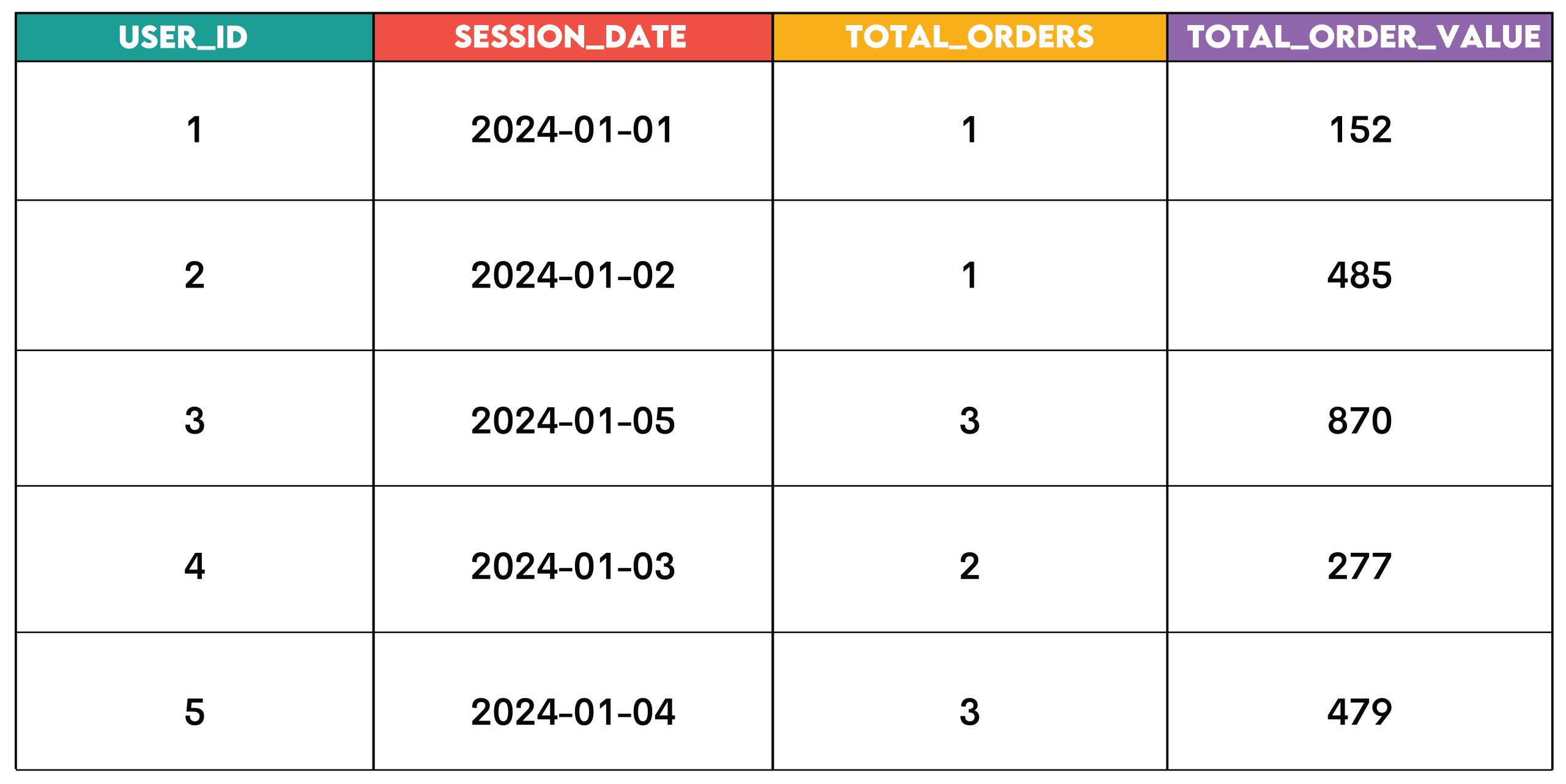
Pattern: This pattern is for summarizing data, e.g. across users, dates, products, or other analytical dimensions.
Here’s the sequence.

- Identify the grouping dimension: The column you want to group by (
user_idandsession_date) - Group the data: Use
GROUP BYon the chosen dimension(s) to group the data - Aggregate the metrics: Summarize the values for each group using the aggregate functions
- Filter aggregated results (optional): Use
HAVINGto keep only certain groups depending on the aggregate value
// Business Uses
- E-commerce: Orders and revenue per customer per day
- SaaS: Logins per user per week
- Finance: Transactions per account per quarter
# 4. Pivoting: Turning Rows Into Columns
Question: Highest Payment from the City of San Francisco
Task: Create a pivot table that shows the highest payment for each employee in each year, ordered by employee name in ascending order. The table should show years 2011, 2012, 2013, and 2014.
Solution:
SELECT employeename,
       MAX(pay_2011) AS pay_2011,
       MAX(pay_2012) AS pay_2012,
       MAX(pay_2013) AS pay_2013,
       MAX(pay_2014) AS pay_2014
FROM
    (SELECT employeename,
            CASE
                WHEN year = 2011
                THEN totalpay
                ELSE 0
            END AS pay_2011,
            CASE
                WHEN year = 2012
                THEN totalpay
                ELSE 0
            END AS pay_2012,
            CASE
                WHEN year = 2013
                THEN totalpay
                ELSE 0
            END AS pay_2013,
            CASE
                WHEN year = 2014
                THEN totalpay
                ELSE 0
            END AS pay_2014
    FROM sf_public_salaries) pmt
GROUP BY employeename
ORDER BY employeename;
Output:
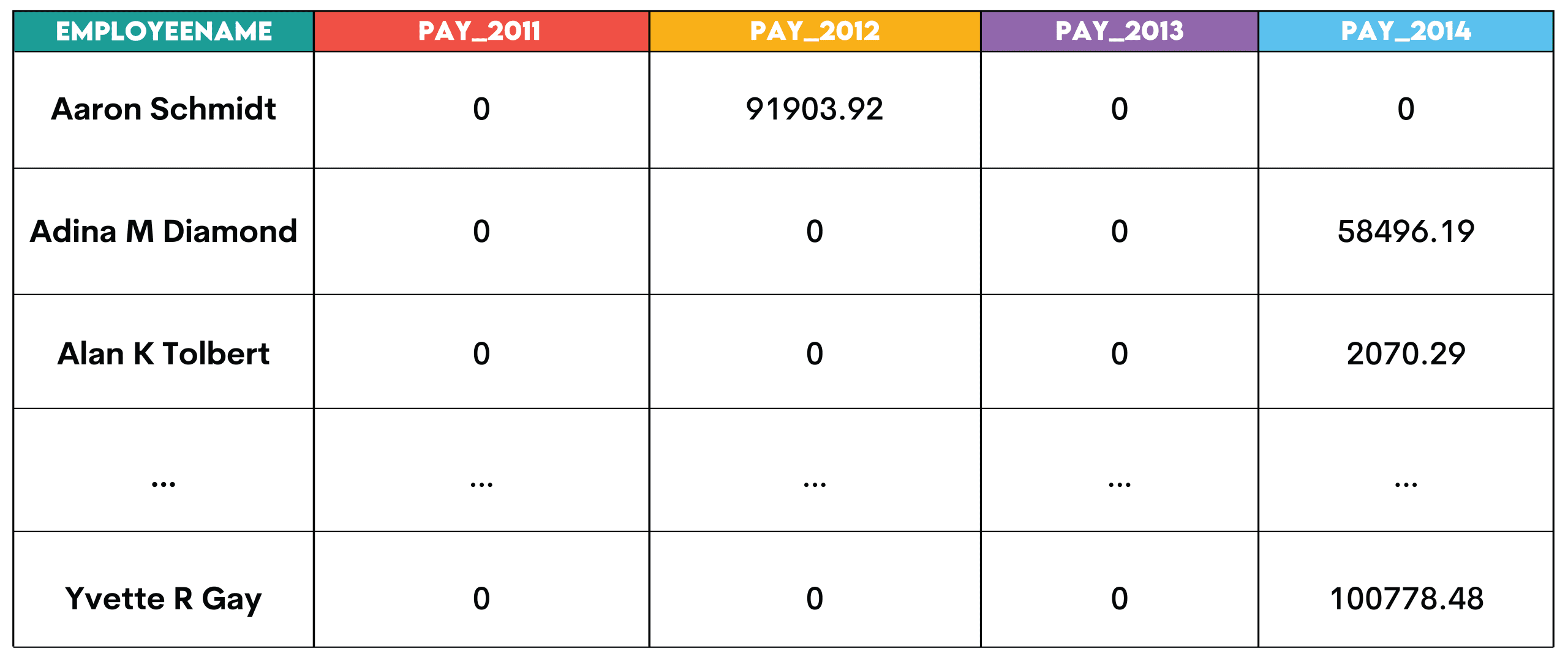
Pattern: Pivoting turns row values into columns. This is useful when comparing metrics across years, categories, or segments.
Here’s the sequence.
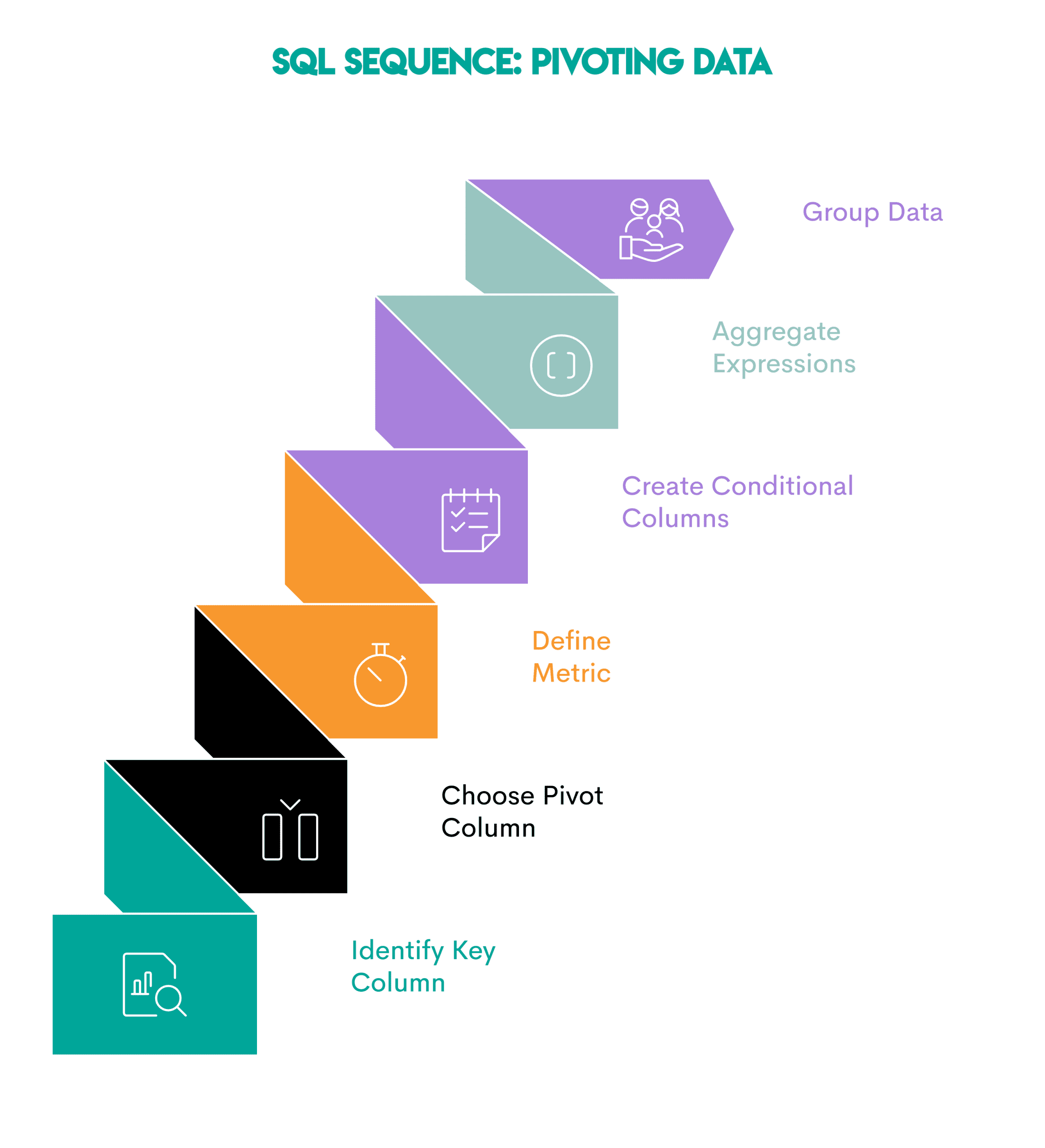
- Identify the key column: The column you want to show as rows (
employeename) - Choose the pivot column: The field whose unique values will become new columns (
year) - Define the metric: Determine the metric you want to calculate and aggregate (
totalpay) - Create conditional columns: Use
CASE WHEN(orPIVOT, where supported) to assign values to each column based on the pivot column - Aggregate conditional expressions in the outer query: Aggregate each pivot column
- Group the data: Use
GROUP BYon the key column to group the output
// Business Uses
- Finance: Comparing revenue per quarter side-by-side
- HR: Comparing salaries across years
- Retail: Comparing monthly sales totals
# 5. Cumulative Metrics: Growth, Retention, and Progress
Question: Revenue Over Time from Amazon
Task: Calculate the 3-month rolling average of total revenue from purchases. The returns — represented by negative purchase values — shouldn’t be included in the calculation.
The output should show year-month (YYYY-MM) and the rolling average, sorted from the earliest to the latest month.
Solution:
SELECT t.month,
       AVG(t.monthly_revenue) OVER (ORDER BY t.month ROWS BETWEEN 2 PRECEDING AND CURRENT ROW) AS avg_revenue
FROM
  (SELECT to_char(created_at::date, 'YYYY-MM') AS month,
          SUM(purchase_amt) AS monthly_revenue
   FROM amazon_purchases
   WHERE purchase_amt > 0
   GROUP BY to_char(created_at::date, 'YYYY-MM')
   ORDER BY to_char(created_at::date, 'YYYY-MM')
) t
ORDER BY t.month ASC;
Output:
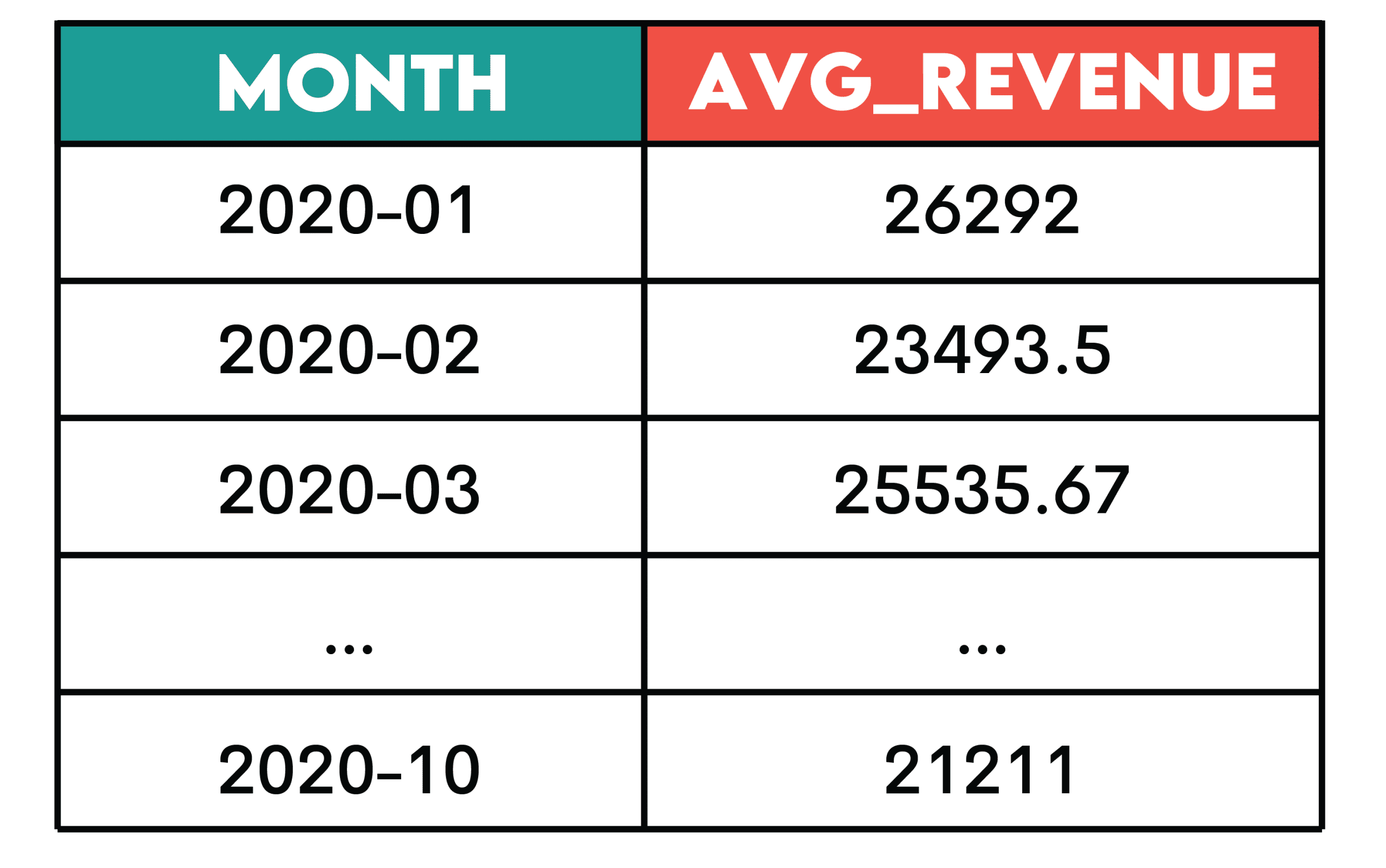
Pattern: Cumulative metrics (e.g. running total, moving average, or running count) are used to understand trends rather than showing individual time periods separately.
Here’s the sequence.
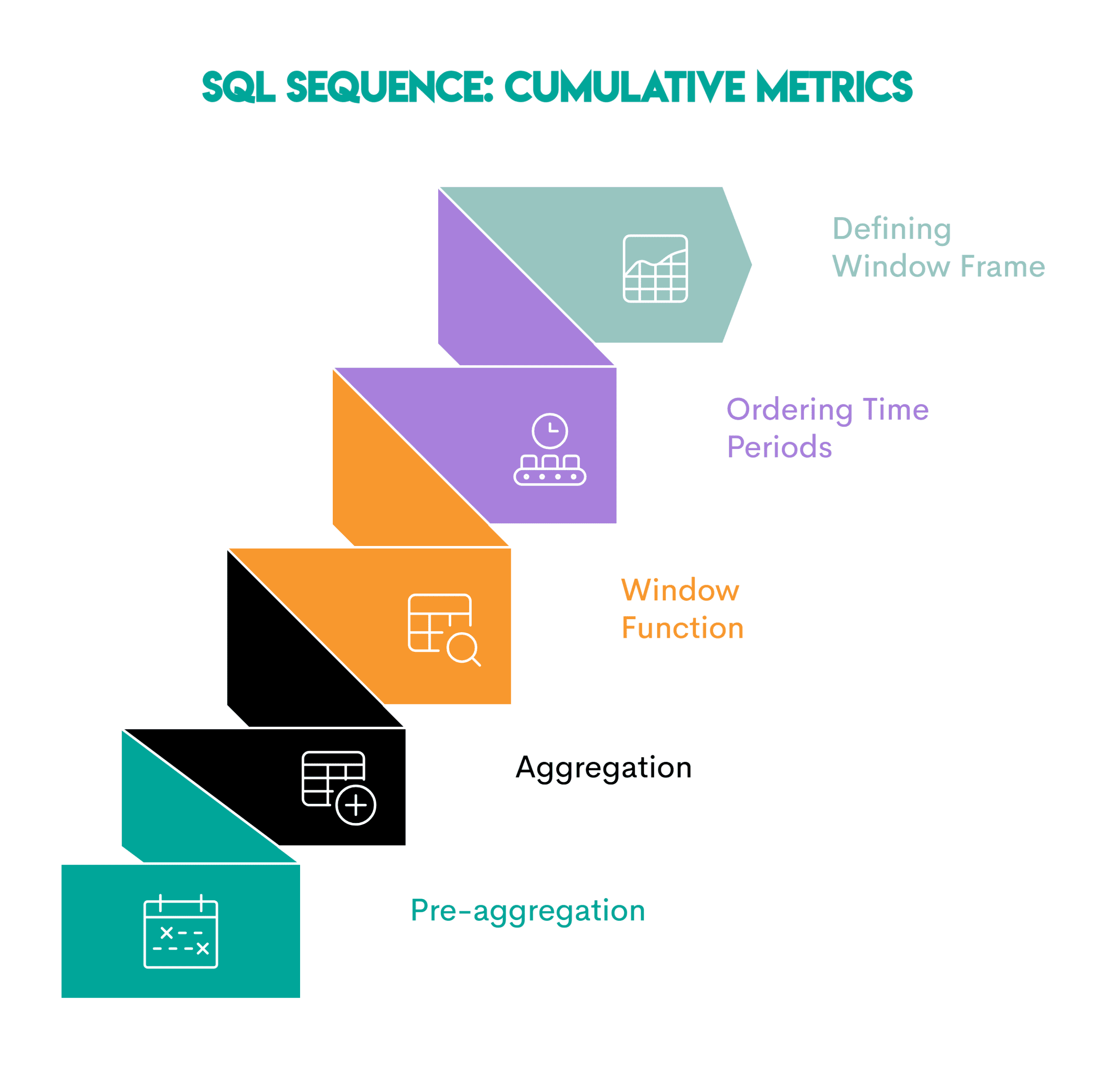
- Pre-aggregation (optional) by time-period: Summarize the analytical data into totals per the required time period (shown in the subquery)
- Apply the aggregate function: Use an aggregate function on the column you want to aggregate in the main query
- Turn the aggregate function into a window function: Use the
OVER()clause - Order the time periods: Sort the data within a partition chronologically so the cumulative calculation is applied correctly (
ORDER BY t.month) - Define the window frame: Define the number of previous or following periods to include in the cumulative calculation (
ROWS BETWEEN 2 PRECEDING AND CURRENT ROW)
// Business Uses
- E-commerce: Running total revenue
- SaaS: Cumulative active users
- Product analytics: Cohort retention curves
- Finance: Trailing averages
- Operations: Rolling total of support tickets
# 6. Funnel Analysis: Tracking Sequential Behavior
Question: Penetration Analysis by Spotify
Task: We’ll have to revise the requirements. The new task is to measure how users progress through engagement stages on Spotify. Here are the stages of engagement:
- Active — User had at least one session
- Engaged — User had 5+ sessions
- Power User — User had 5+ sessions and at least 10 listening hours in the past 30 days
For each country, calculate how many users reach each stage and the overall conversion rate from first activity to power user status.
Solution:
WITH base AS (
  SELECT country,
         user_id,
         sessions,
         listening_hours,
         last_active_date
  FROM penetration_analysis
),

stage_1 AS (
  SELECT DISTINCT user_id, country
  FROM base
  WHERE sessions > 0
),

stage_2 AS (
  SELECT DISTINCT user_id, country
  FROM base
  WHERE sessions >= 5
),

stage_3 AS (
  SELECT DISTINCT user_id, country
  FROM base
  WHERE sessions >= 5 AND listening_hours >= 10
)

SELECT country,
       COUNT(DISTINCT s1.user_id) AS users_started,
       COUNT(DISTINCT s2.user_id) AS engaged_5_sessions,
       COUNT(DISTINCT s3.user_id) AS power_users,
       ROUND(100.0 * COUNT(DISTINCT s3.user_id) / NULLIF(COUNT(DISTINCT s1.user_id), 0), 2
  ) AS conversion_rate
FROM stage_1 s1
LEFT JOIN stage_2 s2 USING (user_id, country)
LEFT JOIN stage_3 s3 USING (user_id, country)
GROUP BY country;
Output:

Pattern: Funnel analysis shows how users move through a series of ordered stages. Because the analysis depends on completing the one before it, it focuses on conversion and drop-off.
Here’s the sequence.
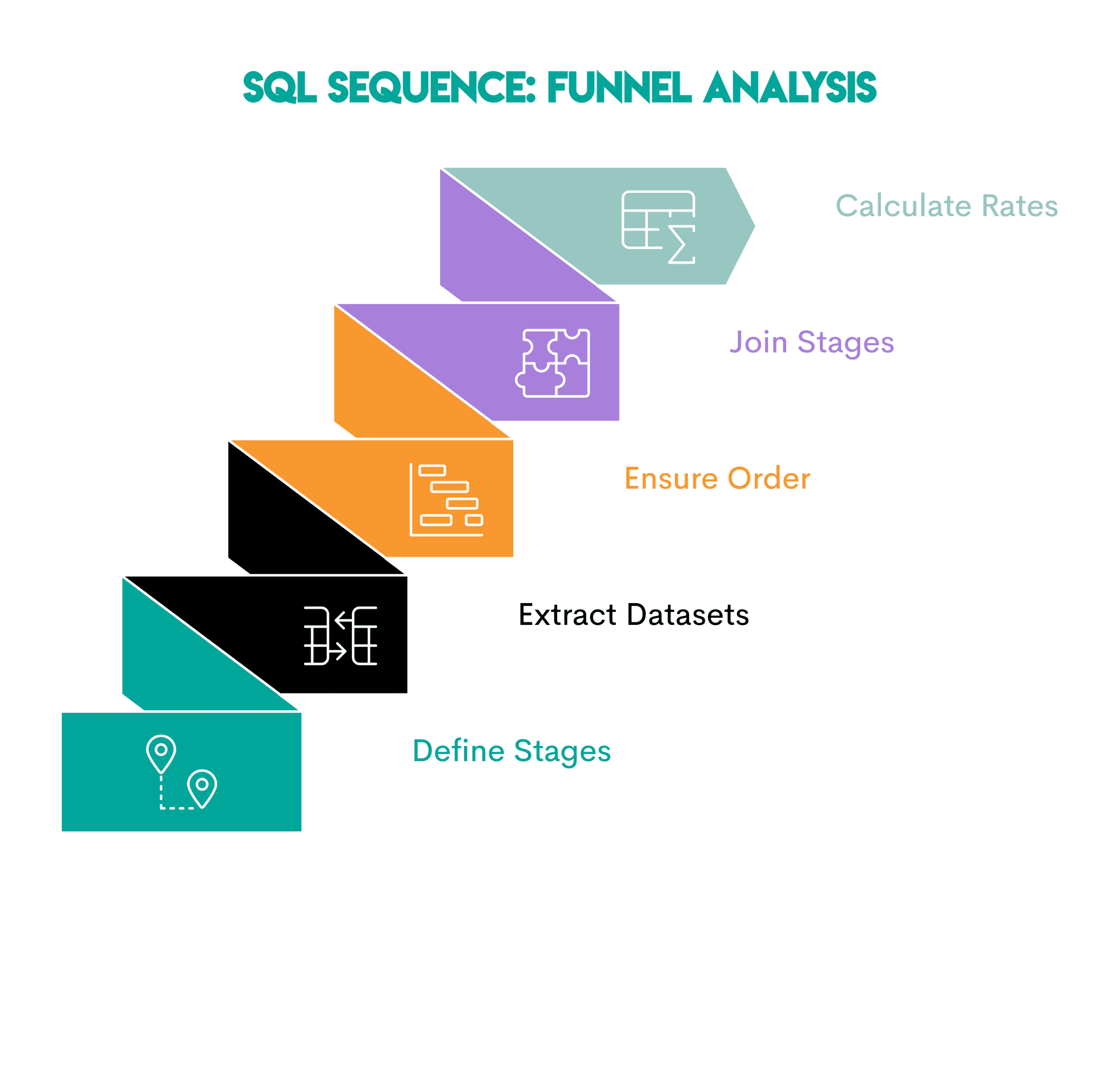
- Define the stages: Identify each step a user must complete
- Extract one dataset per stage: Write a common table expression (CTE) or subquery for each stage, containing only the users who qualify
- Ensure stage order: If needed, filter by timestamps or sequence rules so that later stages occur after earlier ones
- Join the stages: Join the stage datasets using
LEFT JOINto see how many users reach each step - Count the users and calculate conversion rates: Compare the number of users in each stage
// Business Uses
- E-commerce: Visit -> Add to Cart -> Purchase
- SaaS: Signup -> Activate -> Retain
- Streaming: Listen Once -> Engage Regularly -> Become Power User
# 7. Time-Based Comparison: Period-over-Period Metrics
Question: Daily Violation Counts from the City of San Francisco
Task: Determine the change in the number of daily violations by calculating the difference between the number of current and previous violations by inspection date.
Show the inspection date and the change in the number of daily violations, ordered from the earliest to the latest inspection.
Solution:
SELECT inspection_date::DATE,
       COUNT(violation_id) - LAG(COUNT(violation_id)) OVER(ORDER BY inspection_date::DATE) AS diff
FROM sf_restaurant_health_violations
GROUP BY 1
ORDER BY 1;
Output:
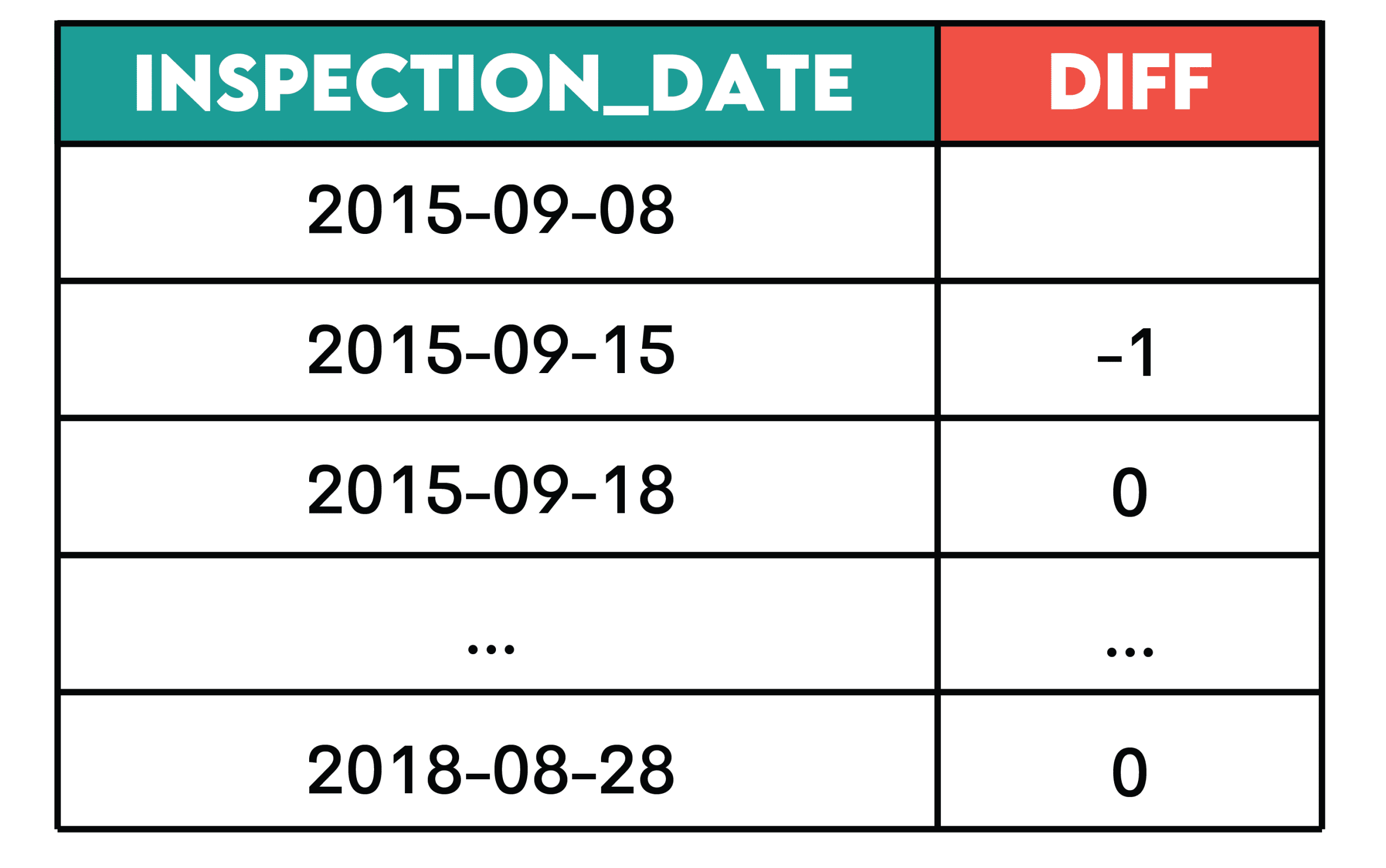
Pattern: This pattern is useful when you want to see how a metric changes over time.
Here’s the sequence.
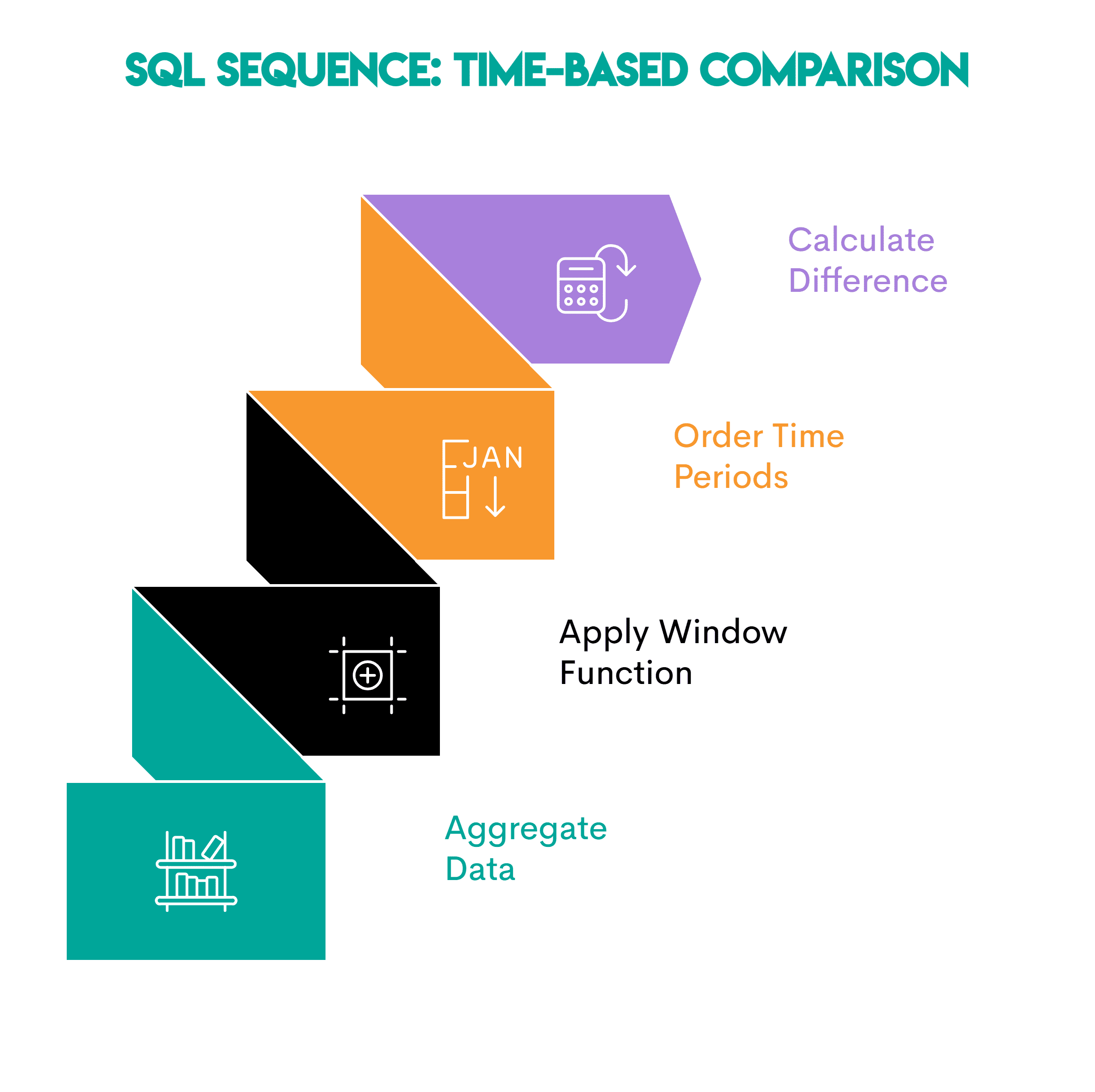
- Aggregate data: Summarize the events into time periods (daily/weekly/monthly totals)
- Apply a window function: Use
LAG()orLEAD()to access the values from the previous or the following period - Order the time periods: Use the
ORDER BYclause inOVER()to sort the data chronologically so comparisons are correct - Calculate the difference: Subtract the prior value from the current value to get the difference
// Business Uses
- Product: Day-to-day changes in active users
- Operations: Daily changes in support volume
- Finance: Month-over-month revenue deltas
# Wrapping Up
Internalize those seven patterns and watch the data analysis problems dissolve before your eyes. I’m sure they will be helpful in many business situations and job interviews.
Nate Rosidi is a data scientist and in product strategy. He's also an adjunct professor teaching analytics, and is the founder of StrataScratch, a platform helping data scientists prepare for their interviews with real interview questions from top companies. Nate writes on the latest trends in the career market, gives interview advice, shares data science projects, and covers everything SQL.