


Mocking a Year of IoT Sensor Time Series Data with Mimesis
In this guide, you will learn the process of generating a year's worth of daily temperature readings, mimicking a seasonal curve that looks like real — all together with device-level metadata, and ready to build based on open-source frameworks.
# Introduction
Mocking Internet of Things (IoT) sensor data that would be otherwise difficult to gather at scale can constitute a valuable approach to facilitate experimental analyses, projects, and studies. However, it requires much more than random value generation: it necessitates a chronological timeline, device metadata, and a need to reflect natural environmental fluctuations or patterns like seasonality. Mimesis is an excellent open-source tool for fake data generation, while a pinch of math can be integrated into a code-based solution to deal with the latter: this article shows how.
Through the step-by-step guide below, I will navigate you through the process of generating a year's worth of daily temperature readings, mimicking a seasonal curve that looks like real — all together with device-level metadata, and ready to build based on open-source frameworks.
# Step-by-Step Guide
We will rely on three key Python libraries to create our year-round set of IoT sensor readings: mimesis for synthetic data generation, pandas for dealing with the time series' scaffolding, and NumPy for doing some math, leading us to mimic seasonal patterns.
Bear in mind that real-world IoT time series datasets are generally tied to a concrete device. The way to emulate this, aided by Mimesis, is by using the Generic provider class and generating a realistic hardware device profile: our "fictional sensor", so to speak. This is done before creating the actual daily readings:
import pandas as pd
import numpy as np
from mimesis import Generic
from mimesis.locales import Locale

# Initializing a generic provider for English language
g = Generic(locale=Locale.EN, seed=101)

# Generating static metadata for our mock IoT device
device_profile = {
    'device_id': g.cryptographic.uuid(),
    'location': g.address.city(),
    'firmware_version': g.development.version(),
    'ip_address': g.internet.ip_v4()
}

print(f"Tracking Device: {device_profile['device_id']} located in {device_profile['location']}")
Note that device_profile is a dictionary containing our fictional sensor metadata: identifier, location, firmware version, and IP address. It will look like:
Tracking Device: e88b7591-31db-4e32-98dc-b35f94c662cd located in Paragould
Now, before generating the time series, we will define an equation to emulate the seasonality pattern needed to reflect temperature readings throughout a year. As you might have guessed, trigonometric functions like sine are perfect to reflect this kind of year-round pattern that looks like a sine wave, so our equation will be based on one:
\[
T(t) = T_{\text{base}} + A \cdot \sin\left(\frac{2\pi (t - \phi)}{365}\right) + \epsilon
\]
Here, \(T(t)\) stands for the temperature reading on day of the year \(t\), ranging from 1 to 365. The rest of the variables are components of a sine wave, and importantly, \(\epsilon\) is the random noise introduced by using Mimesis: without the latter, we would have a perfect, smooth sine wave, which wouldn't be realistic, as real-world temperature has its short-term ups and downs, of course!
Next, we iterate over the whole year, day by day, to generate the daily timeline. pandas will govern the data creation process, while mimesis.numeric will be used to inject not only the aforesaid environmental noise, but also some realistic network latency: a common aspect in IoT devices. All of these go on top of the mathematical baseline equation previously defined. NumPy's role, meanwhile, is to apply the sine function as part of the generation process.
# 1. Setting up mathematical constants for emulating daily temperature
T_base = 15.0       # Base temperature in Celsius
A = 12.0            # Fluctuates by 12 degrees up/down throughout the year
phase_shift = 80    # Shift the sine wave so the peak falls in the summer

# 2. Creating the 365-day time series starting Jan 1, 2026
dates = pd.date_range(start='2026-01-01', periods=365, freq='D')

readings = []

# 3. Looping through each day and calculating the readings
for day_index, current_date in enumerate(dates):

    # Calculating the seasonal curve baseline for this specific day
    seasonal_temp = T_base + A * np.sin(2 * np.pi * (day_index - phase_shift) / 365)

    # Using Mimesis to inject random hardware variance/noise (e.g., -2.0 to 2.0 degrees)
    sensor_noise = g.numeric.float_number(start=-2.0, end=2.0, precision=2)

    # Calculating final recorded temperature
    final_temp = round(seasonal_temp + sensor_noise, 2)

    # Compiling the daily record, mixing static metadata with dynamic Mimesis generation
    readings.append({
        'timestamp': current_date,
        'device_id': device_profile['device_id'],
        'location': device_profile['location'],
        'temperature_c': final_temp,
        'latency_ms': g.numeric.integer_number(start=12, end=145)       # Mocking network connection strength/latency fluctuations per day
    })

# Converting to a DataFrame for analysis
df = pd.DataFrame(readings)
As you can observe, we use Mimesis twice in the time series generation process for every daily instance of the time series: once for the sensor noise, and once for the latency, the latter of which mimics network connection fluctuations every day.
It's time to see what the generated IoT time series looks like and verify the seasonal pattern we tried to mimic:
print("--- January (Winter) Readings ---")
print(df[['timestamp', 'temperature_c', 'latency_ms']].head(3))

print("\n--- July (Summer) Readings ---")
print(df[['timestamp', 'temperature_c', 'latency_ms']].iloc[180:183])
Output:
--- January (Winter) Readings ---
   timestamp  temperature_c  latency_ms
0 2026-01-01           3.54          61
1 2026-01-02           4.90         103
2 2026-01-03           3.18         140

--- July (Summer) Readings ---
     timestamp  temperature_c  latency_ms
180 2026-06-30          28.84         116
181 2026-07-01          25.81          62
182 2026-07-02          26.08          97
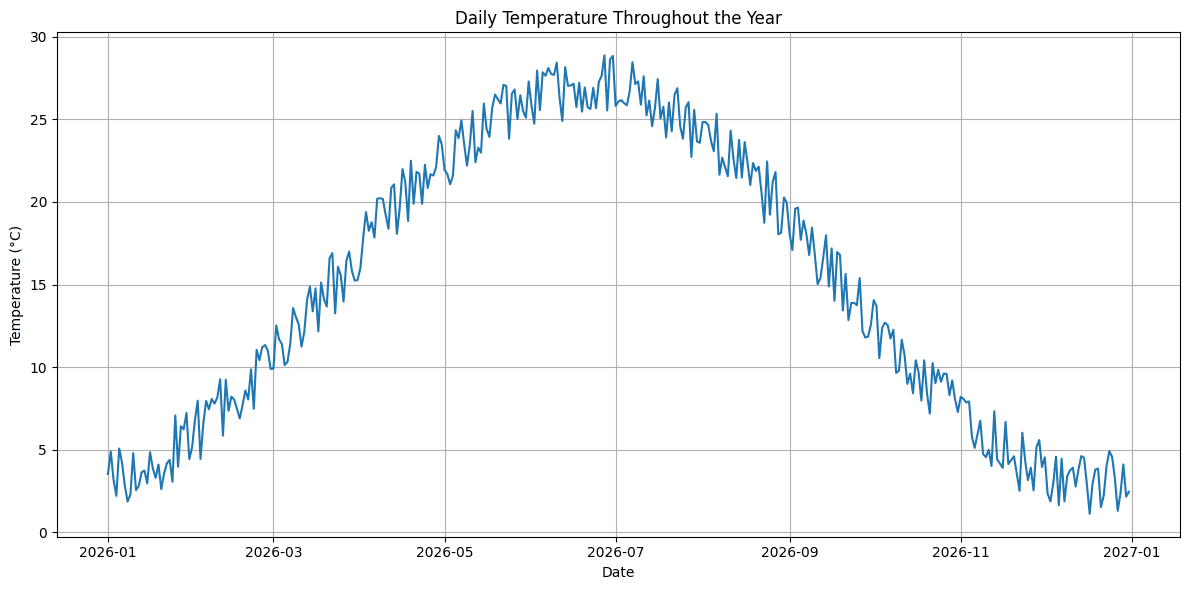
For a more visual result, why not try this:
import matplotlib.pyplot as plt

plt.figure(figsize=(12, 6))
plt.plot(df['timestamp'], df['temperature_c'])
plt.xlabel('Date')
plt.ylabel('Temperature (°C)')
plt.title('Daily Temperature Throughout the Year')
plt.grid(True)
plt.tight_layout()
plt.show()
Well done if you made it this far!
# Final Remarks
In this article, we showed how to utilize Mimesis combined with pandas and NumPy to illustrate the generation of fake yet convincing IoT time series data. In particular, we illustrated the process of creating a year-round dataset of daily temperature readings collected from an IoT sensor, including device-related metadata, random noise to emulate realistic temperature changes, and device latency. These data can be leveraged by downstream forecasting models or even dashboard solutions: they will surely ingest it and help interpret aspects like seasonal peaks, common sensor fluctuations, and so on.
Iván Palomares Carrascosa is a leader, writer, speaker, and adviser in AI, machine learning, deep learning & LLMs. He trains and guides others in harnessing AI in the real world.