


Monday.com Review 2025: Features, Pricing, Pros & Cons



updated
|AuthorUpdated: Jan 3, 2025, 5:19 pm
Our Verdict
Our Verdict
With many work management tools available, choosing the best one for your business can be a challenge. monday.com stands out as a powerful solution for keeping projects on track and fostering team collaboration. Its intuitive interface and customizable features make it a suitable choice for businesses looking to move beyond traditional spreadsheets and optimize their workflow. With experience as a certified monday.com partner and extensive hands-on usage in various environments, this review offers valuable insights into how monday.com can fit different business needs. While the platform excels in many areas, there are also opportunities for improvement, which are discussed in this review.


Pros
- User-friendly interface, easy for beginners.
- Highly customizable workflows for specific needs.
- Extensive third-party app integrations available.
- Scalable solutions for businesses of all sizes.
- Strong security practices including SOC 2 Compliance.
- 24/7 customer support via multiple channels.
- Competitive pricing plans for wide accessibility.
Cons
- Advanced features limited to higher-tier plans.
- Moderate learning curve for complex features.
- Occasional performance issues with large datasets.
- Mobile app lacks full desktop functionality.
- Customization options can be overwhelming.
What Is monday.com?
At a Glance
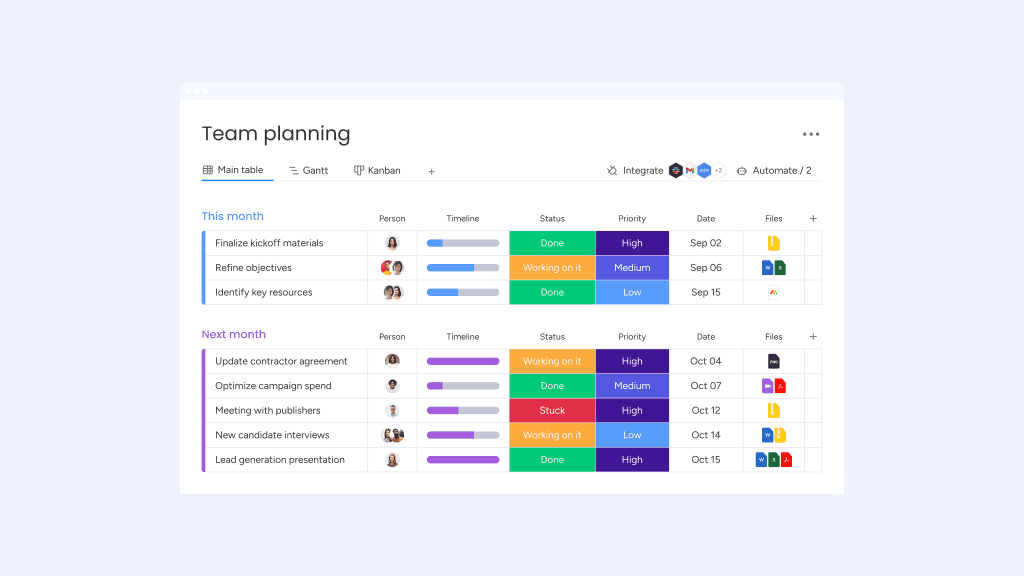
The monday.com work management product is a user-friendly task and workflow management solution. It enables users to transform a standard set of tasks and processes into visually intuitive boards and dashboards with graphics like pie charts and bar graphs. Keeping your projects on track and your teams in sync.
Price range: $0 - $24/seat/month, Enterprise pricing requires sales consultation
Features you’ll love:
- Templates - Create your own or use the ones from the Template Center
- Automations - Automate your repetitive tasks like email reminders based on a status
- Integrations & Apps - Integrate with your favorite tools like Slack, Gmail, Outlook, and 3rd party apps
- AI - Leverage AI to extract and summarize data in your boards
More generally speaking, monday.com is a software as a service (SaaS) company offering 4 products ranging from work/project management to customer relationship management (CRM). Each product has its own unique set of features and capabilities but they all utilize the same foundational infrastructure based on boards with items. Your boards can be customized to fit your team’s workflow processes and tasks automated with template and custom automations native to monday.com work management. Once you’ve populated your boards, visualize board item data with Board “views” or dashboards. In addition to being a feature rich solution, monday.com has a growing 3rd party App & Integration ecosystem. This enables you to connect your favorite tools like G Suite, Slack, etc for better collaboration and automation. Last but not least, monday.com has rolled out (and continues to add) several AI powered features like AI summary and extraction.
Let’s continue a deeper dive into the monday.com work management platform and how you and your team could benefit from it. Also, it is important to note, since these products are all built on the same foundation, it makes it easier for teams to cross collaborate. But we’ll touch on that more later.
Who Is Monday.com Best for?
Thanks to monday.com’s scalability and multi-tier pricing, there are options for teams and companies of all sizes. Here’s what customers are saying.
Small to Medium size businesses are using monday.com work management in a myriad of different businesses. Some of which include small to medium sized Real Estate Agencies, Doctor and Dentist offices, Tax and Financial business and various different Digital Agencies. Some of my first hand experience has been with Event Management, Construction and Digital Agencies. I can say without a doubt, monday.com improved team dynamics and productivity. For example, an agency I was working with used monday.com work management to collaborate on tasks among a remote international team. This streamlined assigning tasks, keeping tasks updated through status changes and keeping overall client projects on time. I’ve also worked with teams using the work management solution to keep track of design service work. This way they aren’t overloading designers, they make projects stay within budget and can communicate across teams and departments to get projects done correctly and on time.
Enterprise Businesses like Coca-Cola, Occidental Petroleum, and Canva all rely on monday.com to reduce their repetitive tasks and streamline their operations. In the case of Canva, they were able to optimize their creative project team’s operations. As described on monday.com’s website, Canva automated creative requests via the forms feature, improved transparency by mirroring data across internal and external production boards and integrated Slack to notify stakeholders when a project status has changed. Below are the amazing results Canva achieved.

Source: https://monday.com/customers/canva
“In this journey, we realized very quickly that monday.com wasn’t just another tool in the mix, but a Work Operating System that could support our need for efficiency at scale,” says Vic, Creative Operations Lead, Canva
At a high level, there really are a limitless number of teams, departments and organizations benefiting from monday.com work management. So, from my experience, here are a few common teams (some examples are similar/interchangeable depending on context) I’ve seen achieve some great return on their investment.
1. Program/Project Management (PMO): Users looking to organize their tasks and keep projects on track but need more functionality than standard spreadsheets. They want their “To-do” list and dates visualized in a Gantt chart, Calendar or Battery Graphic. Project goals and metrics need to show up on a dashboard with bar graphs and pie charts. And repetitive tasks, like sending reminders and emails, need to be automated. Some examples of project management I’ve seen include personal project tracking, construction project management, and design service work project tracking.
2. Operations: Similar to the PMO, operations teams are looking for functionality beyond the standard spreadsheet and a better way of keeping Standard Operating Procedures (SOP) consolidated and adhered to. Ops teams also need a software tool with seamless integration functionality with all of their favorite tools like Slack and Gmail. For example, a sales ops team can streamline and visualize their new client onboarding process by collaborating across boards and assigning tasks which send email updates based on status changes. Some operation team examples I've seen include new client onboarding & ongoing customer success, real estate property management, production build tracking, and event management operations.
3. Marketing: Marketing campaigns do not track themselves and KPIs aren’t measured without collecting some data. Both social media and product marketing can leverage the power of monday’s task tracking by date and milestones and both assign and automate Linkedin posts via the Linkedin App by monday. Marketing teams also need an easier way to capture all of those marketing requests which is where monday.com forms go to work automating request capturing. Although monday.com has a CRM product with a mass email component, work management is still a great tool for keeping a marketing campaign on track and enabling cross collaboration on marketing collateral with monday work docs.
4. Human Resources: Human resource teams use monday.com work management for the complete employee recruitment process. Forms can be embedded on websites to capture new prospective employees resumes/applications. Candidate status is tracked throughout the hiring process and interviewers can be assigned to candidates with tasks to perform interviews. Interview feedback can be added on an individual candidate and automations can send out emails to candidates based on a status change.
Core Features
Boards are the foundation of monday.com’s work management system. This is where all of your data is captured. Within each board there are various types of columns ranging from status to date and formulas. So, for comparison, a board is similar to a spreadsheet “sheet” or “tab” and the columns are the same as spreadsheet columns except that monday.com has functionality specific to their column type. This enables the users with additional functionality beyond data storage. While there is a plethora of features one can leverage with all of these special data types, here's a list of nine essential features every team should know about.
1. Dashboards (Reporting)
All of the data stored in your board columns come to life in your dashboards. You can think of dashboards like the reporting functionality showing all of your team’s tracking and goal metrics. The Pro Plan lets users connect and visualize up to 10 boards at one time. Visualization is accomplished via what monday.com calls “widgets.” Widgets range from bar and pie charts to a map showing the location of all your customers. They are very flexible with over 20 widget options (and additional app options), each of which are customizable, so there’s plenty of ways to get your dashboards looking sharp! Here you can see an example of the widgets

Even though dashboards pack a punch when it comes to data analysis and visualization, there are a few “limitations” to be wary of….I find most users can accomplish 80% to 90% of their data analysis needs with dashboards but if you are looking for in depth statistical analysis, this is where you’ll will need to enlist the help of another Business Intelligence (BI) tool. Thanks to the monday app marketplace, you can use 3rd party apps to sync your favorite tools like Tableau or Power BI to monday or you can easily do a csv or .xls export.
2. Automations & Workflows
If you’re finding yourself doing repetitive tasks or you want to streamline a process, monday.com automations are here to help. You can use one of monday’s automations to get started or customize your own. Automations are created using “recipes.” Each recipe has a trigger and action and can have conditions.

For example, the above recipe trigger would be when a “Status changes to Not Started”, condition is “only if item is in New Projects” group, action is “Then notify Rick”.
If you have some more complicated automation needs, monday.com offers “workflows.” Workflows have more options and granularity but operate on a similar trigger, condition, action structure to that of the automation recipes.

3. Board Views/Embed & Share Boards
This is not only a two for one feature but a bit of a hybrid between dashboards and customizing how users see boards. You can custom filter and sort your board columns and save these settings as a new “view.” In addition, you can create a dashboard type view where you add widgets in the same way you would on a dashboard. This way you don’t have to click back and forth between your board and dashboard, and you can be more focused on specific data and metrics in one spot. And the coolest (in my opinion) part of this feature by far is the ability to share the board views and embed them in your website. Below is a screenshot of a Gantt chart board view. And here’s what board views look like when embedded in a website https://www.processflowpros.com/visualize-embed Pretty cool, right!?

4. Connect Board and Mirror Columns
Sometimes you want the same data to show up in more than one place. Or, you don’t want to repetitively fill in the same data in multiple places. This is where the connect board and mirror column feature comes into play. You can create a column which connects two boards so users can select from a drop down menu of data options. Then a mirror column will mirror other data associated with the chosen data. So, if you wanted a project budget and status to show up in multiple locations, you can connect that board with a summary board showing projects by name and their associated budget and status.
5. Workspaces
Workspaces are the highest level of the organizational structure in monday.com. All of your boards, dashboards, works docs, folders, etc are housed in a workspace. This simplifies the division between teams, departments or groups at a high level. Say for instance you have finance, marketing, and human resource departments all using monday.com at one time. It might make sense to create a workspace for each. So, you would have a finance workspace, marketing workspace, and etc. Even though these workspaces are separate, you can still cross collaborate between workspaces with connect boards or mentioning another user in an update, etc. There are some caveats to this though if you have some boards set to private and if you are on the Enterprise Plan, you can set workspaces to private as well as limit user type functionality.

6. Forms
If you are looking for a better way to capture requests, survey data or similar, monday.com forms are a game changer. You can set up a form in a board where you want the form data to populate. Each form question is linked to a column in the board. So, when someone submits a form, a new board item is created and populated with the form data. The beauty of these forms is they can be embedded in your website, sent as a link or a QR code can be added to your collateral or easily scanned at an event. Below is an example of how I capture customer consultation requests. A link to the form is attached to a button on my website which opens the form when it’s clicked.

7. Formulas
Similar to formulas in Excel or Google Sheets, the formulas column can add, subtract, extract, concatenate, etc. The formulas can range from simplistic to complex. Lucky for us, monday.com has added an AI assistant to the formula column so you don’t need to know the exact syntax for every formula. If you like to be a bit creative, formulas can be a real game changer. Especially when doing data reporting. You can do some data pre-processing with the formula's column, before visualizing in the dashboards. This is how I’ve managed to get over some of the data analysis limitations in the dashboards.

8. Monday Work Doc
Monday work docs are another connectivity and productivity hack. Users can enrich work docs with board column data, create items from notes by highlighting text and click the “create item” icon, or embed widgets. Work docs are a great way to document standard operating procedures (SOPs), create a “How to use this board or workspace” document, and much more. I’ve seen companies use these for general note taking during a meeting and then they just highlight each action item note and with just a few clicks, it’s added as an item to a board.

9. Time Tracker
The time tracker column is great for those looking to track how long a task or project takes. This is ideal for contractors or freelancers billing hours toward a project. You can then visualize the time spent per project or status in a dashboard or board view. This will help keep your projects within budget.

So, you might be thinking to yourself, “that’s quite the feature set but what’s the catch?” Well, there are a few features “missing” from monday.com work management. I put “missing” in quotes because there are workarounds for most if not all of them. Here are a few examples…
1. Column Copy/Paste (Sort of Missing)
Now this one is infamous in the monday.com community. Users can duplicate, mirror and bulk update columns but they cannot do the classic highlight and then copy and paste multiple fields from one column to another. The work around for this would be using a 3rd party app from monday.com’s marketplace. Or you can get fancy with formula columns but there are some limitations there. From my experience, this is occasionally an issue and pops up less often than you might expect. But, the 3rd party apps do a good job of filling the gap on this one.
2. Data Analysis Limitations
As previously described, the dashboard widgets do a wonderful job visualizing data and get you around 80% to 90% of the analysis you need. But, for that last mile, you either need an Enterprise Plan so you can access the pivot table feature, integrate with an app and your favorite BI tool or do a csv or .xls export. A small price to pay for the rest of the feature set in my opinion.
3. Automation Limitations
It goes without saying, we would all like to automate as much as we can but the reality is there are limitations. And the same is true for monday.com work management. While the automations and workflows offer a lot, they occasionally fall short. So, it is not uncommon for companies to augment their automations using tools like Zapier or Make.com. I’ve personally used both of them and they are fairly straightforward and user friendly.
What Sets monday.com Apart from the Competition?
So, now that you have a taste for what monday.com work management is and what it’s capable of, what is it that really sets it apart from the competition? For me, it’s hands down the connectivity. I have yet to work with a software solution with such an emphasis and ease of keeping teams, tasks and projects connected. You can even connect data across products like monday.com CRM to monday.com work management and between workspaces. The one caveat here is the quality and quantity of connectivity is predominantly left up to the user. Meaning, you have to set up your workspace to take advantage of the connectivity. So, that requires one to know how to use the connect board and mirror features, integrating apps like Slack, Google Calendar and Gmail to synchronize messaging, email and calendar, auto assigning tasks, using the update section and mentioning people with “@”. The list can go on and on. So, unless you are an expert, it can be a bit difficult to get the perfect setup for your team. Luckily, monday.com has an ecosystem of partners ready to help with but more on that later.
Not only is monday.com’s connectivity second to none but it has a top tier User Interface (UI). It is intuitive and thanks to the 30 day trash bin, forgiving. I will say there is a bit of a hurdle after the initial intuitive features. It is very easy to navigate for the basic feature set but it takes a bit of learning to get more comfortable with the more “powerful” features like automations and workflows and formulas…well formula columns are like Excel formulas so we all know how that is easy until it’s not.
Last but not least, monday.com’s app marketplace is a fantastic way to bridge the gap between what monday.com offers and what you need. I’ve used a few 3rd party apps in monday.com before and they work seamlessly. If you want an app to sync monday.com with quickbooks, there’s an app for that. If you want to automate adding new email addresses from your monday.com board to a Mailchimp list, there’s an app for that. There’s over 150 apps in the app marketplace and growing with no signs of slowing down.
Getting Started and Support
Getting started with monday.com work management is quick and easy. Once you start your free 2 week trial, you instantly have Pro Plan level functionality. So, you can start building just about anything. Monday.com’s knowledge base is full of very straightforward articles and video tutorials to help you build both simple and complex workflows. The majority of their board templates have instructions on how to get started using them. Also, the functionality still looks and feels a little like a fancy spreadsheet so that familiarity will make the transition easier.
Monday.com’s support is 24/7 and top notch. I’ve personally used both the live chat and email support features on several occasions at various hours of the day. As you might expect, for the live chat, you begin the conversation with an AI chat bot, which is actually quite helpful because it directly links to the jam-packed knowledge base, so there may be an article with a solution to your problem. If not, they will link you to a live support representative. The representative will ask you to use screenshots or video to help describe your issue. Then they will send a solution via a video explanation. You can also request support over email or request to be called. I’ve also successfully used the email support. If you want to go another route, monday.com has a community forum which is monitored by monday.com product specialists and monday.com partner experts like me. There you can ask questions that might require more creative thinking or additional tools like make.com or zapier to get the job done. (affiliate link opp)
In addition to their support team, monday.com has a partner ecosystem. Let’s be honest, implementing a new software tool can be daunting at times…especially when you already have a million other priorities. So, that’s where monday.com partners come into play. Each partner must undergo training to become certified monday.com expert partners. So, if you’re looking for support beyond standard troubleshooting, this would be the route to go. Monday.com partners help with a wide range of services such as setting up your boards and workflows, optimizing an existing setup and training. Full disclaimer, I am a certified monday.com partner so if you have additional questions, please feel free to reach out.
Pricing & Plans
Another thing setting Monday.com apart from other work management software is their pricing flexibility. They offer 5 different tiers so you can pick the one that best fits your situation. You’re welcome to start at a lower tier and upgrade as you develop your processes and teams. Or, if you have some experience with work/project management software and/or have some sophisticated processes, jump right into a Pro or Enterprise Plan for a feature rich experience.
| Plan Type | Free | Basic | Standard | Pro | Enterprise |
| Price: Billed Monthly | $0/seat/mth | $12/seat/mth | $14/seat/mth | $24/seat/mth | Requires a Sales Consult |
| Price: Billed Annually | $0/seat/mth | $9/seat/mth | $12/seat/mth | $19/seat/mth | Requires a Sales Consult |
| Min/Max Seats | Up to 2 | 3/Unlimited | 3/Unlimited | 3/Unlimited | Requires a Sales Consult |
| # of Boards | Up to 3 | Unlimited | Unlimited | Unlimited | Unlimited |
| 24/7 Customer Support | No | Yes | Yes | Yes | Yes |
A complete list of features per pricing tier can be found here: https://monday.com/pricing
If you’re on the fence on which plan is best for you, monday.com offers a free two-week trial to their Pro Plan.
Alternatives
If you’re reading this review, there’s a good chance you’ve been investigating multiple work management solutions. When it comes to work management software, some variation of a spreadsheet or board with columns and items are the standard. Most have begun implementing workflow automation functionality and some offer app integrations. I’ve dabbled with a few others myself. So, here is a table comparing and contrasting some alternative options similar to monday.com work management.
 |
 |
 |
 |
|
| monday.com | Asana | Clickup | Smartsheet | |
| Pros | User friendly interfaceConnectivity & collaboration | Large app & integration library | Slightly more feature in their lower tier compared to monday.comRecord videos in app | User friendly because it’s essentially a traditional spreadsheet with more features |
| Cons | No integrations or automations at lower tiers No direct copy/paste of columns without app or workaroundMost likely need at least the Pro Plan for most teams | Not as many features as monday.com or clickupNot as visual or collaborative as monday.com | Not as user friendly as monday.com | Not very visualNot the best for collaboration like monday.com or Clickup |
| Notable Customers | Coca-Cola, Occidental Petroleum, Canva | Google, Amazon, Paypal | Dish, Chick-Fil-A, Mayo Clinic | Cisco, General Motors, Roche |
| Price (non-Enterprise) |    ($0-$24/seat/month) |
($0-$30.49/seat/month) |
($0-$19/seat/month) |
($12-$24/seat/month) |
| Features | |
|
|
|
| Usability | |
|
|
|
| Customer Support | |
|
|
|
| Security | |
|
|
|
Notable mentions not included in the review: Wrike, Teamwork and Trello
What I look for in each category?
Price
- Number of pricing tiers & do they actually fit a customer profile
- License/seat flexibility
- Features per pricing tier
Features
- Does the software offer the expected features?
- Are there additional game changer features?
- Are there any critical features missing?
Usability
- Getting started difficulty
- Ease of team adoption into everyday work
- Is the UI/UX intuitive?
- Scalability
Customer Support
- Support availability
- Self serve options: training courses, knowledge base articles and videos
- Community forum
Security
- SOC 2 Compliance
- 2 factor authentication
The criteria above is used to give each software a “score” but for some, price may be more important than customer support or vice versa. So, there is a solution out there for every team but not necessarily a single solution built for every teams’ situation.
Final Thoughts
If you’re looking for a robust, user friendly, connectivity & collaboration first work management solution, monday.com should be at the top of your list. The multi-tier pricing options offer some flexibility, but I believe a majority of teams will need at least Pro Plan level functionality. This is primarily because the “action” count per month for the automations is too low (250 actions per month) for the Standard Plan. When it comes to the competition, monday.com is more flexible and offers more for your money. Alternatives like Asana and Smartsheet are more focused on project management and not necessarily built to support different team types beyond PMO. And Click up falls short in the features & functionality department when compared to monday.com.
With monday.com’s user friendly interface, seamless app integrations and custom automations, you get much more than a simple spreadsheet replacement. You’re getting a feature rich tool your team will actually use. If you’re ready to give monday.com work management a try, get a free two-week trial of the Pro Plan here
Charles Ferriera is a certified monday.com partner and expert with 3 years of hands-on experience implementing and optimizing monday.com solutions. Charles has 10+ years of experience in sales, process improvement and product management across several industry domains including SaaS, IoT, Augmented Reality, manufacturing and industrial enterprise solutions. Leveraging his broad range of experience, Charles provides companies with expert sales and process improvement services and maximum ROI on monday.com implementations. For additional help, feel free to find Charles at Process Flow Pros