


Monday.com CRM Review 2025: Features, Pricing, Pros & Cons



reviewed
|AuthorUpdated: Jan 3, 2025, 5:18 pm
Our Verdict
Our Verdict
Monday.com CRM is a customizable customer relationship management platform built on Monday.com’s Work OS. It enables businesses to manage and streamline their sales, marketing, and customer service workflows through an intuitive, drag-and-drop interface. The platform offers features like customizable pipelines, automation, real-time collaboration, and robust reporting tools, making it easy to track customer interactions and drive sales growth. Integrations with tools like Slack, Zoom, and Google Workspace enhance its functionality, allowing seamless data synchronization across platforms. Monday.com CRM is suitable for businesses of all sizes looking for a flexible, user-friendly CRM solution that can be tailored to specific needs.



Pros
- Highly customizable workflows and dashboards
- Intuitive, user-friendly drag-and-drop interface
- Seamless integrations with popular third-party tools
- Robust automation reduces manual tasks significantly
- Real-time collaboration enhances team communication
Cons
- Can become complex with added features
- Limited advanced CRM functionalities in lower plans
- Automation actions are restricted by plan limits
- Learning curve for non-tech-savvy users
- No email extension app
Introduction
The customer relationship management (CRM) software landscape is vast and choosing the best one for your business can seem like a daunting task. Over the years, I’ve used a couple of the more well known options like Salesforce.com and HubSpot. We will touch on those a bit but in this review, we’ll be focusing on one of the rising stars in the CRM space, monday.com CRM. With a unique set of automation and connectivity features, monday CRM keeps your teams connected so you can close deals quicker. How you might ask? Continue reading to learn more.
What is monday.com?
At a Glance
As a user friendly CRM solution, monday CRM is a great fit for teams small and large with the option to be simple or complex. Monday CRM has all of the standard features you would expect from a CRM including: lead management, deal/opportunity management, contact management, company/account management and reports/dashboards. However, monday CRM goes beyond standard CRM functionality with its workflow automations, integrations and board visualizations. This keeps your teams more connected pre-sale, during and post sale. So, you close deals and implement post sale projects faster.
Price range: $0 - $33/seat/month
Features you’ll love:
- Forms: Automate lead capturing and reduce manual data entry
- Automations: Automate email follow ups, reminders, and more
- Connect Boards: Connect boards for data transparency from lead to closed won and beyond
- Integrations & Apps: Integrate with your favorite tools like Slack, Gmail, Outlook, Mailchimp and more
Monday.com has provided software as a service (SaaS) solutions since 2012 beginning with their work management product. Since then, they have built a large customer base of 225,000 customers ranging from Coca-Cola to Canva. Now they offer 4 different products including: monday work management, monday CRM, monday Dev and monday Service.
Each product has its own unique set of features and capabilities but they all utilize the same foundational infrastructure based on boards with items. Your boards can be customized to fit your team’s workflow processes and tasks automated with template and custom automations native to monday.com work management. Once you’ve populated your boards, visualize board item data with board “views” or dashboards. In addition to being a feature rich solution, monday.com has a growing 3rd party App & Integration ecosystem. This enables you to connect your favorite tools like G Suite, Slack, etc for better collaboration and automation. Last but not least, monday.com has rolled out (and continues to add) several AI powered features like AI summary and extraction.
Now that you have some more background on monday.com, let’s take a more in depth look at monday CRM features, who uses it, and how it compares to other CRMs. Also, it is important to note, since these products are all built on the same foundation, it makes it easier for teams to cross collaborate. But we’ll touch on that more later.
Who Is monday CRM For?
Whether you’re a small company looking to upgrade from spreadsheet tracking or a larger organization in need of a better option, monday CRM may be a fit for you. I’ve worked with small, medium and enterprise businesses using monday.com and the beauty of the platform is its flexibility to fit each one based on its needs. Its out of the box functionality is easy to use and get started with and its customisation is only limited to the imagination of the user.
Small to Medium size businesses ranging from construction management to interior design companies and software/hardware startups will all benefit from the out of the box board setup and automations. From my experience, smaller companies get up and running with monday CRM very quickly. There’s a straightforward spreadsheet import option for all of your boards so you don’t have to start from scratch. Monday incorporates a lot of little training videos everywhere and has a solid knowledge base to learn from. But, I suspect most small and medium size businesses would benefit from hiring an expert to do at least the initial setup and training. While the CRM can be fairly intuitive, it definitely falls into one of those “you don’t know what you don’t know” categories, so it’s much quicker to get that initial setup done right with some training from a professional. Despite this suggestion, monday CRM is very flexible, so if you want a simple setup with some smooth automations, that option definitely works well. Especially if you are a small team of 2 or 3 with non or infrequent recurring business. For example, if you are running an event once a year but you accumulate customers on an ongoing basis, you can most likely get away with a simpler setup requiring less setup time and maintenance. Versus, a software company with recurring revenue with various customer types, sizes and in multiple verticals.
Enterprise Businesses like Black Mountain and KC Petroleum rely on monday CRM to keep their sales teams in sync and customers on track. Some of the features they love include automations to reduce admin and manual work, one source of truth thanks to email tracking and everything being connected, and overall usability/ease of use. According to monday.com, Black Mountain is supporting 700 clients in over 165 countries so they were in need of a solution providing ample connectivity and data transparency so their teams could stay in sync across the globe. They also really like how they can do both their project management and CRM in one software solution.

"Everyone loves monday CRM. Almost immediately, we hear how easy it is to use and how much value it brings."
Luca Pope, Global Client Solutions Manager, Black Mountain
Source: https://monday.com/customers/black-mountain
There’s a lot to consider when picking a CRM, so here are a few examples of companies I’ve helped implement monday CRM with.
- Construction: Whether you’re building a luxury home, fence or landscaping, monday crm can provide a great experience for your sales team. I have customers using the form feature to automatically capture new leads from their “Contact Us” page and it adds them to their leads board. Using the deal management board allows construction managers to manage deal flow and know when a deal is about to close so they can prepare kicking off a new project.
- Events: Since monday CRM is highly customisable, you can manage your event exhibitors in 1 or more boards. Leverage the standard out of the box set of boards or consolidate to a couple boards for quicker access to data. I have customers using a more consolidated board view to track their customers for an annual event. This allows them to keep up to date on how many booths they’ve sold, how many booths are left and what size and gives them historical data to prepare for next season.
- Software & Hardware: I’ve worked with a variety of hardware and software companies and typically the full CRM Pro Plan or Enterprise is the way to go. The automation and “mirror” features are a favorite among these teams because it keeps data transparency across the sales and project team lifecycle. For instance, if a Deal is about to close or has a specific status, an automation creating an item on a project or production management board can be created to notify the project team to begin their set of tasks. Then data from that deal can be “mirrored” over to their board. Information such as product type, deal priority, and dates from a deal can be mirrored to the project board. Automations send notifications via Gmail, Outlook or Slack to keep teams updated.
- Healthcare: Teams working in healthcare staffing and eldercare like using forms for lead capture during marketing campaigns or events. They’ll put the QR code on their flyers so people interested in either becoming a nurse or client can scan the QR code and fill out the form stating their interest type. Then you can use sales dashboards to analyze your data to see which campaigns bring in the most leads, how many leads converted each month or how many new nurses you were able to recruit. Then you can connect these data points to boards in the work management product when you are project managing patient care and resource allocation. This gives you full end to end data transparency.
Core Features
Boards are the foundation of monday.com’s products. This is where all your data is captured. Within each board there are various types of columns ranging from status to date and formulas. So, for comparison, a board is similar to a spreadsheet “sheet” or “tab” and the columns are the same as spreadsheet columns except monday.com’s have functionality specific to their column type. This enables users additional functionality beyond data storage. Unique to monday CRM is the Core CRM boards. Each board is built with specific core CRM columns and automations unique to each board. These boards establish the full CRM Workflow.
- Leads Board: Lead capturing and management
- Accounts Board: Account Management
- Contacts Board: Contact Management
- Deals Board: Deal/Opportunity Management
- Activities: Sales activity tracking
- Projects: Project Management

Within each board you have your Leads, Deals, Contacts, Accounts, Activities and Projects listed by row. When you click on them, you can see the stage they are in along with the other board data and activities tracked with it in the Emails & Activities feed.

Each board comes with a set of basic automations which in my opinion are a bit limited but the idea behind the short list is to give the user flexibility to build automations which best fit their business. So, it’s best to learn a bit about automations or hire a monday.com expert to help get them set up.
When it comes to features, monday.com products have a lot to work with. Since this review focuses on the CRM product, we will take a closer look at some of the features more geared toward CRM users. So, here is a list of 8 essential features every team should know about.
1. Mass Email
As the name suggests, monday CRM has a bulk emailing feature. Simply click the checkbox next to the contacts or leads you want to send an email to and they will be added to your mass email list. When writing the email, populate data from your boards with column data so each contact and lead email will be directly tailored to each customer. It’s quick and easy but has one key element missing and that’s an unsubscribe link. So, you will need to add your own unsubscribe link in the email which you could do with a monday form. Once the email is sent, monday CRM tracks all of the email metrics such as who opened the email, who clicked on links in the email, etc…below is a snippet of the data captured.

2. Sequences
Sequences enable you to set up an automated series of actions. Similar to the Mass Email feature, you can send an email to multiple contacts on a schedule. This is great if you’re running a marketing campaign, monthly newsletter or payment reminders. In addition to emails, you can set up sequences to remind your sales team to make calls or do certain tasks on a scheduled basis.

3. Forms (Lead Capturing)
A great way to optimize your lead capturing process is with monday.com Forms. You can set up a form in a board where you want the form data to populate but in this case the Lead board is best. Each form question is linked to a column in the board. So, when someone submits a form, a new board item is created and populated with the form data. The beauty of these forms is they can be embedded in your website, sent as a link or a QR code can be added to your collateral and easily scanned at an event. Below is an example of how I capture customer consultation requests. A link to the form is attached to a button on my website which opens the form when it’s clicked.

4. Dashboards (Reporting)
All of the data stored in your board columns come to life in your dashboards. You can think of dashboards like the reporting functionality showing all of your sales and board data as graphs and charts. With the Pro Plan users can connect and visualize up to 10 boards at one time. Visualization is accomplished via what monday.com calls “widgets.” Widgets range from bar and pie charts to a map showing the location of all your customers. They are very flexible with over 20 widget options (and additional app options), each of which are customizable, so there’s plenty of ways to get your dashboards looking sharp! Here you can see an example of several widgets in a sales dashboard.

Even though dashboards pack a punch when it comes to data analysis and visualization, there are a few “limitations” to be wary of….I find most users accomplish 80% to 90% of their data analysis needs with dashboards but if you are looking for in depth statistical analysis, this is where you’ll will need to enlist the help of another Business Intelligence (BI) tool. Thanks to the monday app marketplace, you can use 3rd party apps to sync your favorite tools like Tableau or Power BI to monday or you can easily do a csv or .xls export.
5. Automations & Workflows
Reducing manual data entry and repetitive tasks is key to a user friendly CRM. With monday.com’s automations you can customize your own automated workflows. Automations are created using “recipes.” Each recipe has a trigger and action and can have conditions.
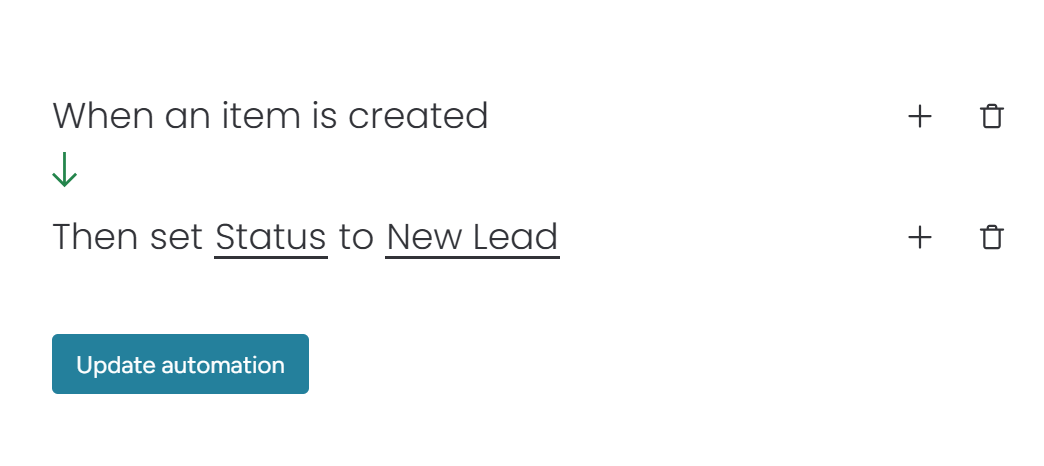
For example, the above recipe trigger would be when an “item is created” and the action is then “set Status to New Lead”. This means all new items created in that board will have their status set to “New Lead.”
If you have some more complicated automation needs, monday.com offers “workflows.” Workflows (enterprise only feature) have more options and granularity but operate on a similar trigger, condition, action structure to that of the automation recipes.

6. Quotes & Invoices
A newer feature recently added to monday CRM is Quotes & Invoices. You can create custom quotes and invoices using the contact info and product info from your boards. Utilizing the board data and templates feature makes quote creation very quick and easy. However, it is not a super customizable Cost, Price, Quote (CPQ) system. So, if you need a lot of drop down menus and customization options, this may not be the feature for you.

7. Formulas
Similar to formulas in Excel or Google Sheets, the formulas column can add, subtract, extract, concatenate, etc. Formulas range from simplistic to complex. Lucky for us, monday.com has added an AI assistant to the formula column so you don’t need to know the exact syntax for every formula. If you like to be a bit creative, formulas can be a real game changer. Especially when doing data reporting. You can do some data pre-processing with the formulas column, before visualizing in the dashboards. This is how I’ve managed to get over some of the data analysis limitations in the dashboards.

8. Connect Board & Mirror Column
This feature is a 2 for 1 special. As the name implies, you can connect two separate boards and copy “mirror” the data. For example, if you have a Deals board and a Contacts board, you can connect the Deals board to the contacts board

Now, you may be wondering, what doesn’t monday CRM offer? Are there any gaps? Well, it all depends on what you’re looking for. For example, if you want an integrated dialer without using a 3rd party app, you’ll need to try another CRM. But, for the most part, monday.com’s App store “monday marketplace” fills missing feature/functionality gaps but at a price. That being said, here are a few functionality gaps not offered out of the box…
1. No Email Extension
Monday CRM offers email tracking and automated emails but there is no email extension for Gmail or Outlook. So, while you can send emails directly from Gmail or Outlook to your boards, you cannot get a nice little view of your customer’s data within Gmail or Outlook like with Hubspot or Salesforce.com.
2. Data Analysis Limitations
As previously described, the dashboard widgets do a wonderful job visualizing data and get you around 80% to 90% of the analysis you need. But, for that last mile, you either need an Enterprise Plan so you can access the pivot table feature, integrate with an app and your favorite BI tool or do a csv or .xls export. A small price to pay for the rest of the feature set in my opinion.
3. Automation Limitations
It goes without saying, we would all like to automate as much as we can but the reality is there are limitations. And the same is true for monday.com work management. While the automations and workflows offer a lot, they occasionally fall short. So, it is not uncommon for companies to augment their automations using tools like Zapier or Make.com. I’ve personally used both of them and they are fairly straightforward and user friendly.
What Sets monday.com Apart from the competition?
I’ve been fortunate enough to use several different CRMs over the years. Including administrating a Salesforce.com instance for 3 years (this was back in 2017 so the feature set has changed a bit) and a year of Hubspot. So, I have a taste for what features are standard for a CRM and which ones are a bit unique. In this case monday CRM far outshines its competitors when it comes to connectivity, collaboration and customization. Thanks to features like connect boards and mirroring, users can refer to data across workspaces, boards and products. Meaning, if you want to create a new project item in monday.com Work Management whenever a deal closes in monday CRM and have it connect the two items, you can do that. You can send updates to Slack channels whenever a deal closes or a new lead comes in. And you can “@” people on any item, lead, deal, etc..to get their attention. So, there are a plethora of connectivity and collaboration options, but this also means it requires a couple things…1. Team Training: make sure your team knows the SOPs for using monday CRM and monday.com in general. 2. Customization and Setup: making sure your automations, reminders, etc are set up to your liking can be tricky and sometimes daunting to keep up with. So, unless you are an expert, it can be a bit difficult to get the perfect setup for your team. Luckily, monday.com has an ecosystem of partners ready to help but more on that later.
Not only is monday.com’s connectivity second to none but it has a top tier User Interface (UI). It is intuitive and thanks to the 30 day trash bin, forgiving. I will say there is a bit of a hurdle after the initial intuitive features. It is very easy to navigate for the basic feature set but it takes a bit of learning to get more comfortable with the more “powerful” features like automations, workflows and formulas…well formula columns are like Excel formulas so we all know how that is easy until it’s not.
Last but not least, monday.com’s app marketplace is a fantastic way to bridge the gap between what monday.com offers and what you need. I’ve used a few 3rd party apps in monday.com before and they work seamlessly. If you want an app to sync monday CRM with quickbooks, there’s an app for that. If you want to automate adding new email addresses from your Leads or Contacts board to a Mailchimp list, there’s an app for that. There’s over 150 apps in the app marketplace and growing with no signs of slowing down.
Getting Started and Support
Getting started with monday.com CRM is quick and easy. There’s two primary paths you can choose. The first and easiest option is to do a 2 week trial of the Pro Plan. You can sign up for that here. The second option is contacting the monday.com sales team to learn more about the Enterprise Plan. If your team is in need of an Enterprise Plan, monday.com will have a sales and customer success team available to help you get started. When starting out with the Pro Plan, you’ll have access to all of the core CRM boards (Leads, Accounts, Contacts, Deals, Activities, Project management) along with the standard monday.com foundational features previously discussed.
Next, you can either keep the boards the way they are and start importing your leads, contacts, etc, via csv or Excel spreadsheets or customize the column as you see fit. Lucky for us, monday.com’s knowledge base is full of very straightforward articles and video tutorials to help build both simple and complex workflows. The majority of their board templates have instructions on how to get started using them. Also, the functionality still looks and feels a little like a fancy spreadsheet so that familiarity will make the transition easier.
Monday.com’s support is 24/7 and top notch. I’ve personally used both the live chat and email support features on several occasions at various hours of the day. As you might expect, for the live chat, you begin the conversation with an AI chat bot, which is actually quite helpful because it directly links to the jam-packed knowledge base, so there may be an article with a solution to your problem. If not, they will link you to a live support representative. The representative will ask you to use screenshots or video to help describe your issue. Then they will send a solution via a video explanation. You can also request support over email or request to be called. I’ve also successfully used the email support. If you want to go another route, monday.com has a community forum which is monitored by monday.com product specialists and monday.com partner experts like me. There you can ask questions that might require more creative thinking or additional tools like make.com or zapier to get the job done. (affiliate link opp)
In addition to their support team, monday.com has a partner ecosystem. Let’s be honest, implementing a new software tool can be daunting at times…especially when you already have a million other priorities. So, that’s where monday.com partners come into play. Each partner must undergo training to become certified monday.com expert partners. So, if you’re looking for support beyond standard troubleshooting, this would be the route to go. Monday.com partners help with a wide range of services such as setting up your boards and workflows, optimizing an existing setup and training. Full disclaimer, I am a certified monday.com partner so if you have additional questions, please feel free to reach out here.
Pricing & Plans
When it comes to pricing, monday.com has 5 options including a free plan for Nonprofits. You have access to more functionality and features as you move up in tiers. You’re welcome to start at a lower tier and upgrade as you develop your processes and teams. Or, if you have some experience with CRMs, jump right into a Pro or Enterprise Plan for a feature rich experience. I find most customers need at least the Pro level plan. This is mostly due to limitations on automations. The Standard plan offers 250 actions/month and the Pro plan offers 25,000 actions/month…it’s surprising how quickly the automations rack up in short order.
| Plan Type | Non-Profit | Basic | Standard | Pro | Enterprise |
| Price: Billed Monthly | $0/seat/month for 10 seats. 70% off after that (33% of Enterprise) | $15/seat/mth | $20/seat/mth | $33/seat/mth | Requires a Sales Consult |
| Price: Billed Annually | Same as above | $12/seat/mth | $17/seat/mth | $28/seat/mth | Requires a Sales Consult |
| Minimum Seats/Maximum | 3/Unlimited | 3/Unlimited | 3/Unlimited | 3/Unlimited | Requires a Sales Consult |
| # of Boards | Unlimited | Unlimited | Unlimited | Unlimited | Unlimited |
| 24/7 Support | Yes | Yes | Yes | Yes | Yes |
A complete list of features per pricing tier can be found here: monday CRM Pricing
If you’re on the fence about picking a plan, monday.com offers a free two week trial to their Pro Plan
Alternatives
If you’re reading this review, there’s a good chance you’ve been investigating multiple CRM options. So, I’m sure you’ve heard of Salesforce.com, Hubspot and maybe Zoho. I would say these are the most popular options among the CRM community. While they all have some similar foundational features and functionality, each CRM has their own unique strengths and weaknesses. And as you may suspect, the price varies depending on what features you need.
 |  |  |  | |
| monday CRM | Hubspot | Salesforce.com | Zoho CRM | |
| Pros | User friendly interfaceConnectivity & collaboration across all teams thanks to integration with other monday.com products | Great pre-built feature setIntegration with other Hubspot products | Integrates with other Salesforce products | Easy and quick setup for basic functionalityIntegrates with other Zoho products |
| Cons | No integrations or automations at lower tiers No email extension app. Only email tracking | Pricey if you need more than basic functionalityConfusing limitations below Professional & Enterprise Tier | Priciest optionRequires more investment for setup if you want to take advantage of all the features | Learning all of the different add on features can take some timeOlder UI |
| Notable Customers | KC Petroleum, Velv, Black Mountain | Tripadvisor, reddit, ebay | Fedex, Siemens, BP | Bose, Air Panama, Suzuki |
| Best for | SMB and some Enterprise businesses looking for strong collaboration and connectivity with other teams and OK missing out on some sales features. But the app marketplace closes most of the gaps. | SMB and some Enterprise businesses looking for a great user experience and some level of investment in building out their CRM system | Mostly Enterprise and some Medium size businesses willing to invest time and money into building out a CRM system | Mostly SMB looking for a simple out of the box feature set (not including add-ons) without a lot of setup expertise needed. |
| Price |   ($0-$33/seat/month) |  ($0-$150/seat/month) ($0-$150/seat/month) | ($25-$330/seat/month) | ($0-$65/seat/month) |
| Features | | | | |
| Usability | | | | |
| Support | | | | |
| Security | | | | |
| Final Score | | | | |
Notable mentions not included in the review: Pipedrive and High Level
What I look for in each category
Price
- Number of pricing tiers & do they actually fit a customer profile
- License/seat flexibility
- Features per pricing tier
Features
- Does the software offer the expected features?
- Are there additional game changer features?
- Are there any critical features missing?
Usability
- Getting started difficulty
- Ease of team adoption into everyday work
- Is the UI/UX intuitive?
- Scalability
Customer Support
- Support availability
- Self serve options: training courses, knowledge base articles and videos
- Community forum
Security
- SOC 2 Compliance
- 2 factor authentication
The criteria above is used to give each software a “score” but for some, price may be more important than customer support or vice versa. So, there is a solution out there for every team but not necessarily a single solution built for every teams’ situation.
Final Thoughts
Monday CRM is by far the best option for those looking for unbeatable connectivity and collaboration. It’s no code automations and user friendly interface keep it smooth and easy to use. So, it’s likely your sales team will be more inclined to use it. When it comes to overall feature set, monday CRM may not have all the bells and whistles like Salesforce.com or Hubspot but they are releasing new features at a blazing fast rate. Also, from my experience, most teams do not need much more if any functionality beyond what monday CRM offers. If they do, usually an app from the monday marketplace fills the gap. And last but certainly not least, is price….even though monday CRM has a more attractive price point compared to the competition, you must follow their seat tier increments (3,5, and 10) so no adding 1 license at a time. Also, most teams will require at least Pro Plan level functionality primarily due to the limit on automation actions per month (the Standard tier only offers 250 actions per month).
So, we covered a lot of details in this review because there’s a lot to consider when investing in a new CRM tool. And the best way to understand what you’re buying is with some hands-on experience. So, if you’re ready to make your customer relationship management easier, get a free two week trial of the monday CRM Pro Plan here.
Charles Ferriera is a certified monday.com partner and expert with 3 years of hands-on experience implementing and optimizing monday.com solutions. Charles has 10+ years of experience in sales, process improvement and product management across several industry domains including SaaS, IoT, Augmented Reality, manufacturing and industrial enterprise solutions. Leveraging his broad range of experience, Charles provides companies with expert sales and process improvement services and maximum ROI on monday.com implementations. For additional help, feel free to find Charles at Process Flow Pros