


NinjaOne Review 2025: Features, Pros & Cons


updated
|AuthorUpdated: Mar 25, 2026, 11:46 am
Our Verdict
Our Verdict
NinjaOne is a cloud-based IT management platform designed for remote monitoring, patch management, and IT asset tracking. It simplifies IT operations by automating routine tasks, providing real-time device monitoring, and enabling remote troubleshooting. The main benefits include increased efficiency through automation, improved security via regular patching and backups, and centralized management of endpoints across multiple locations. With its intuitive interface and strong customer support, NinjaOne is ideal for enterprise IT teams and managed service providers (MSPs) managing complex, distributed IT environments at scale.


Pros
- Intuitive, user-friendly interface.
- Strong automation for IT tasks.
- Responsive and helpful customer support.
- Robust patch management and security tools.
- Efficient remote monitoring and management capabilities.
Cons
- Limited advanced customization options.
- Higher pricing compared to competitors.
- Limited reporting flexibility.
- Mobile app lacks some key features.
- Occasional delays in feature updates.
What Is NinjaOne?
FNinjaOne is a cloud-based IT management software that provides comprehensive remote monitoring and management (RMM) tools for IT professionals and managed service providers (MSPs). It offers features like remote device monitoring, patch management, IT asset tracking, and endpoint management. NinjaOne also includes automated alerts, backup solutions, and ticketing for streamlined IT operations.
Benefits Include
- User-Friendly: Intuitive interface for faster adoption.
- Improved Efficiency: Automates routine IT tasks like patching and monitoring.
- Remote Access: Enables quick remote troubleshooting.
- Centralized Management: Consolidates IT operations across devices.
- Scalability: Easily adapts to growing business needs.
What Is NinjaOne Used For?
NinjaOne is primarily used for three core functions:
- Remote Monitoring and Management (RMM): NinjaOne enables IT professionals to remotely monitor and manage devices across multiple locations. It tracks device health, performance, and security, allowing IT teams to proactively address issues before they escalate.
- Patch Management: NinjaOne automates the deployment of software updates and security patches across endpoints, ensuring systems stay up-to-date and secure, reducing vulnerabilities.
- IT Asset Management: The platform helps track hardware and software assets, offering detailed inventory management. This allows IT teams to monitor usage, detect unauthorized software, and optimize resource allocation.
These functions make NinjaOne a robust tool for streamlining IT operations, enhancing security, and improving overall efficiency in managing large IT infrastructures.

What Sets NinjaOne Apart
What sets NinjaOne apart from its competitors is its combination of simplicity and powerful functionality. It offers an intuitive, user-friendly interface that minimizes the learning curve, making it easy for IT teams to manage endpoints across distributed networks. NinjaOne also excels in automation, with robust tools for patch management, backup, and remote monitoring, significantly reducing manual IT tasks. Additionally, its cloud-based infrastructure ensures scalability, quick deployment, and accessibility from anywhere, making it an attractive option for both MSPs and internal IT departments.
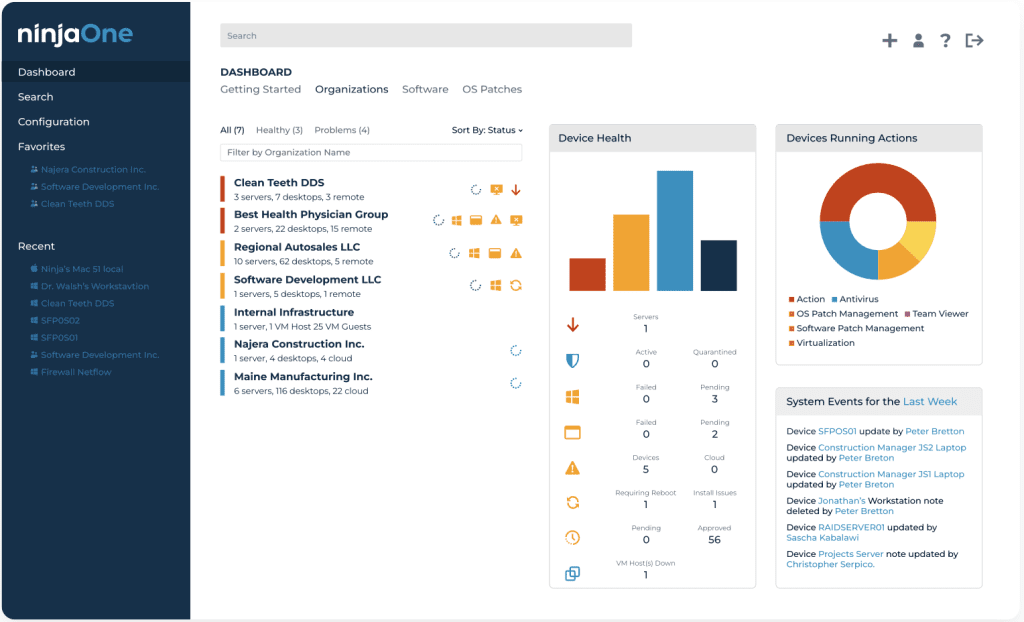
NinjaOne Core Features
| Feature | Description |
|---|---|
| Remote Monitoring and Management (RMM) | Monitors and manages endpoints remotely, ensuring devices remain secure and operational. |
| Patch Management | Automates the scheduling and deployment of software updates and security patches to all managed devices. |
| IT Asset Management | Tracks hardware and software inventory, usage, and updates, offering visibility into all IT assets across the network. |
| Backup and Disaster Recovery | Provides automated backup and recovery options to safeguard data across devices and servers. |
| Endpoint Security | Monitors endpoints for vulnerabilities and threats, providing tools for antivirus integration and remediation. |
| Remote Access | Enables fast, secure remote control of devices for troubleshooting and management. |
| Automation | Automates repetitive IT tasks, such as script execution, alert responses, and system updates, improving efficiency. |
| Ticketing Integration | Integrates with ticketing systems to create, manage, and resolve IT support requests within the platform. |
| Software Deployment | Deploys software remotely to multiple devices, simplifying software management and installations. |
| Reporting and Analytics | Generates real-time reports on system health, asset usage, and IT operations, providing valuable insights for decision-making. |
NinjaOne Pricing and Plans
NinjaOne does not publicly list its pricing in predefined plans, as its pricing is typically customized based on the number of endpoints and specific features required. Instead, businesses are encouraged to contact NinjaOne for a personalized quote based on their needs. This pricing model allows flexibility, ensuring that companies pay for only the services they use. NinjaOne’s pricing usually includes core features like remote monitoring, patch management, and IT asset management, with additional services based on customization.
For the latest details, visit NinjaOne Pricing.
Security Features
NinjaOne offers comprehensive security features to ensure the safety of endpoints and data. It integrates with antivirus solutions to monitor and protect devices from threats, while its automated patch management keeps systems updated with the latest security patches, reducing vulnerabilities. The platform’s backup and disaster recovery feature ensures data is safeguarded and easily recoverable. Additionally, NinjaOne includes tools for auditing and reporting, allowing IT teams to maintain compliance with security protocols.
Setup and Configuration
NinjaOne is designed for fast and easy setup, with minimal technical expertise required. The cloud-based platform allows for quick deployment, and its intuitive interface streamlines the initial configuration process. IT teams can easily add devices, set up monitoring protocols, automate patch management, and customize workflows to suit their needs. The platform also supports integration with various third-party tools, enhancing functionality without complex configurations, making it ideal for organizations of all sizes.
Customer Support
NinjaOne offers robust customer support to ensure a smooth user experience. Support is available through multiple channels, including email, phone, and live chat, providing responsive assistance when needed. Users also benefit from access to a comprehensive knowledge base, tutorials, and documentation to address common issues. NinjaOne’s customer support team is known for being helpful and responsive, ensuring that businesses can resolve any technical challenges quickly and effectively.
Who Is NinjaOne Best For?
NinjaOne is best suited for enterprise IT teams and managed service providers (MSPs) managing complex, distributed IT environments. Its cloud-based platform delivers scalable remote monitoring and management (RMM) capabilities, making it the platform of choice for organizations managing thousands of endpoints across multiple locations. NinjaOne enables both internal IT departments and MSPs to efficiently handle demanding tasks like patch management, endpoint security, and asset tracking, while providing the automation and centralized control that enterprise IT operations require.
What Users Are Saying
Users generally highlight several pros and cons of NinjaOne:
Pros:
- Ease of Use: Many users appreciate the platform's intuitive interface, which makes it easy to navigate and manage.
- Robust Automation: Users praise the automation of patch management and remote monitoring, which saves time and reduces manual tasks.
- Excellent Customer Support: NinjaOne is noted for its responsive and helpful customer support.
Cons:
Higher Costs: NinjaOne’s pricing can be higher compared to similar RMM solutions, especially for smaller businesses.
Limited Customization: Some users mention that there could be more options for advanced customization.
Matthew Mayo (@mattmayo13) holds a master's degree in computer science and a graduate diploma in data mining. As managing editor of KDnuggets & Statology, and contributing editor at Machine Learning Mastery, Matthew aims to make complex data science concepts accessible. His professional interests include natural language processing, language models, machine learning algorithms, and exploring emerging AI. He is driven by a mission to democratize knowledge in the data science community. Matthew has been coding since he was 6 years old.