


5 Powerful Ways to Use Claude 4
Discover how to integrate Claude 4 into your workflow to solve complex coding challenges in minutes and supercharge productivity.

Image by Author
Claude 4, the latest AI model from Anthropic, is making waves in the development community. Many engineers are hailing it as the best coding model available, capable of resolving year-long coding challenges in mere minutes, a truly remarkable feat
In this article, we will explore five powerful ways to integrate Claude 4 into your workflow to supercharge productivity. From integrating GitHub repositories into the Claude AI web app to leveraging its Python SDK, we will cover steps to make the most of this groundbreaking AI model.
1. Claude AI Web App
The Claude AI Web App provides an intuitive way to integrate Claude into your development workflow.
To get started, visit the Claude website, sign up, and click the (+) button to add a project from GitHub. Once connected, select the folder you want Claude AI to use as context and click the “Add files” button to upload the relevant files. This setup allows Claude to understand your project structure and context effectively.

Image from https://claude.ai/
After the setup, you can ask Claude to improve your application or analyze the project. This process is fast, accurate, and tailored to your specific project needs.
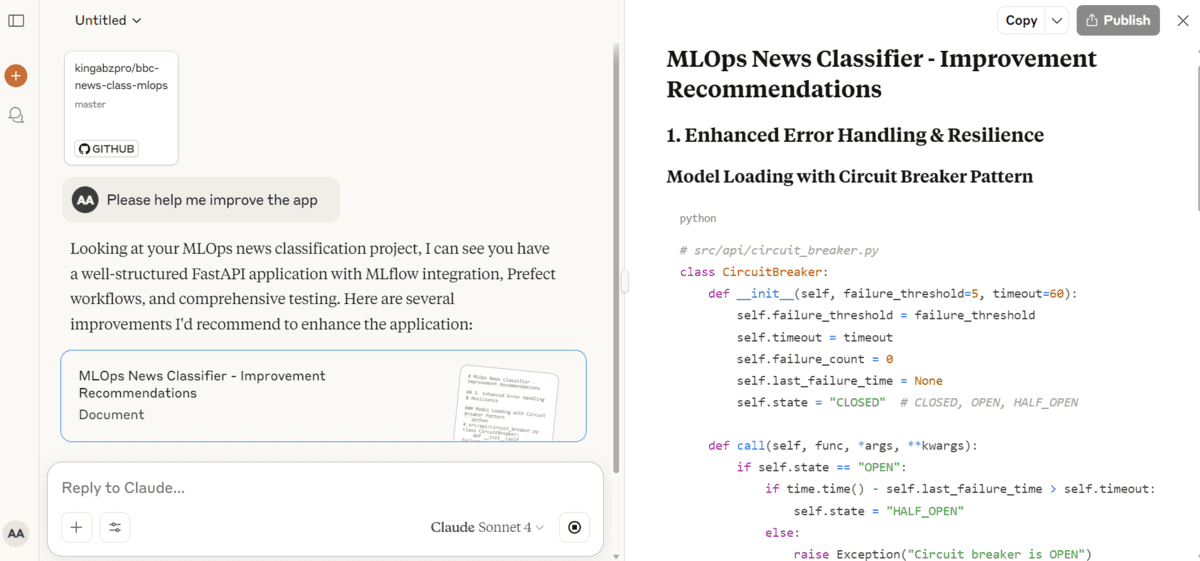
Image from https://claude.ai/
2. Claude Code
Setting up Claude Code allows you to leverage the power of Claude 4 models, such as Sonnet and Opus, directly within your project directory for efficient code improvements and automation.
To get started, follow the Claude Opus 4 with Claude Code guide to configure the environment. Once the setup is complete, navigate to your project directory and start Claude Code. Use the /model command to select the Claude Sonnet 4 model, which is ideal for coding workflows due to its balance of performance and practicality.
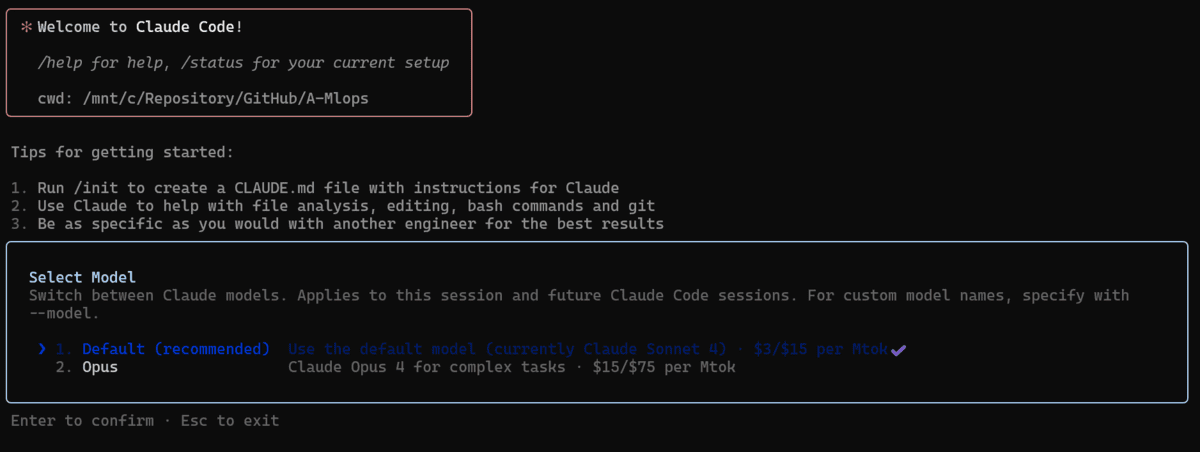
After selecting the model, you can ask Claude to improve your codebase. For example, you might request it to refactor, optimize, or debug specific sections of your code. Claude will analyze the codebase, make the necessary edits, and generate a detailed summary of the changes it has made.

3. Automating GitHub Workflow
Automating your GitHub workflow with Claude Code allows you to streamline development tasks such as code reviews, issue resolution, and pull request (PR) management. By integrating Claude Code into your repository using GitHub Actions, you can invoke Claude directly in comments, issues, or PRs by tagging @claude.
For example, in the kingabzpro/bbc-news-class-mlop repository, you could comment on Issue #9 with:
@claude add the docker compose file based on the issue description.
Claude will analyze the issue description, understand the codebase, and generate the required changes.
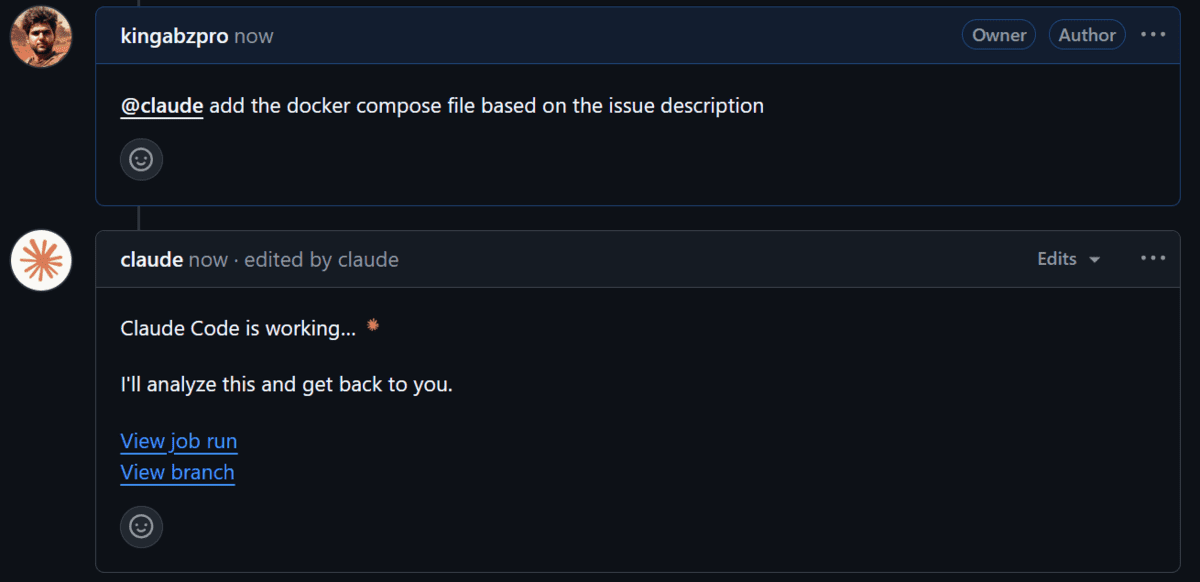
Screenshot from kingabzpro/bbc-news-class-mlops
Once the changes are ready, Claude provides the option to create a pull request directly. After reviewing the changes, you can merge the PR to apply the updates to the main branch.

Screenshot from kingabzpro/bbc-news-class-mlops
4. Integrating it with VSCode
Integrating Claude with Visual Studio Code (VSCode) enhances your development workflow by embedding an intelligent coding assistant directly into your IDE. To begin, open VSCode and launch the integrated terminal. From there, run the claude command, which initializes the Claude Code. Once active, type /ide and select VSCode to establish the connection.
For quick access, you can use the shortcut Cmd+Esc on Mac or Ctrl+Esc on Windows/Linux to open Claude Code directly, or click the Claude Code button in the UI.
Claude supports advanced features Diff viewing, Selection context, File reference shortcuts, and Diagnostic sharing.
5. Python SDK
To integrate Claude 4 into your Python-based workflow or application, you can use the Python SDK, which provides seamless access to the AI model via the API. This SDK makes it easier to leverage Claude 4 for tasks such as automating workflows, improving performance, and executing tools efficiently.
Start by installing the Python SDK using the following command:
pip install anthropic
After installation, you can create an Anthropic client using your API key and interact with the Claude 4 model. To generate a response, simply specify the model name, the maximum token limit, and the prompt. Here is an example:
import anthropic
import os

client = anthropic.Anthropic(
    api_key=os.environ.get("ANTHROPIC_API_KEY"),
)
message = client.messages.create(
    model="claude-sonnet-4-20250514",
    max_tokens=1024,
    messages=[{"role": "user", "content": "Create the RESTAPI server in python"}],
)
print(message.content)
Conclusion
Integrating Claude 4 into your workflow offers numerous possibilities to enhance productivity and streamline coding tasks. Beyond using it with VSCode, you can also integrate it with tools like Cursor MAX, Windsurf, or even your local chat applications via the API key. However, it is important to note that while Claude 4 Opus provides exceptional capabilities, it comes with a high price tag, and even Claude 4 Sonnet remains relatively expensive compared to other coding AI models.
Abid Ali Awan (@1abidaliawan) is a certified data scientist professional who loves building machine learning models. Currently, he is focusing on content creation and writing technical blogs on machine learning and data science technologies. Abid holds a Master's degree in technology management and a bachelor's degree in telecommunication engineering. His vision is to build an AI product using a graph neural network for students struggling with mental illness.