


Introduction
Data professionals live in their browsers. You're reading technical documentation, analyzing research papers, reviewing model cards, working through GitHub repositories, and summarizing industry reports — often all in the same afternoon. Increasingly, AI assistants sit alongside that work.
The tools most people reach for (Chrome with Gemini, Perplexity, ChatGPT in a pinned tab) are genuinely capable. But each carries a privacy cost that's easy to overlook when you're focused on getting work done. Consumer Gemini may use your conversations to improve Google's services, and selected conversations can be reviewed by human staff. Perplexity routes your queries and page content to its cloud servers for processing. ChatGPT, unless you actively opt out, can use your inputs for model training.
For casual browsing, this is an acceptable tradeoff. For data professionals working with proprietary datasets, client research, unreleased model architectures, or sensitive business intelligence, it may not be.
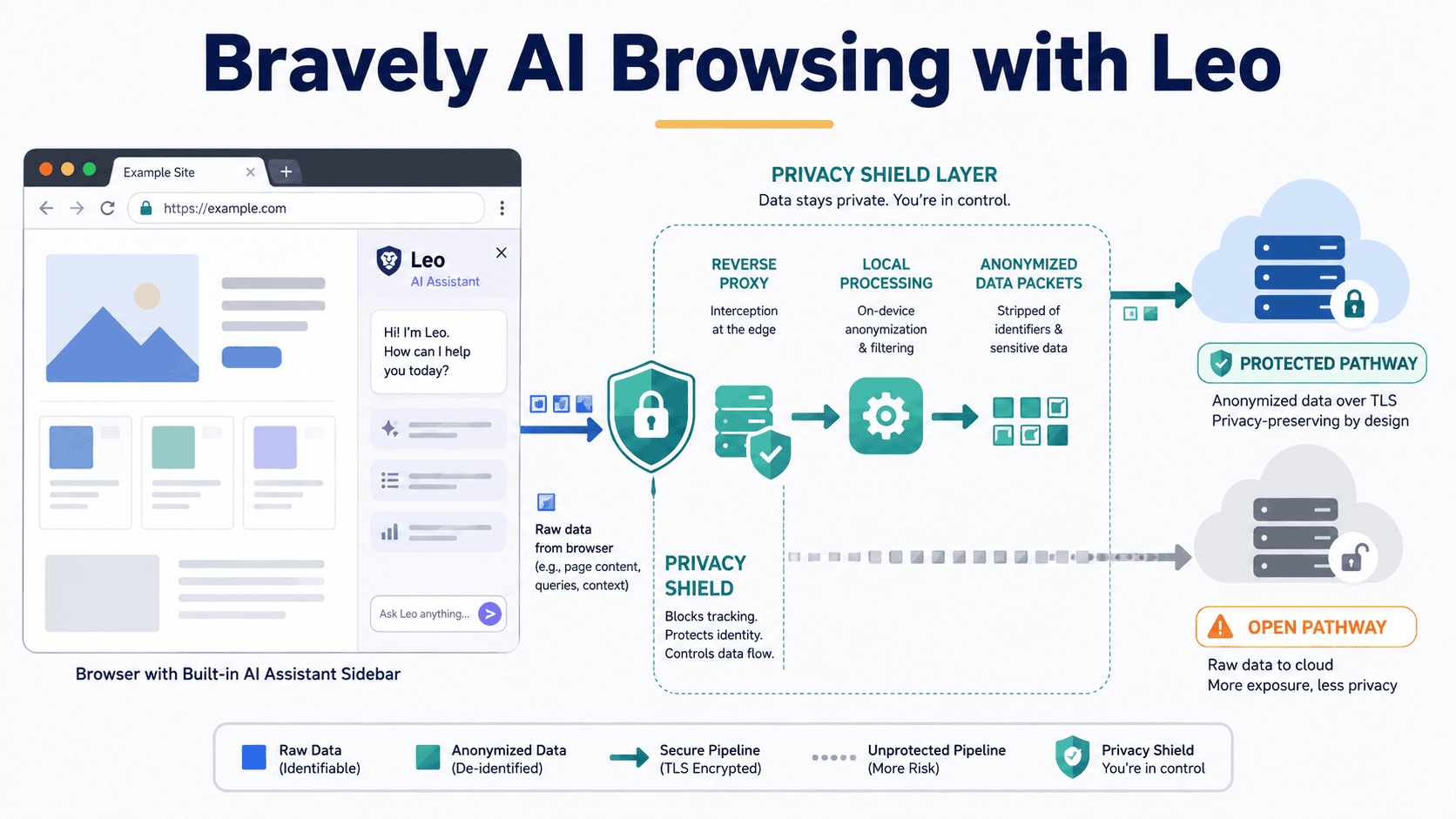
Brave Leo is the alternative most people haven't considered. It's a privacy-first AI assistant built directly into the Brave browser — not a separate tab or third-party extension, but a sidebar that reads what you're currently looking at and responds without storing, logging, or training on anything you share. The free tier requires no account and no sign-up. And it has a model lineup that's more capable than most people expect.
This article covers what Leo does, how it compares to the tools you already use, how to set it up, and how to build a private AI workflow around it.
Step 1: Understanding Why Privacy in AI Browsing Matters for Data Professionals
Before getting into Leo's features, it helps to understand what's actually happening when you use mainstream browser AI tools, because the data handling differences are structural, not cosmetic.
When you use Chrome's Gemini, Google's own documentation advises you not to enter anything you wouldn't want a human reviewer to see. The Gemini Nano model is downloaded silently to your device in the background, often without explicit consent. On consumer plans, your inputs can be used for model improvement by default.
When you use Perplexity, you're working with a solid research tool. Its citation-backed answers are genuinely strong, and most data professionals already trust it for exploratory research. But like Gemini, it operates on a cloud-first model where your queries and page content leave your machine.
Safari's Apple Intelligence is the most privacy-respectable mainstream option, processing more work on-device. But it's locked to Apple hardware, which excludes data professionals working on Windows or Linux.
Leo takes a different architectural approach. Queries are routed through a reverse proxy that strips your IP address before they reach the underlying model. Conversations are discarded immediately after a response is generated, so nothing is stored on Brave's servers. No account is linked to your usage. No inputs are used for model training. This is the default behavior for every user, free or paid.
The practical implication: you can paste proprietary documentation, ask questions about an internal dataset schema, or work through a client's unpublished research, and none of it persists beyond your session.
Step 2: Getting Started With Leo
Leo ships with every installation of Brave, available on Windows, macOS, Linux, Android, and iOS. Because Brave is built on the same Chromium engine as Chrome, the transition is low-friction. Your bookmarks, passwords, and extensions import in a few clicks.
Accessing Leo is immediate. You'll find it in the browser sidebar, or by clicking the Leo icon in the toolbar. On desktop, you can also start a conversation from the address bar. No login is required.
Choosing your model is done from within the Leo sidebar. The free tier includes:
- Meta's Llama 3.1 for general tasks
- Alibaba's Qwen 3 for multilingual content and structured reasoning
- Anthropic's Claude Haiku 3.5 for fast summarization
- GLM models for additional open options
For most day-to-day work — summarizing papers, explaining documentation, answering questions about open code — the free tier is sufficient. One reviewer who tested the Premium tier for months said plainly: "I have not paid for it. The free tier has handled everything I actually use Leo for."
Leo Premium costs \$14.99 per month or \$149.99 annually (roughly \$12.50 per month) and covers up to five devices. It unlocks Claude Sonnet 4, DeepSeek R1, Kimi K2.5, and other frontier models, along with higher rate limits and priority access during peak times.
Worth noting: Premium does not change the privacy model. Brave uses a credential-based token system that keeps payment information separated from chat activity. Even paying subscribers remain unlinkable to their usage. Premium users can enable persistent chat history, but this is opt-in. For maximum privacy, leave it disabled.
There's also Brave Ocelot, introduced in April 2026, a local-first summarization model that runs inference directly on your hardware, meaning content never leaves your machine. If you regularly summarize sensitive documents, it's worth a look.
The Bring Your Own Model (BYOM) feature lets you connect local models or plug in third-party API keys for models not included in Brave's lineup.
Step 3: Core Workflows for Data Professionals
Leo's most distinctive capability is page-awareness. Unlike standalone chatbots that require you to copy and paste content, Leo reads the active tab in real time.
Summarizing Research Papers and Documentation
Open any arXiv paper, model card, or technical documentation page, then ask Leo to summarize the key findings, explain a specific methodology, or extract evaluation metrics. Leo reads the page directly without you copying a word.
This is useful for long documentation pages where you need just a few specific things: what the model was trained on, its known limitations, and recommended use cases. A prompt like the following handles this in seconds:
Summarize this page in three sections:
1. What this model was trained on
2. Known limitations
3. Recommended use cases
Leo will produce a structured response drawn from the page content, without that content ever being stored.
Analyzing PDFs, Google Docs, and Google Sheets
Leo reads PDFs opened in the browser, Google Docs, and Google Sheets natively. Open a dataset documentation file, a research proposal, or a methodology review and ask Leo targeted questions:
What are the data collection methods described in this document?
Are there any limitations mentioned regarding sample size or bias?
For spreadsheet work, Leo can help you understand what a dataset contains, identify column descriptions, or explain unfamiliar field names. This comes in handy when working with third-party data dictionaries.
Working With YouTube Tutorials and Talks
Leo can read the transcript of any YouTube video open in your browser. Rather than watching a 90-minute NeurIPS talk in full, you can ask Leo to extract the core contributions, the experimental setup, or the conclusions, then watch only the sections that matter.
Generating and Explaining Code
Leo handles code generation and explanation on the free tier, and at Claude Sonnet level on Premium. You can highlight a confusing function in documentation, ask Leo to explain it, then ask for a working implementation in your preferred language. Leo's page-awareness helps here — you can ask it to generate code that matches the structure described on the page you have open.
Step 4: Exploring Advanced Features
Multi-Tab Context
Leo can draw context from multiple open tabs, not just the one you're viewing. For data professionals comparing two papers, reviewing multiple documentation sources, or cross-referencing a library's API docs against a tutorial, this removes the need to switch tabs and re-establish context each time.
Tab Focus Mode
Tab Focus Mode lets you direct Leo's attention to a specific tab while keeping others open. This is useful when you want Leo grounded in one authoritative source (say, the official PyTorch documentation) while you browse elsewhere.
Skills
Introduced in December 2025, Skills are saved prompt chains that run against the current page. A Skill can be a single saved instruction ("extract all evaluation metrics from this page") or a multi-step chain ("summarize, then list the methods used, then identify any dataset limitations"). For data professionals who perform the same analysis tasks repeatedly across different papers or documentation pages, Skills turn Leo into something closer to a custom assistant.
Agentic Browsing (Early Access)
In May 2026, Leo added agentic browsing in early access, letting Leo autonomously complete multi-step tasks in an isolated browser profile. Leo's implementation keeps the privacy model intact by operating within Brave's infrastructure rather than sending your session data to external services.
Step 5: Building a Privacy-First AI Workflow
Leo isn't a replacement for every AI tool in your stack. Different tools are better at different moments, and privacy requirements vary by task.
Use Leo when:
- You're working with proprietary or client-sensitive content
- You need to summarize or interrogate a specific page without copying its contents elsewhere
- You want AI assistance without creating an account or logging in
- You're working across PDFs, docs, and web pages in a single research session
- You want frontier-model access (via Premium) without that work leaving Brave's infrastructure
Use Perplexity when:
- You need cited, web-grounded research answers with source attribution
- You're doing exploratory research on public topics where privacy isn't a concern
- You need depth and breadth across live web sources
- Answer quality outweighs data-handling considerations
Use a local model when:
- The content is maximally sensitive and should never touch any external server
- You need persistent memory across sessions
- You want complete control over the inference environment
The Leo vs. Perplexity question is worth addressing directly. Perplexity Pro at \$20/month gives you GPT-5 and Claude Opus 4.6, unlimited Pro Search, file uploads, and the Comet browser agent. It's a stronger research tool for public-domain, citation-heavy work. Leo Premium at \$14.99/month gives you Claude Sonnet 4 and DeepSeek R1 in a privacy architecture that Perplexity doesn't offer. These serve different moments in a professional workflow, not the same one.
A practical approach: use Leo as the default browser assistant for daily reading, documentation work, and anything touching sensitive material, and reach for Perplexity when a task specifically requires live web citations or deeper research synthesis.
Step 6: Knowing What Leo Does Not Do
Honest tool evaluation means acknowledging limitations, and Leo has real ones.
Leo doesn't browse the web autonomously the way Perplexity does. If you ask "what are the latest updates to this library?", it will work from the page you have open and its training data, not crawl off-tab to find newer information. For current-events research or rapidly evolving topics, Perplexity remains the stronger choice.
Leo doesn't generate images, doesn't support voice mode beyond iOS voice-to-text input, and doesn't maintain memory across sessions by default. For data professionals who rely on persistent context or ongoing project threads, Leo's session-based model requires more manual setup.
Leo also only works inside the Brave browser. If you're committed to Chrome, Safari, or Firefox and have no intention of switching, Leo isn't available as an extension.
Answer quality on the free tier, particularly with smaller open models, can be inconsistent for complex technical tasks. This is where Premium earns its price. Claude Sonnet 4 handles technical depth substantially better than Llama 3.1 for tasks like interpreting statistical methodology or explaining complex model architectures.
Recommended Resources
- Brave Leo official page — current model availability, pricing, and feature documentation
- Brave's Leo roadmap blog — development history and upcoming features including agentic browsing
- Brave privacy documentation — detailed explanation of how Leo's reverse proxy and data handling work
- Perplexity.ai — for comparison and complementary use; the Pro plan at \$20/month is the relevant tier for most professionals
- Ollama — for data professionals interested in running local models connectable to Leo via BYOM
- Privacy Guides — independent evaluation of browser privacy across Brave, Firefox, Safari, and Chrome
Final Thoughts
Most data professionals adopted AI tools based on what was available two years ago and haven't revisited those choices since. The assumption that AI assistance requires handing your work to a cloud service is worth questioning in 2026.
Brave Leo doesn't ask you to trade capability for privacy. The free tier handles daily reading and research tasks well. The Premium tier, at \$14.99 per month, brings frontier models into a browser environment where your inputs are structurally inaccessible to anyone but you.
For data professionals working with sensitive content, client data, or proprietary research, that's not a minor benefit. It's the difference between a tool you can use everywhere and one you have to be careful with.
Vinod Chugani is an AI and data science educator who bridges the gap between emerging AI technologies and practical application for working professionals. His focus areas include agentic AI, machine learning applications, and automation workflows. Through his work as a technical mentor and instructor, Vinod has supported data professionals through skill development and career transitions. He brings analytical expertise from quantitative finance to his hands-on teaching approach. His content emphasizes actionable strategies and frameworks that professionals can apply immediately.