


How to Install and Run LLMs Locally on Android Phones
Learn how to bring the power of AI right to your Android phone—no cloud, no internet, just pure on-device intelligence!
Image by Author | Canva
Running large language models (LLMs) locally on Android phones means you can access AI models without relying on cloud servers or an internet connection. This local setup ensures privacy by keeping your data secure and on-device. With advancements in mobile hardware, running AI models locally has become a reality. The MLC Chat app makes it easy to experience this powerful technology right on your phone.
This article will explain the significance of running LLMs locally on Android phones and provide a step-by-step tutorial for installing and running them using the MLC Chat app.
Why Run LLMs on Android Phones?
LLMs are commonly run on cloud servers due to the significant computational power they require. While Android phones have certain limitations in running LLMs, they also open up exciting possibilities.
- Enhanced Privacy: Since the entire computation happens on your phone, your data stays local, which is crucial for any sensitive information you share.
- Offline Access: A constant internet connection is not required to access or interact with these models. This is especially useful for users in remote areas or those with limited internet access.
- Cost Efficiency: Running LLMs on cloud servers involves operational costs like processing power and cloud storage. This approach provides an economical solution for users.
Step-by-Step Guide to Install, and Run MLC Chat on Android
The MLC Chat App is an application designed to enable users to run and interact with large language models (LLMs) locally on various devices, including mobile phones, without relying on cloud-based services. Follow the steps below to run LLMs locally on an Android device.
Step 1: Install the MLC Chat App
First, you need to download the APK for the MLC Chat App(112MB) from the link given below.
MLC Chat App APK File
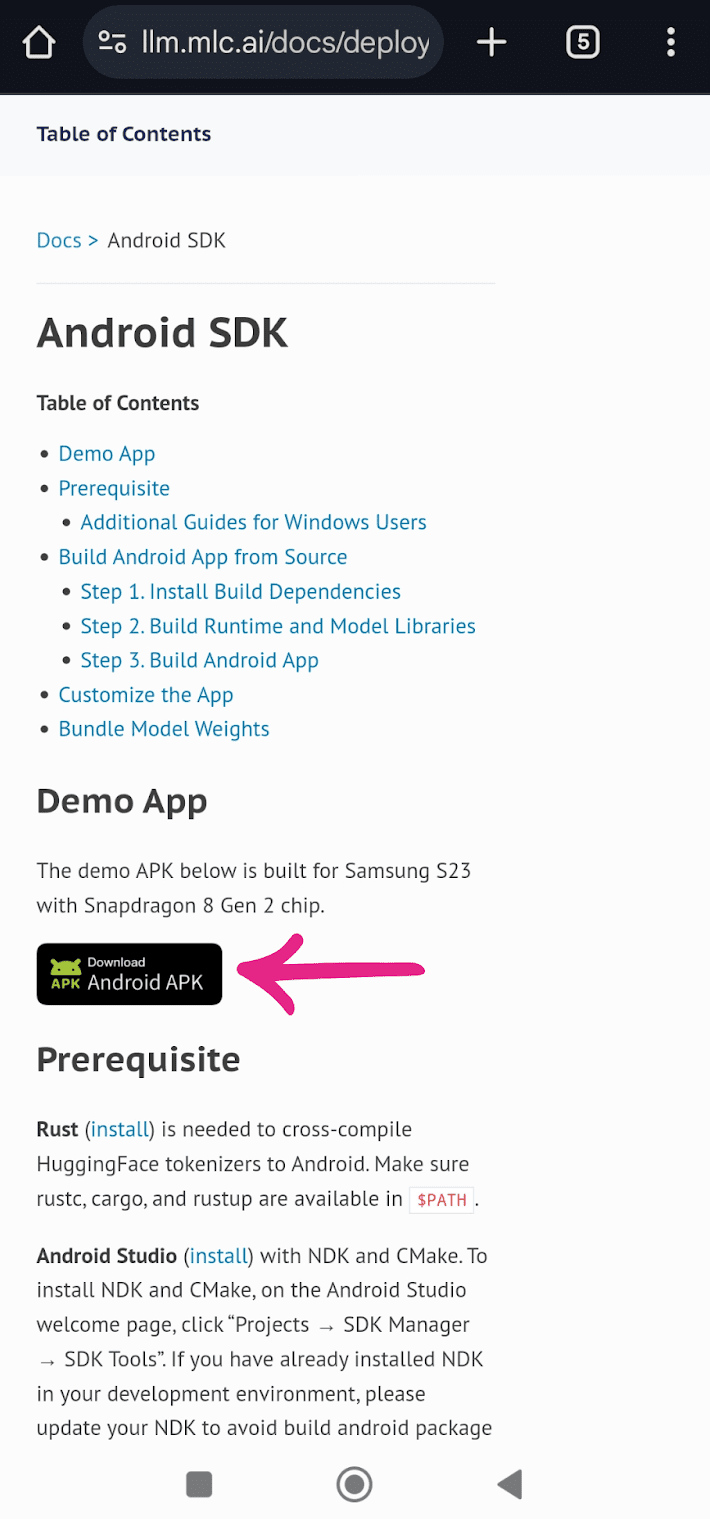
Once the APK is downloaded, tap on the file to begin installation.
Step 2: Download the LLM
After successfully installing the app, open it, and you'll see a list of available LLMs for download. Models of different sizes and capabilities, such as LLama-3.2, Phi-3.5, and Mistral, are available. Select the model according to your needs and tap the download icon next to it to begin the download. For example, since I’m using a mid-range phone like the Redmi Note 10, I opted for a lightweight model like Qwen-2.5 for smoother performance.

Step 3: Run the Installed LLM
Once the model is downloaded, a chat icon will appear next to it. Tap the icon to initiate the model.

When the model is ready to go, you can start typing prompts and interact with the LLM locally.

For example, on a device like the Redmi Note 10, running a smaller model like Qwen2.5 offers a reasonably smooth experience, generating about 1.4 tokens per second. While this performance is slower compared to high-end devices such as the Galaxy S23 Ultra, it remains functional for basic tasks like short conversations and simple content generation.
Conclusion
Running LLMs locally on Android devices via the MLC Chat app offers an accessible and privacy-preserving way to interact with AI models. The performance depends heavily on your phone's hardware. This solution is ideal for users who need offline access to AI models, experiment with LLMs in real-time, or are concerned about privacy. As mobile hardware continues to improve, the capabilities of local LLMs will only expand, making this an exciting frontier for AI technology.
Kanwal Mehreen is a machine learning engineer and a technical writer with a profound passion for data science and the intersection of AI with medicine. She co-authored the ebook "Maximizing Productivity with ChatGPT". As a Google Generation Scholar 2022 for APAC, she champions diversity and academic excellence. She's also recognized as a Teradata Diversity in Tech Scholar, Mitacs Globalink Research Scholar, and Harvard WeCode Scholar. Kanwal is an ardent advocate for change, having founded FEMCodes to empower women in STEM fields.