


Notion Review 2025: Features, Pros & Cons


updated
|AuthorUpdated: Jan 3, 2025, 5:18 pm
Our Verdict
Our Verdict
Notion software offers a range of benefits, making it a versatile tool for both individuals and teams. Its all-in-one platform combines note-taking, task management, databases, and collaboration tools, allowing users to centralize their workflows and information in a single, customizable space. Notion’s flexibility is one of its greatest strengths, enabling users to create personalized workspaces that fit their unique needs, whether for personal organization or team projects.


Pros
- Combines notes, tasks, databases in one.
- Highly customizable for diverse workflows.
- Intuitive drag-and-drop user interface.
- Integrates with popular tools and apps.
- Real-time collaboration for seamless teamwork.
Cons
- Learning curve for advanced features.
- Can be overwhelming for new users.
- Performance issues with large, complex datasets.
- Limited offline functionality and access.
- Pricing can be high for larger teams.
What Is Notion?
Notion is an all-in-one workspace software that combines note-taking, task management, databases, calendars, and collaboration tools into a single platform. It is designed to help individuals, teams, and organizations manage their projects, documents, and workflows efficiently. Notion’s flexibility and customizability are among its standout features, allowing users to create personalized workspaces tailored to their specific needs.
One of Notion's core strengths is its ability to serve multiple purposes within a single platform. Users can create and organize notes, documents, and wikis, manage tasks and projects, and build databases and knowledge hubs. The software offers a range of templates to get started quickly, and its drag-and-drop interface makes it easy to customize pages and databases.
Notion also excels in collaboration, making it a popular choice for teams. Users can share pages, collaborate in real time, comment, and assign tasks, which fosters seamless communication and teamwork. The platform integrates with various third-party applications like Slack, Google Workspace, and Trello, enhancing its functionality and allowing teams to streamline their workflows.
Notion is available across multiple platforms, including web, desktop (Windows and Mac), and mobile (iOS and Android), ensuring users can access their workspace from anywhere. The software offers a free version with essential features, while its paid plans unlock advanced functionalities and increased storage.

What Is Notion Used For?
Notion software is used in various ways, offering flexibility and customization for different needs. Here are the five key ways Notion is commonly used:
Personal Knowledge Management: Individuals use Notion for personal organization and knowledge management. It serves as a digital planner, habit tracker, journal, or repository for personal knowledge, allowing users to manage their daily lives, goals, and learning in one place.
Note-Taking and Documentation: Notion is widely used for creating and organizing notes, documents, and wikis. Users can create detailed notes, embed media, and structure content hierarchically, making it a powerful tool for personal and team documentation.
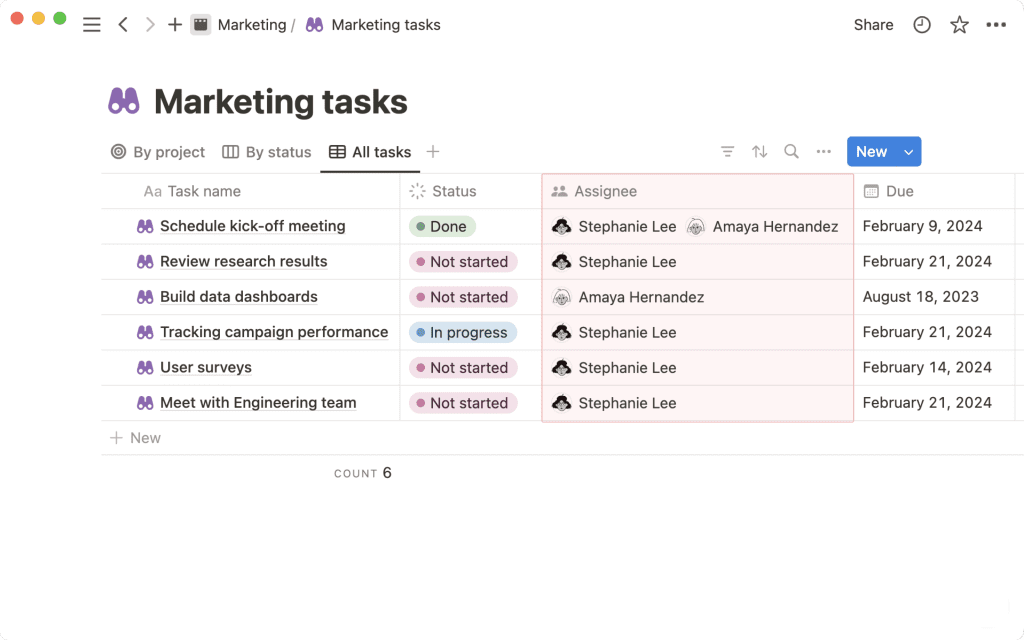
Task and Project Management: Many individuals and teams use Notion to manage tasks and projects. With features like to-do lists, Kanban boards, calendars, and timelines, Notion helps users track tasks, set deadlines, and manage project workflows effectively.
Database Management: Notion allows users to create customizable databases to manage various types of data, from simple tables to complex relational databases. These databases can be used for CRM, content planning, inventory tracking, and more.
Team Collaboration: Notion is a popular choice for team collaboration due to its shared workspaces, real-time collaboration, commenting, and task assignment features. Teams can collaborate on projects, share documents, and communicate effectively within the platform.
What Sets Notion Apart
Notion sets itself apart from its competitors through its flexibility, all-in-one functionality, and user-centric design. Unlike other productivity tools that focus on specific tasks like note-taking or project management, Notion combines multiple features—notes, tasks, databases, calendars, and wikis—into a single platform. This versatility allows users to tailor Notion to fit various needs, from personal organization to complex team projects.
One of Notion’s standout features is its high degree of customization. Users can create unique pages and databases with a simple drag-and-drop interface, customizing everything from layouts to data structures without needing coding skills. This flexibility empowers individuals and teams to build their own workflows, making Notion a highly adaptable tool that can cater to diverse use cases.
Collaboration is another key differentiator for Notion. The platform supports real-time editing, commenting, and sharing, making it easy for teams to collaborate and communicate effectively. This collaborative environment is enhanced by Notion’s ability to integrate with other popular tools, such as Slack, Google Workspace, and Trello, allowing seamless workflows across multiple platforms.
Moreover, Notion's aesthetic and user-friendly interface is both intuitive and visually appealing, offering a more engaging user experience than many competitors. The ability to create visually rich documents and workspaces with embedded images, videos, and files further enhances its appeal.
Overall, Notion’s combination of flexibility, comprehensive functionality, strong collaboration tools, and an engaging user interface distinguishes it from other productivity software, making it a preferred choice for individuals and teams looking to consolidate their work processes into one cohesive platform.
Notion Core Features
| Feature | Description |
|---|---|
| Note-Taking | Create, organize, and format rich text notes with embedded media, images, and links. |
| Task Management | Manage tasks with to-do lists, Kanban boards, calendars, and reminders for efficient workflows. |
| Database Management | Build customizable databases, tables, and lists to store and organize information systematically. |
| Templates | Use pre-built templates for quick setup of notes, tasks, projects, and databases. |
| Real-Time Collaboration | Collaborate with team members in real time with shared workspaces, comments, and task assignments. |
| Customizable Pages | Create fully customizable pages using a drag-and-drop interface to structure content as needed. |
| Integration Capabilities | Integrate with tools like Slack, Google Workspace, Trello, and others for seamless workflows. |
| Knowledge Base and Wikis | Build and maintain internal knowledge bases and wikis for team or personal use. |
| Calendar and Timeline Views | Use calendar and timeline views to manage project schedules and deadlines visually. |
| Markdown Support | Support for Markdown syntax to easily format text and create structured content. |
| Offline Access | Access and edit content offline with automatic syncing when back online. |
| Personal Knowledge Management | Organize personal information, journals, habit trackers, and more in one place. |
| Aesthetic and Intuitive Interface | User-friendly design with visually rich documents and customizable layouts. |
Project Management Features
Notion offers versatile project management capabilities that cater to diverse team needs, from simple task tracking to complex project workflows. Its flexibility allows users to create custom workflows using a variety of views, such as Kanban boards, Gantt charts, calendars, and lists, making it adaptable for different project management styles, including Agile and Scrum.
Users can easily create and manage tasks within Notion, assigning them to team members, setting due dates, adding tags, and tracking progress. The drag-and-drop interface makes it simple to adjust task priorities and project timelines, ensuring smooth and dynamic project planning. Notion’s databases allow teams to create relational databases for managing tasks, projects, and resources, providing a structured yet flexible way to organize project data.
Collaboration is a key strength in Notion’s project management suite. Teams can work together in real time, leave comments, mention teammates, and attach files directly within tasks or project pages. This promotes seamless communication and keeps all project-related information centralized and accessible.
Additionally, Notion integrates with various external tools like Slack, Google Workspace, and Trello, allowing teams to synchronize their project management activities across platforms. The platform’s customization options, coupled with its collaborative features, make Notion a powerful tool for managing projects of all sizes and complexities, helping teams stay organized, aligned, and productive.
Notion's Pricing and Plans
| Feature | Free | Plus | Business | Enterprise |
|---|---|---|---|---|
| Price (per user/month) | $0 | $8 | $15 | Custom Pricing |
| Unlimited Pages and Blocks | ✓ | ✓ | ✓ | ✓ |
| File Uploads | Limited (5 MB per file) | Unlimited | Unlimited | Unlimited |
| Guests | Up to 5 | Unlimited | Unlimited | Unlimited |
| Page History | 7-day | 30-day | 90-day | Unlimited |
| Collaborative Workspace | ✓ | ✓ | ✓ | ✓ |
| Advanced Permissions | • | • | ✓ | ✓ |
| Private Team Spaces | • | • | ✓ | ✓ |
| Admin Tools | • | • | ✓ | ✓ |
| Single Sign-On (SSO) | • | • | ✓ | ✓ |
| Advanced Security | • | • | • | ✓ |
| User Management | • | • | • | ✓ |
| Audit Logs | • | • | • | ✓ |
| Dedicated Support | • | • | • | ✓ |
| Custom SLAs | • | • | • | ✓ |
Featured Partners
1
Monday.com

Multiple tiers including free to enterprise
Enterprise grade and GDPR compliant
Support for several third party apps
2
deel.com

From $49 per month per seat
Knowledge base, 24/7 customer support, setup support
Included
3
1Password

From $7.99 per user per month, billed annually
24/7 customer support
Advanced encryption
1
monday sales CRM

On monday.com's Website
Free; $9 per user per month for basic features
14 days
Yes
2
monday sales CRM
On monday.com's Website
Free; $9 per user per month for basic features
14 days
Yes
3
monday sales CRM
On monday.com's Website
Free; $9 per user per month for basic features
14 days
Yes
Security Features
Notion provides robust security features to safeguard user data and maintain compliance with industry standards. It employs enterprise-level security measures, including Single Sign-On (SSO) for simplified user authentication and two-factor authentication (2FA) to enhance account security. Data is encrypted both at rest and in transit using industry-standard protocols like AES-256 and TLS, ensuring secure data handling. Notion also offers granular access controls, allowing administrators to set permissions at multiple levels for enhanced data protection. The platform complies with GDPR regulations and other global privacy standards, reinforcing its commitment to data privacy. Regular security audits and monitoring further enhance Notion’s secure environment for all users.
Setup and Configuration
Setting up and configuring Notion is designed to be intuitive and highly customizable, enabling users to tailor the platform to their specific needs. Users can start with pre-built templates for common workflows or build their own custom pages and databases from scratch using the platform’s drag-and-drop interface. The interface supports a wide range of content types, from simple text and lists to complex databases, making it easy to adapt Notion to various use cases. Integrations with third-party apps are also easy to configure, allowing seamless integration into existing workflows. Notion’s flexible setup process accommodates diverse needs, from personal organization to team collaboration.
Customer Support
Notion offers comprehensive customer support to help users maximize the platform's capabilities. Users have access to a rich knowledge base filled with articles, guides, and tutorials for self-service support. Additionally, Notion provides email support for all users, ensuring assistance is available when needed. For teams and organizations on the Business and Enterprise plans, priority support is available, providing faster response times and more personalized assistance. Notion also offers community forums and regular webinars where users can learn best practices and engage with other users, fostering a collaborative learning environment to enhance user experience.
Who Is Notion Best For?
Notion is best suited for individuals, teams, and businesses looking for a versatile, all-in-one platform to manage notes, tasks, databases, and projects. Its flexibility makes it ideal for a wide range of users, from freelancers and small startups to large enterprises needing a customizable solution for knowledge management, project planning, and team collaboration. Notion is particularly beneficial for creative teams, writers, marketers, and product managers who require a tool that supports both structured and unstructured data management. With its ability to adapt to various workflows and integrate with other tools, Notion helps enhance productivity, streamline processes, and foster effective collaboration across diverse industries.
What Users Are Saying
User reviews for Notion software is overwhelmingly positive. Users frequently commend the platform for its versatility and ease of customization, allowing them to create personalized workspaces tailored to their specific needs. Many appreciate Notion’s clean, intuitive interface and its ability to serve multiple purposes—ranging from note-taking and project management to database creation and team collaboration.
However, some users have mentioned that the extensive features can be overwhelming initially, leading to a learning curve, especially for those new to such comprehensive tools. Additionally, a few users feel that the performance can lag with large or complex datasets. Despite these minor concerns, the overall sentiment indicates that Notion is a powerful, flexible tool that significantly enhances both personal productivity and team collaboration.
Matthew Mayo (@mattmayo13) holds a master's degree in computer science and a graduate diploma in data mining. As managing editor of KDnuggets & Statology, and contributing editor at Machine Learning Mastery, Matthew aims to make complex data science concepts accessible. His professional interests include natural language processing, language models, machine learning algorithms, and exploring emerging AI. He is driven by a mission to democratize knowledge in the data science community. Matthew has been coding since he was 6 years old.