


Teamwork.com Review 2025: Features, Pros & Cons



updated
|AuthorUpdated: Jan 3, 2025, 5:18 pm
Our Verdict
Our Verdict
Teamwork.com offers several key benefits, making it a powerful project management tool. It provides comprehensive task and project management capabilities, including customizable workflows, Gantt charts, and Kanban boards. Integrated time tracking aids in productivity and budget management. The platform enhances team collaboration with real-time chat, file sharing, and document editing. Robust reporting and analytics tools deliver insights into project performance and resource utilization. Additionally, Teamwork.com’s flexibility in customization and its integration with popular tools like Slack and Google Workspace streamline workflows. These features collectively boost productivity, organization, and team efficiency.


Pros
- Comprehensive task and project management features.
- Customizable workflows and project templates.
- Integrated time tracking for accurate budgeting.
- Robust reporting and analytics tools.
- Strong collaboration tools and integrations.
Cons
- Can be overwhelming due to numerous features.
- Higher pricing for advanced features and larger teams.
- Learning curve for new users.
- Limited offline functionality.
- Performance issues with large projects or data.
What Is Teamwork.com?
Teamwork.com is a comprehensive project management (PM) software designed to help teams plan, collaborate, and deliver projects efficiently. It offers a range of features, including task management, time tracking, resource allocation, and project planning tools, making it suitable for teams of all sizes and industries. The platform provides a centralized workspace where teams can manage their tasks, set deadlines, assign responsibilities, and monitor project progress in real time.
One of Teamwork.com's key strengths is its flexibility and customization. Users can create custom workflows, set up automated triggers, and use various views such as Gantt charts, Kanban boards, and calendar views to manage projects according to their preferred methodologies, whether Agile, Waterfall, or hybrid approaches.
Teamwork.com also emphasizes collaboration, with features like real-time chat, file sharing, and collaborative document editing, enabling seamless communication among team members. Its integration capabilities with popular tools like Slack, Google Workspace, and Microsoft Teams further enhance its functionality, allowing teams to streamline their workflows.
Additionally, Teamwork.com provides robust reporting and analytics tools to help teams gain insights into project performance, resource utilization, and team productivity. Its scalable pricing plans cater to different business needs, from small startups to large enterprises, making it a versatile choice for organizations looking to improve their project management and team collaboration efforts. Overall, Teamwork.com is a powerful PM solution that supports efficient project execution and fosters team collaboration.

What Is Teamwork.com Used For?
Teamwork.com is designed to help teams efficiently manage their projects from inception to completion, ensuring better organization, communication, and productivity. The platform is suitable for various industries and team sizes, offering a range of features to address different project management needs.
Integration Capabilities: The software integrates with popular tools like Slack, Google Workspace, and Microsoft Teams, enabling seamless workflow integration and enhancing overall productivity.
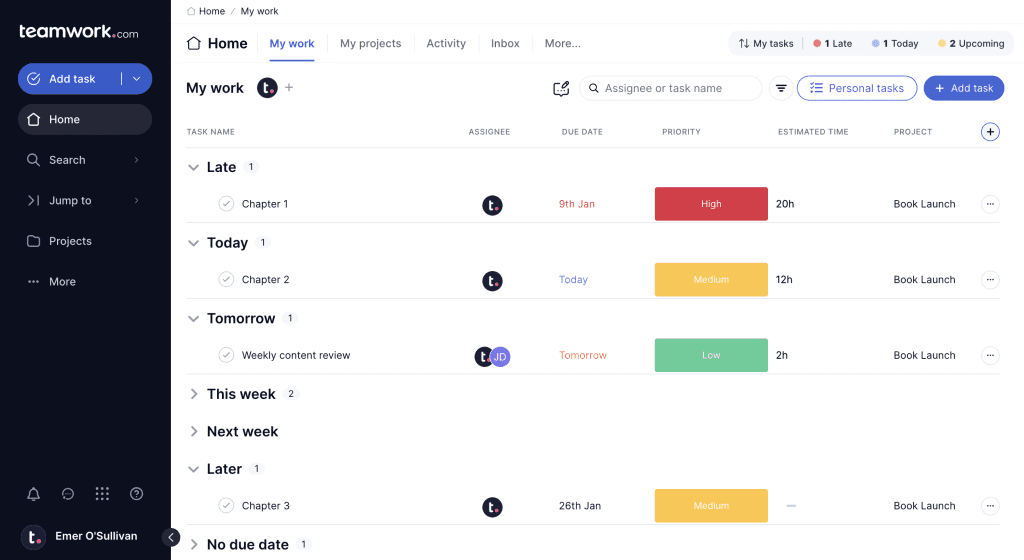
Task Management: Users can create tasks, assign them to team members, set deadlines, and track progress. Tasks can be organized into projects, allowing for easy monitoring and management of deliverables.
Project Planning: Teamwork.com provides tools like Gantt charts and Kanban boards for visual project planning. These features help teams map out project timelines, dependencies, and workflows.
Time Tracking: The software includes built-in time tracking, allowing users to log hours spent on tasks and projects. This feature aids in tracking productivity and managing budgets.
Collaboration Tools: The platform offers real-time chat, file sharing, and document collaboration features, facilitating effective communication and teamwork. Users can discuss tasks, share files, and work on documents together in real time.
What Sets Teamwork.com Apart
Teamwork.com distinguishes itself from its key competitors through several unique features and advantages:
Scalable Pricing Plans: Teamwork.com’s pricing structure is designed to accommodate a range of business sizes, from small startups to large enterprises. The scalable plans ensure that teams only pay for the features and capacity they need, offering flexibility as organizations grow.
Comprehensive Feature Set: Unlike some competitors that focus on specific aspects of project management, Teamwork.com offers a robust suite of tools, including task management, time tracking, Gantt charts, Kanban boards, and collaborative document editing. This all-in-one approach reduces the need for multiple tools and streamlines workflows.
Customizable Workflows: Teamwork.com provides extensive customization options for workflows and project templates. Users can tailor the platform to fit their specific needs, whether they are using Agile, Waterfall, or hybrid methodologies. This flexibility helps teams adapt the software to their preferred project management styles.
Integrated Time Tracking: The integrated time tracking feature sets Teamwork.com apart by allowing users to log hours directly within tasks and projects. This seamless integration aids in budgeting, billing, and productivity tracking without requiring a separate time tracking tool.
Advanced Reporting and Analytics: Teamwork.com offers detailed reporting and analytics tools that provide insights into project performance, team productivity, and resource utilization. Customizable reports help managers make data-driven decisions and optimize project outcomes.
Strong Collaboration Features: The platform emphasizes collaboration with real-time chat, file sharing, and document collaboration. Its integration with popular communication tools like Slack and Microsoft Teams further enhances team interaction and information sharing.
Teamwork.com Core Features
Feature | Description |
|---|---|
| Task Management | Create, assign, and track tasks with deadlines and priorities. |
| Project Planning | Use Gantt charts and Kanban boards to plan and visualize project timelines. |
| Time Tracking | Log hours worked on tasks and projects for budgeting and productivity tracking. |
| Collaboration Tools | Real-time chat, file sharing, and document collaboration. |
| Reporting & Analytics | Generate customizable reports and insights on project performance and team productivity. |
| Customizable Workflows | Tailor workflows and project templates to fit various methodologies and needs. |
| Integration Capabilities | Integrates with tools like Slack, Google Workspace, Microsoft Teams, and others. |
| Resource Management | Allocate and track resources across projects to optimize utilization. |
| Client Access | Provide clients with limited access to view project progress and provide feedback. |
| Automations | Set up automated triggers and actions to streamline repetitive tasks. |
Teamwork.com's Pricing and Plans
| Feature | Free | Deliver | Grow | Scale |
|---|---|---|---|---|
| Price (per user/month) | $0 | $10 | $18 | $30 |
| Task Management | ✓ | ✓ | ✓ | ✓ |
| Project Planning | Limited | Advanced | Advanced | Advanced |
| Time Tracking | Limited | ✓ | ✓ | ✓ |
| Collaboration Tools | Basic | Advanced | Advanced | Advanced |
| Reporting & Analytics | Basic | Advanced | Advanced | Advanced |
| Customizable Workflows | • | ✓ | ✓ | ✓ |
| Integration Capabilities | Limited | ✓ | ✓ | ✓ |
| Resource Management | • | • | ✓ | ✓ |
| Client Access | • | • | ✓ | ✓ |
| Automations | • | • | ✓ | ✓ |
| Custom Branding | • | • | • | ✓ |
| Dedicated Support | • | • | • | ✓ |
Featured Partners
1
Monday.com

Multiple tiers including free to enterprise
Enterprise grade and GDPR compliant
Support for several third party apps
2
deel.com

From $49 per month per seat
Knowledge base, 24/7 customer support, setup support
Included
3
Notion

From $7.99 per user per month, billed annually
24/7 customer support
Advanced encryption
1
monday sales CRM

On monday.com's Website
Free; $9 per user per month for basic features
14 days
Yes
2
monday sales CRM
On monday.com's Website
Free; $9 per user per month for basic features
14 days
Yes
3
monday sales CRM
On monday.com's Website
Free; $9 per user per month for basic features
14 days
Yes
Security Features
Teamwork.com provides robust security measures to ensure the protection of user data and compliance with industry standards. It employs advanced security protocols, including Single Sign-On (SSO) for secure user authentication and two-factor authentication (2FA) to further enhance account security. Data is encrypted both at rest and in transit using AES-256 and TLS protocols, safeguarding sensitive information. Teamwork.com offers granular access controls, allowing administrators to manage permissions and ensure that data access is restricted based on user roles. The platform is compliant with GDPR and other global privacy regulations, reflecting its commitment to data protection. Regular security audits and continuous monitoring are conducted to maintain a secure environment and address potential vulnerabilities.
Setup and Configuration
Setting up and configuring Teamwork.com is designed to be user-friendly and adaptable. Users can start with pre-designed templates tailored for various project types or create custom project setups from scratch. The platform's drag-and-drop interface simplifies the process of organizing tasks, creating project timelines, and configuring dashboards. Teamwork.com supports a range of project management methodologies and allows for extensive customization to fit different team needs. Integrations with third-party applications are straightforward, enabling easy connection with tools like Slack, Google Workspace, and Microsoft Teams. This flexibility ensures that users can quickly adapt Teamwork.com to their existing workflows and project requirements.
Customer Support
Teamwork.com offers comprehensive customer support to assist users in leveraging the platform’s full potential. Users can access an extensive knowledge base, including articles, guides, and tutorials for self-help. Email support is available for all users, providing assistance when needed. For those on the Grow and Scale plans, priority support options are offered, including faster response times and dedicated account management. Additionally, Teamwork.com provides access to community forums and regular webinars, where users can gain insights, share experiences, and learn best practices. This multi-tiered support approach ensures that users at all levels receive the help they need to optimize their use of the platform.
Who Is Teamwork.com Best For?
Teamwork.com is ideal for businesses and teams of all sizes that require a robust and flexible project management solution. It is particularly well-suited for organizations that need to manage complex projects with multiple moving parts, such as marketing agencies, software development teams, and consulting firms. The platform’s extensive feature set supports both high-level project planning and day-to-day task management, making it suitable for teams looking to enhance collaboration, track progress, and optimize workflows. Whether you’re a small startup or a large enterprise, Teamwork.com’s customizable tools and scalable plans can be tailored to meet diverse project management needs and support growth.
What Users Are Saying
User reviews for Teamwork.com is generally positive. Many users appreciate the platform's comprehensive feature set, which covers everything from task management to advanced reporting and time tracking. The flexibility of customizable workflows and project templates is frequently highlighted as a major advantage.
However, some users have noted that the interface can be overwhelming due to the vast number of features, which may present a learning curve. Additionally, there are occasional concerns about the pricing, especially for smaller teams or startups. Despite these minor drawbacks, the overall feedback reflects that Teamwork.com is a powerful and versatile tool that significantly enhances project management and team collaboration.