


7 Steps to Mastering Language Model Deployment
Deployment is not just about calling an API or hosting a model. It involves decisions around architecture, cost, latency, safety, and monitoring.
Image by Author
# Introduction
You build an LLM powered feature that works perfectly on your machine. The responses are fast, accurate, and everything feels smooth. Then you deploy it, and suddenly, things change. Responses slow down. Costs start creeping up. Users ask questions you did not anticipate. The model gives answers that look fine at first glance but break real workflows. What worked in a controlled environment starts falling apart under real usage.
This is where most projects hit a wall. The challenge is not getting a language model to work. That part is easier than ever. The real challenge is making it reliable, scalable, and usable in a production environment where inputs are messy, expectations are high, and mistakes actually matter.
Deployment is not just about calling an API or hosting a model. It involves decisions around architecture, cost, latency, safety, and monitoring. Each of these factors can affect whether your system holds up or quietly fails over time. A lot of teams underestimate this gap. They focus heavily on prompts and model performance, but spend far less time thinking about how the system behaves once real users are involved. Here are 7 practical steps to move from prototype to production-ready LLM systems.
# Step 1: Defining the Use Case Clearly
Most deployment problems start before any code is written. If the use case is vague, everything that follows becomes harder. You end up over-engineering parts of the system while missing what actually matters.
Clarity here means narrowing the problem down. Instead of saying "build a chatbot," define exactly what that chatbot should do. Is it answering FAQs, handling support tickets, or guiding users through a product? Each of these requires a different approach.
Input and output expectations also need to be clear. What kind of data will users provide? What format should the response take — free-form text, structured JSON, or something else entirely? These decisions affect how you design prompts, validation layers, and even your UI.
Success metrics are just as important. Without them, it is hard to know if the system is working. That could be response accuracy, task completion rate, latency, or even user satisfaction. The clearer the metric, the easier it is to make tradeoffs later.
A simple example makes this obvious. A general-purpose chatbot is broad and unpredictable. A structured data extractor, on the other hand, has clear inputs and outputs. It is easier to test, easier to optimize, and easier to deploy reliably. The more specific your use case, the easier everything else becomes.
# Step 2: Choosing the Right Model (Not the Biggest One)
Once the use case is clear, the next decision is the model itself. It can be tempting to go straight for the most powerful model available. Bigger models tend to perform better in benchmarks, but in production, that is only one part of the equation. Cost is often the first constraint. Larger models are more expensive to run, especially at scale. What looks manageable during testing can become a serious expense once real traffic comes in.
Latency is another factor. Bigger models usually take longer to respond. For user-facing applications, even small delays can affect the experience. Accuracy still matters, but it needs to be viewed in context. A slightly less powerful model that performs well on your specific task may be a better choice than a larger model that is more general but slower and more expensive.
There is also the decision between hosted APIs and open-source models. Hosted APIs are easier to integrate and maintain, but you trade off some control. Open-source models give you more flexibility and can reduce long-term costs, but they require more infrastructure and operational effort. In practice, the best choice is rarely the biggest model. It is the one that fits your use case, budget, and performance requirements.
# Step 3: Designing Your System Architecture
Once you move beyond a simple prototype, the model is no longer the system. It becomes one component inside a larger architecture. LLMs should not operate in isolation. A typical production setup includes an API layer that handles incoming requests, the model itself for generation, a retrieval layer for grounding responses, and a database for storing data, logs, or user state. Each part plays a role in making the system reliable and scalable.
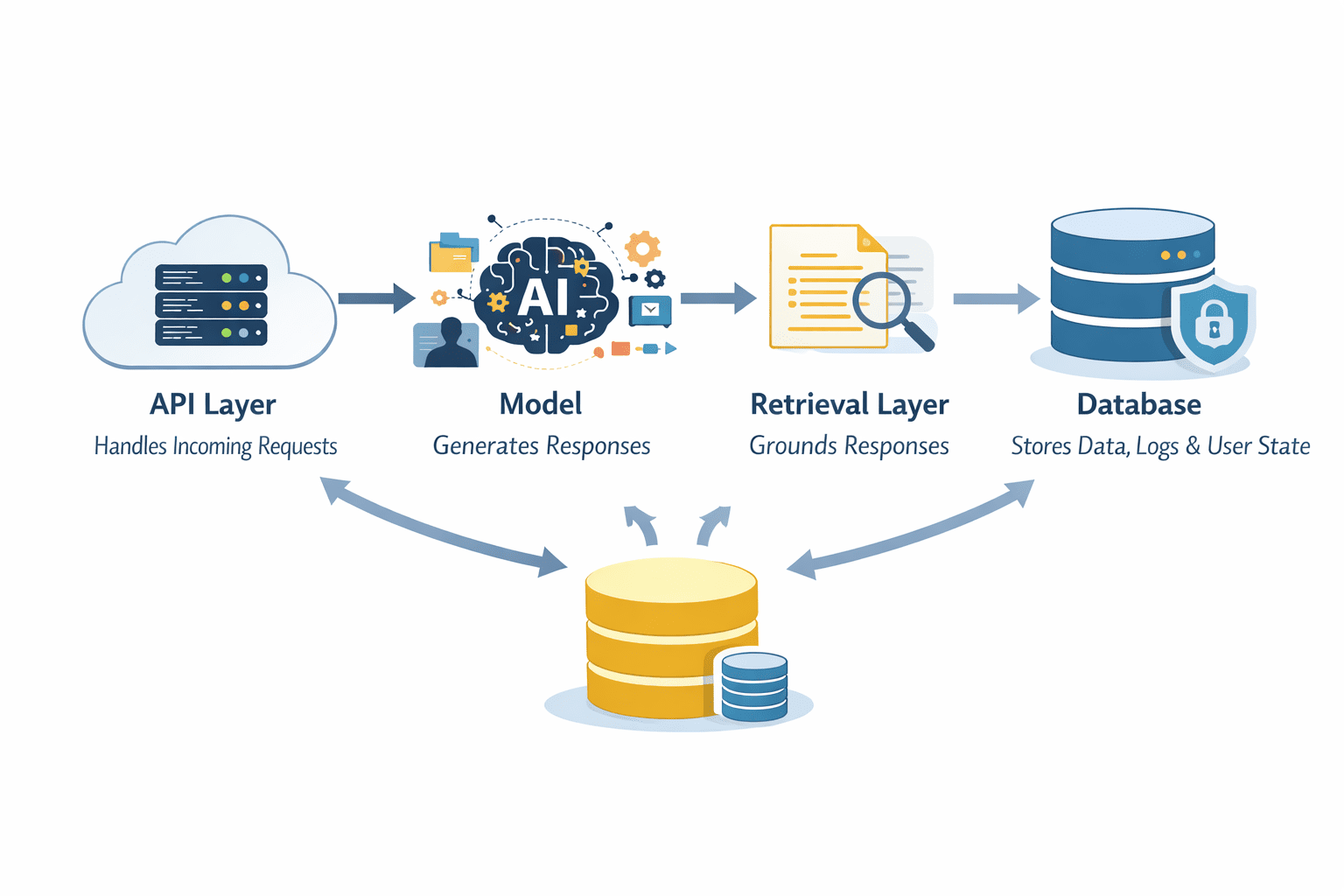
Layers in a System Architecture | Image by Author
The API layer acts as the entry point. It manages requests, handles authentication, and routes inputs to the right components. This is where you can enforce limits, validate inputs, and control how the system is accessed.
The model sits in the middle, but it does not have to do everything. Retrieval systems can provide relevant context from external data sources, reducing hallucinations and improving accuracy. Databases store structured data, user interactions, and system outputs that can be reused later.
Another important decision is whether your system is stateless or stateful. Stateless systems treat every request independently, which makes them easier to scale. Stateful systems retain context across interactions, which can improve user experience but adds complexity in how data is stored and retrieved.
Thinking in terms of pipelines helps here. Instead of one step that generates an answer, you design a flow. Input comes in, passes validation, is enriched with context, is processed by the model, and is handled before being returned. Each step is controlled and observable.
# Step 4: Adding Guardrails and Safety Layers
Even with a solid architecture, raw model output should never go directly to users. Language models are powerful, but they are not inherently safe or reliable. Without constraints, they can generate incorrect, irrelevant, or even harmful responses.
Guardrails are what keep that in check.
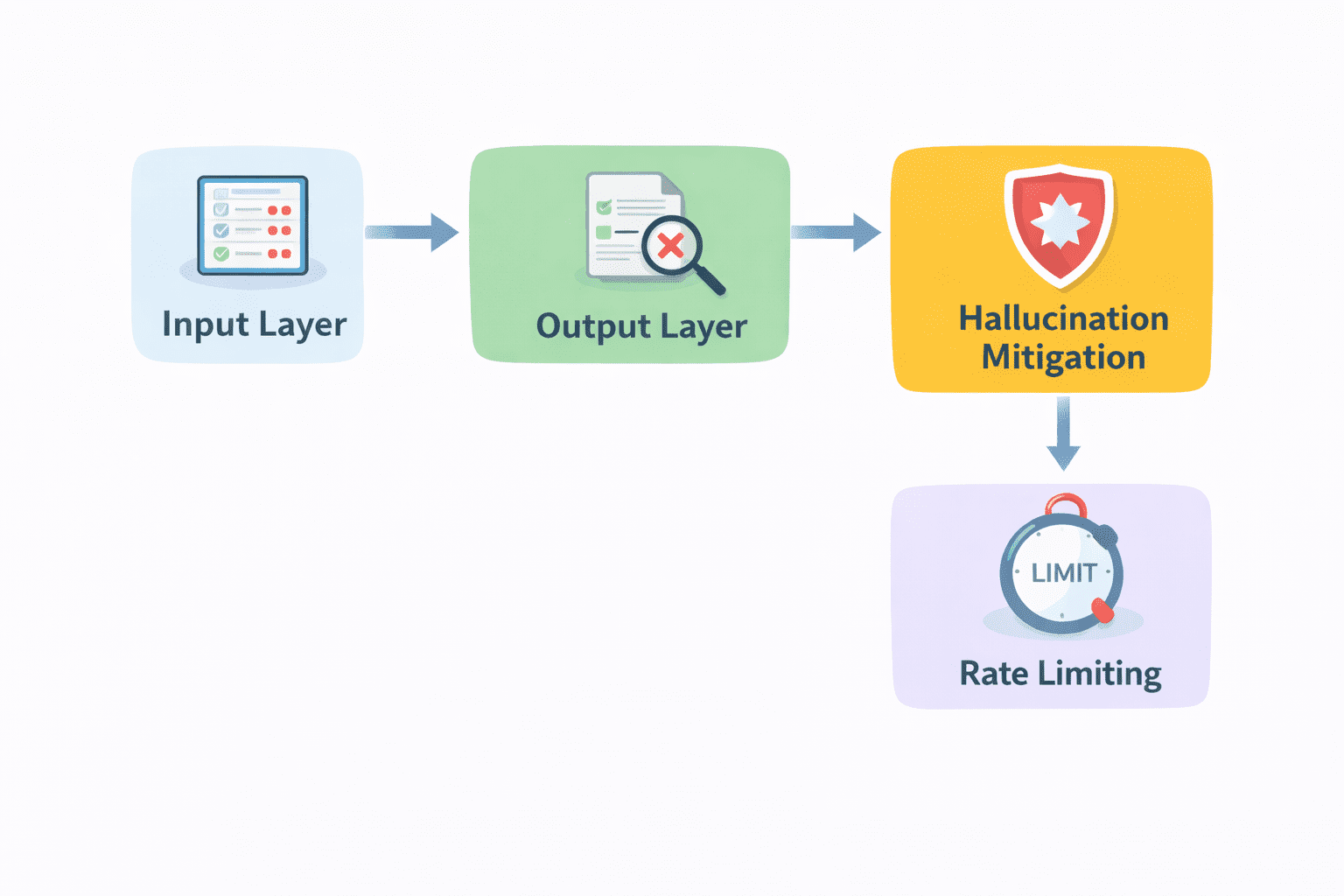
Guardrails and Safety Layers | Image by Author
- Input validation is the first layer. Before a request reaches the model, it should be checked. Is the input valid? Does it meet expected formats? Are there attempts to misuse the system? Filtering at this stage prevents unnecessary or risky calls.
- Output filtering comes next. After the model generates a response, it should be reviewed before being delivered. This can include checking for harmful content, enforcing formatting rules, or validating specific fields in structured outputs.
- Hallucination mitigation is also part of this layer. Techniques like retrieval, verification, or constrained generation can be applied here to reduce the chances of incorrect responses reaching the user.
- Rate limiting is another practical safeguard. It protects your system from abuse and helps control costs by limiting how often requests can be made.
Without guardrails, even a strong model can produce results that break trust or create risk. With the right layers in place, you turn raw generation into something controlled and reliable.
# Step 5: Optimizing for Latency and Cost
Once your system is live, the performance stops being a technical detail and becomes a user-facing problem. Slow responses frustrate users. High costs limit how far you can scale. Both can quietly kill an otherwise solid product.
Caching is one of the simplest ways to improve both. If users are asking similar questions or triggering similar workflows, you do not need to generate a fresh response every time. Storing and reusing results can significantly reduce both latency and cost.
Streaming responses also helps with perceived performance. Instead of waiting for the full output, users start seeing results as they are generated. Even if total processing time stays the same, the experience feels faster.
Another practical approach is selecting models dynamically. Not every request needs the most powerful model. Simpler tasks can be handled by smaller, cheaper models, while more complex ones can be routed to stronger models. This kind of routing keeps costs under control without sacrificing quality where it matters.
Batching is useful in systems that handle multiple requests at once. Instead of processing each request individually, grouping them can improve efficiency and reduce overhead.
The common thread across all of this is balance. You are not just optimizing for speed or cost in isolation. You are finding a point where the system remains responsive while staying economically viable.
# Step 6: Implementing Monitoring and Logging
Once the system is running, you need visibility into what is happening because, without it, you are operating blind. The foundation is logging. Every request and response should be tracked in a way that allows you to review what the system is doing. This includes user inputs, model outputs, and any intermediate steps in the pipeline. When something goes wrong, these logs are often the only way to understand why.
Error tracking builds on this. Instead of manually scanning logs, the system should surface failures automatically. That could be timeouts, invalid outputs, or unexpected behavior. Catching these early prevents small issues from becoming larger problems.
Performance metrics are just as important. You need to know how long responses take, how often requests succeed, and where bottlenecks exist. These metrics help you identify areas that need optimization.
User feedback adds another layer. Sometimes the system appears to work correctly from a technical perspective but still produces poor results. Feedback signals, whether explicit ratings or implicit behavior, help you understand how well the system is actually performing from the user's point of view.
# Step 7: Iterating with Real User Feedback
You must know that deployment is not the finish line. It is where the real work starts. No matter how well you design your system, real users will use it in ways you did not expect. They will ask different questions, provide messy inputs, and push the system into edge cases that never showed up during testing.
This is where iteration becomes critical. A/B testing is one way to approach this. You can test different prompts, model configurations, or system flows with real users and compare outcomes. Instead of guessing what works, you measure it.
Prompt iteration also continues at this stage, but in a more grounded way. Instead of optimizing in isolation, you refine prompts based on actual usage patterns and failure cases. The same applies to other parts of the system. Retrieval quality, guardrails, and routing logic can all be improved over time.
The most important input here is user behavior. What users click, where they drop off, what they repeat, and what they complain about. These signals reveal problems that metrics alone might miss, and over time, this creates a loop. Users interact with the system, the system collects signals, and those signals drive improvements. Each iteration makes the system more aligned with real-world usage.

Diagram showing a simple end-to-end flow of a production LLM system | Image by Author
# Wrapping Up
By the time you reach production, it becomes clear that deploying language models is not just a technical step. It is a design challenge. The model matters, but it is only one piece. What determines success is how well everything around it works together. The architecture, the guardrails, the monitoring, and the iteration process all play a role in shaping how reliable the system becomes.
Strong deployments focus on reliability first. They ensure the system behaves consistently under different conditions. They are built to scale without breaking as usage grows. And they are designed to improve over time through continuous feedback and iteration, and this is what separates working systems from fragile ones.
Shittu Olumide is a software engineer and technical writer passionate about leveraging cutting-edge technologies to craft compelling narratives, with a keen eye for detail and a knack for simplifying complex concepts. You can also find Shittu on Twitter.