


Freshdesk Customer Service Review 2025: Features, Pros & Cons



updated
|AuthorUpdated: Jan 3, 2025, 5:14 pm
Our Verdict
Our Verdict
Freshdesk is a cloud-based customer service software that streamlines support across multiple channels like email, chat, phone, and social media. Its key features include ticket management, automation, and reporting tools, enabling businesses to manage inquiries efficiently. Freshdesk enhances productivity, reduces response times, and improves customer satisfaction through customizable workflows and integrations. It’s ideal for businesses of all sizes, offering scalability, affordability, and ease of use, making it a versatile solution for improving customer service operations.


Pros
- Easy-to-use, intuitive interface.
- Multi-channel support in one platform.
- Strong automation features for efficiency.
- Affordable plans for small businesses.
- Highly customizable workflows and features.
Cons
- Limited reporting on lower-tier plans.
- Inconsistent customer support response times.
- Mobile app lacks full functionality.
- Advanced features require technical expertise.
- Higher tiers needed for advanced features.
What Is Freshdesk Customer Service Software?
Freshdesk is a cloud-based customer service software developed by Freshworks, designed to help businesses manage customer support efficiently. It offers a unified platform where companies can handle customer inquiries from multiple channels such as email, phone, chat, social media, and more. The software's robust ticketing system organizes customer interactions into manageable tickets, allowing support teams to track, prioritize, and resolve issues effectively.
One of the primary benefits of Freshdesk is its ability to enhance customer satisfaction through streamlined communication. By consolidating various support channels, it ensures that no customer query goes unnoticed. The automation features reduce manual workloads by automating repetitive tasks like ticket assignment and follow-ups, enabling support agents to focus on more complex customer needs. Collaboration tools within Freshdesk facilitate seamless teamwork, allowing agents to share information and resolve issues faster.
Freshdesk also provides valuable insights through analytics and reporting tools. Businesses can monitor key performance indicators such as response times, customer satisfaction scores, and agent productivity. These insights help in making informed decisions to improve service quality. Additionally, the software is highly scalable and customizable, catering to the needs of small businesses and large enterprises alike. It integrates with various third-party applications, extending its functionality and allowing for a more personalized support experience.
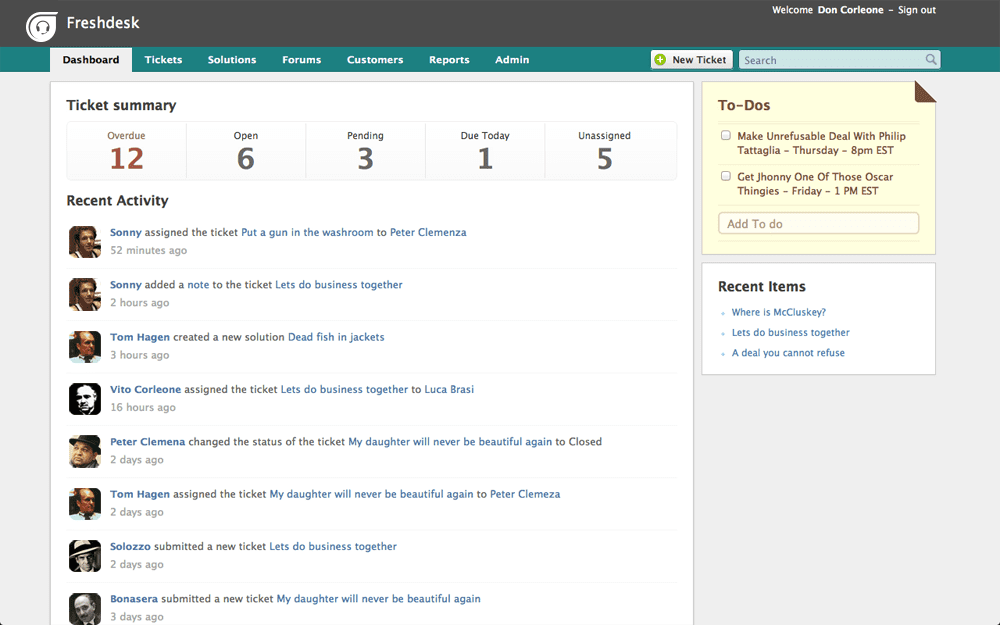
What Is Freshdesk Customer Service Used For?
Freshdesk customer service software is primarily used for three key functions: Ticket Management, Multi-Channel Support, and Automation of Support Processes.
1. Ticket Management: At the core of Freshdesk is its robust ticketing system. This function converts all customer inquiries—whether they come via email, phone, chat, or social media—into manageable tickets. Support agents can track, prioritize, and resolve these tickets efficiently. The system allows for categorization, tagging, and assignment of tickets to specific team members or departments, ensuring that customer issues are addressed promptly and systematically.
2. Multi-Channel Support: Freshdesk enables businesses to provide customer support across multiple channels from a single platform. Whether customers reach out via email, live chat, phone calls, social media platforms, or messaging apps, all interactions are centralized. This unified approach ensures a consistent customer experience and makes it easier for support teams to manage communications without missing any inquiries. It also allows businesses to meet customers on their preferred channels, enhancing customer satisfaction and engagement.
3. Automation of Support Processes: The software offers powerful automation features to streamline repetitive tasks. Functions like automatic ticket assignment, priority setting, and status updates reduce manual workloads for support agents. Automation rules can be set up to trigger actions based on specific conditions, such as sending acknowledgment emails or escalating unresolved tickets. This not only increases efficiency but also allows agents to focus on more complex issues that require personal attention.
These key functions collectively enhance customer service operations by improving response times, increasing agent productivity, and elevating overall customer satisfaction.

What Sets Freshdesk Apart
Freshdesk stands out from competitors due to its user-friendly interface, affordable pricing, and robust multi-channel support that unifies customer interactions across email, chat, phone, and social media. Its strong automation features reduce manual tasks, streamlining support processes. Furthermore, Freshdesk offers extensive customization and integration options, allowing businesses to tailor the platform to their needs, enhancing scalability and flexibility compared to other customer service solutions.
Freshdesk Core Features
| Feature | Description |
|---|---|
| Ticket Management | Centralizes customer inquiries into tickets for efficient tracking, prioritization, and resolution. |
| Multi-Channel Support | Manages customer interactions across email, phone, live chat, social media, and messaging apps from a single platform. |
| Automation Tools | Automates repetitive tasks like ticket assignment, follow-ups, and notifications to improve agent productivity. |
| Self-Service Portal | Offers a knowledge base, FAQs, and community forums for customers to find answers independently. |
| Collaboration Features | Enables team collaboration through shared inboxes, internal notes, and team huddles to resolve tickets faster. |
| Reporting & Analytics | Provides insights with customizable reports and dashboards on metrics like response times, ticket volumes, and customer satisfaction scores. |
| Customization Options | Allows customization of workflows, ticket fields, and branding elements to tailor the support experience. |
| Third-Party Integrations | Integrates with CRM systems, e-commerce platforms, and other tools like Slack, Salesforce, and Shopify to extend functionality. |
| Mobile App | Offers iOS and Android apps for agents to manage support tickets on the go. |
| Service Level Agreements (SLAs) | Helps define and enforce SLAs to ensure timely responses and resolutions, with automated escalations when thresholds are breached. |
| Customer Feedback Mechanisms | Collects customer satisfaction ratings and feedback directly after ticket resolution to gauge service quality. |
| AI-Powered Support (Freddy AI) | Utilizes AI for features like chatbots, predictive support, and automatic suggestion of solutions to expedite issue resolution. |
| Multilingual Support | Supports multiple languages for global customer bases, including localized portals and emails. |
| Time Tracking | Tracks the time spent on each ticket for performance analysis and billing purposes. |
| Escalation Management | Automates the escalation process for critical or unresolved tickets to higher support levels. |
| Security & Compliance | Ensures data protection with features like SSL encryption, role-based access, IP whitelisting, and compliance with GDPR and other regulations. |
| Sandbox Environment | Provides a testing environment to trial new features or configurations without affecting the live setup. |
| API Access | Offers RESTful APIs for developers to build custom integrations and extend platform capabilities. |
| Omnichannel Suite | Unifies support across various channels, providing a seamless experience for both agents and customers. |
| Custom Roles & Permissions | Allows administrators to define roles and set permissions, controlling access to different features and data within the platform. |
Freshdesk Pricing and Plans
| Feature | Free | Growth | Pro | Enterprise |
|---|---|---|---|---|
| Price per Person/Month | $0 | $15 (billed annually) $18 (billed monthly) | $49 (billed annually) $59 (billed monthly) | $79 (billed annually) $95 (billed monthly) |
| Free Trial | N/A | 21-day free trial available | 21-day free trial available | 21-day free trial available |
| Seats Included | Unlimited | Unlimited | Unlimited | Unlimited |
| Core Features | ||||
| Email Ticketing | ✔ | ✔ | ✔ | ✔ |
| Social Ticketing (Facebook & Twitter) | ✔ | ✔ | ✔ | ✔ |
| Knowledge Base | ✔ | ✔ | ✔ | ✔ |
| Team Collaboration Tools | ✔ | ✔ | ✔ | ✔ |
| Customer Portal | ✔ | ✔ | ✔ | ✔ |
| Mobile Apps (iOS & Android) | ✔ | ✔ | ✔ | ✔ |
| Productivity Features | ||||
| Canned Responses | ✔ | ✔ | ✔ | ✔ |
| Ticket Trend Reports | Basic | Standard | Advanced | Advanced |
| Custom Ticket Views | ✔ | ✔ | ✔ | ✔ |
| Automations (Workflow Automator) | ✖ | ✔ | ✔ | ✔ |
| Collision Detection | ✖ | ✔ | ✔ | ✔ |
| Marketplace Apps & Integrations | Limited | ✔ | ✔ | ✔ |
| Customer Experience | ||||
| Customer Satisfaction Surveys (CSAT) | ✖ | ✔ | ✔ | ✔ |
| Customizable Email Notifications | ✔ | ✔ | ✔ | ✔ |
| Multilingual Knowledge Base | ✖ | ✖ | ✔ | ✔ |
| Portal Customization (Basic) | ✔ | ✔ | ✔ | ✔ |
| Portal Customization (Advanced) | ✖ | ✖ | ✖ | ✔ |
| Management & Reporting | ||||
| Helpdesk Reports & Analytics | Basic | Standard | Advanced | Advanced |
| SLA Management | ✖ | ✖ | ✔ | ✔ |
| Business Hours | ✖ | ✔ | ✔ | ✔ |
| Custom Reports and Dashboards | ✖ | ✖ | ✔ | ✔ |
| Multiple SLA Policies | ✖ | ✖ | ✔ | ✔ |
| Agent Performance Reports | ✖ | ✔ | ✔ | ✔ |
| Advanced Features | ||||
| Time Tracking | ✖ | ✖ | ✔ | ✔ |
| Multiple Product Support | ✖ | ✖ | ✔ | ✔ |
| Skill-Based Ticket Assignment | ✖ | ✖ | ✖ | ✔ |
| Custom Roles and Permissions | ✖ | ✖ | ✖ | ✔ |
| Custom Apps | ✖ | ✖ | ✖ | ✔ |
| Sandbox Environment | ✖ | ✖ | ✖ | ✔ |
| IP Whitelisting | ✖ | ✖ | ✖ | ✔ |
| Audit Logs | ✖ | ✖ | ✖ | ✔ |
| Agent Shift Management | ✖ | ✖ | ✔ | ✔ |
| Custom Email Server (Using Own SMTP) | ✖ | ✖ | ✖ | ✔ |
| AI and Automation | ||||
| Freddy AI (Basic) | ✖ | ✔ | ✔ | ✔ |
| Freddy AI (Advanced) | ✖ | ✖ | ✔ | ✔ |
| Bot Sessions | N/A | 2,000/month | 3,000/month | 5,000/month |
| Security and Compliance | ||||
| SSL Encryption | ✔ | ✔ | ✔ | ✔ |
| Data Center Location Choice | ✖ | ✖ | ✖ | ✔ |
| GDPR Compliance Tools | ✔ | ✔ | ✔ | ✔ |
| Role-Based Access Control | Limited | Standard | Advanced | Advanced |
| Support and Service | ||||
| Email Support | Business Hours | 24/5 | 24/5 | 24/7 |
| Phone Support | ✖ | ✔ | ✔ | ✔ |
| Priority Support | ✖ | ✖ | ✔ | ✔ |
| Dedicated Account Manager | ✖ | ✖ | ✖ | ✔ |
| Onboarding and Training | Self-Service | Guided Setup | Guided Setup | Customized Onboarding |
Security Features
Freshdesk offers robust security measures to protect sensitive customer data and maintain compliance with industry standards. It utilizes SSL encryption to secure data transmission between users and servers. Role-based access control allows administrators to define specific permissions for agents, ensuring that each user accesses only the information pertinent to their role. IP whitelisting adds an extra layer of protection by restricting platform access to trusted networks. Additionally, audit logs track all system activities, providing transparency and aiding in compliance efforts.
Setup and Configuration
Setting up Freshdesk is straightforward, designed to get your customer support operations running swiftly. The intuitive interface guides users through initial configuration, including setting up support channels, customizing the helpdesk, and importing existing data. Businesses can tailor the platform extensively by customizing ticket fields, workflows, and automation rules to match their specific processes. Integration with third-party applications like CRM systems and e-commerce platforms is seamless, enhancing functionality and allowing for a personalized support environment.
Customer Support
Freshdesk provides comprehensive customer support to ensure users maximize the platform's benefits. Support channels include email, phone, and live chat, with response times varying based on the subscription plan—from standard business hours to 24/7 priority assistance. Users have access to a rich knowledge base, webinars, and community forums for self-service learning. Higher-tier plans offer dedicated account managers and customized onboarding, facilitating smooth implementation and ongoing optimization of customer service operations.

Who Is Freshdesk Best For?
Freshdesk is designed to be a flexible and scalable customer service solution, making it suitable for a wide range of company sizes and types. Here's how it caters to different businesses:
1. Small Businesses and Startups
- Affordability: With a free plan and competitively priced tiers, Freshdesk is accessible to companies with limited budgets.
- Ease of Use: The intuitive interface and straightforward setup allow small teams to get started quickly without extensive technical expertise.
- Essential Features: Core functionalities like email ticketing, knowledge base, and basic automation help manage customer inquiries efficiently.
2. Medium-Sized Enterprises
- Scalability: As businesses grow, Freshdesk's scalable plans accommodate increasing support demands without significant disruption.
- Advanced Features: Medium-sized companies can leverage features like multi-channel support, advanced automation, and comprehensive reporting to enhance customer service.
- Integration Capabilities: Seamless integration with CRM systems, e-commerce platforms, and other business tools streamlines operations across departments.
3. Large Enterprises
- Enterprise-Level Functionality: Freshdesk offers sophisticated features such as custom roles and permissions, IP whitelisting, and audit logs to meet complex organizational needs.
- Customization and Control: Large companies can customize workflows, automate intricate processes, and manage multiple brands or products within a single platform.
- High Volume Handling: The software is capable of supporting large support teams and handling a high volume of tickets efficiently.
Applicable Industries
Freshdesk is industry-agnostic and is used by companies in various sectors, including:
- E-commerce and Retail
- Technology and Software
- Healthcare
- Education
- Travel and Hospitality
- Financial Services
Its flexibility allows businesses to tailor the platform to specific industry requirements and customer service workflows.
What Users Are Saying
Positive Feedback
- Ease of Use: Many users highlight Freshdesk's intuitive and user-friendly interface, making it easy for support agents to navigate, manage tickets, and collaborate. It’s praised for being quick to set up and easy for non-technical users to adopt.
- Multi-Channel Support: Users appreciate the ability to handle customer inquiries from multiple channels (email, phone, chat, social media) in one platform. This consolidation improves efficiency and ensures that no customer request is missed.
- Automation Tools: Freshdesk’s automation capabilities, such as auto-assignment of tickets and canned responses, are frequently mentioned as helpful in streamlining workflows and reducing manual effort, especially for repetitive tasks.
- Customizability: Many reviews point out that Freshdesk is highly customizable, allowing businesses to tailor ticketing workflows, automations, and reporting to their specific needs.
- Affordability: Freshdesk is seen as cost-effective, particularly for small and medium-sized businesses. Users feel they get a lot of value for the features offered at each pricing tier.
Areas for Improvement
- Customer Support: Some users report mixed experiences with Freshdesk's customer support. While many find the support team helpful, others mention slow response times, especially on lower-tier plans. There are suggestions that support could be more consistent and responsive.
- Reporting Limitations: Several users express a desire for more advanced reporting and analytics features, particularly on the lower-tier plans. Businesses looking for in-depth data insights may need to upgrade to higher-priced plans to access more robust reporting tools.
- Mobile App Issues: A few users mention that the Freshdesk mobile app lacks some functionality compared to the desktop version, which can make managing tickets on the go a bit challenging.
- Advanced Customization Complexity: While the software is customizable, some users say more complex customizations can be difficult to implement without technical expertise, particularly for smaller businesses without in-house developers.
Overall Impression
Freshdesk receives strong praise for its simplicity, multi-channel integration, and value for money, making it a solid choice for small to mid-sized businesses. Larger organizations or those needing advanced features may find it necessary to invest in higher-tier plans. Despite a few concerns about customer support response times and reporting features, most users are satisfied with the overall performance and functionality of Freshdesk for improving customer service operations.