


Freshservice IT Service Management Review 2025: Features, Pros & Cons



updated
|AuthorUpdated: Jan 3, 2025, 5:14 pm
Our Verdict
Our Verdict
Freshservice ITSM is a cloud-based solution designed to streamline IT operations. Its key benefits include efficient incident, change, and asset management, helping teams minimize downtime and improve service delivery. With automation features, it reduces manual tasks and accelerates workflow processes. The software is easy to set up, customizable, and integrates with popular business tools. Freshservice also offers strong security features, like role-based access and compliance tools, ensuring data protection and regulatory adherence for businesses of all sizes.


Pros
- Easy-to-use, intuitive interface.
- Strong asset management capabilities.
- Advanced automation features streamline workflows.
- Robust security and compliance tools.
- Seamless third-party app integrations.
Cons
- Higher tiers required for advanced features.
- Limited customization on lower-tier plans.
- Reporting could be more advanced.
- Some setup complexity for custom workflows.
- Mobile app lacks full desktop functionality.
What Is Freshservice ITSM Software?
Freshservice is a cloud-based IT Service Management (ITSM) software developed by Freshworks, designed to help organizations manage IT services and operations efficiently. Its key features include incident, problem, change, and asset management, as well as automation tools and a configuration management database (CMDB). Freshservice provides a unified platform for handling IT service requests, tracking assets, and managing IT projects.
The main benefits of Freshservice include:
- Streamlined IT Operations: Automates tasks like ticketing and asset tracking, improving service delivery.
- Improved Efficiency: Allows IT teams to manage incidents, changes, and assets with ease, reducing downtime.
- Customization and Integration: Integrates with third-party apps and can be tailored to fit specific workflows.
- Enhanced Visibility: Provides real-time reporting and analytics, allowing for data-driven decision-making.
- User-Friendly Interface: Intuitive design ensures a short learning curve, making it accessible to IT teams of all sizes.
With these benefits, Freshservice helps businesses enhance IT service delivery, ensuring better customer and employee satisfaction.

What Is Freshservice Used For?
Freshservice ITSM is primarily used for three core functions:
- Incident Management: Freshservice helps IT teams quickly resolve service interruptions and restore normal operations. The platform centralizes incident tracking, enabling IT staff to assign, prioritize, and manage tickets efficiently. This reduces downtime and improves service quality.
- Change Management: Freshservice manages IT changes systematically, helping teams plan, approve, and implement changes while minimizing risks. Automated workflows and approvals ensure smooth transitions without affecting ongoing services.
- Asset Management: Freshservice allows organizations to track and manage IT assets throughout their lifecycle, from procurement to disposal. This includes both hardware and software, ensuring accurate inventory management, compliance, and cost control.
These core functions enable businesses to streamline IT operations, reduce response times, and maintain a comprehensive view of their IT infrastructure, leading to better service delivery and resource management.
What Sets Freshservice Apart
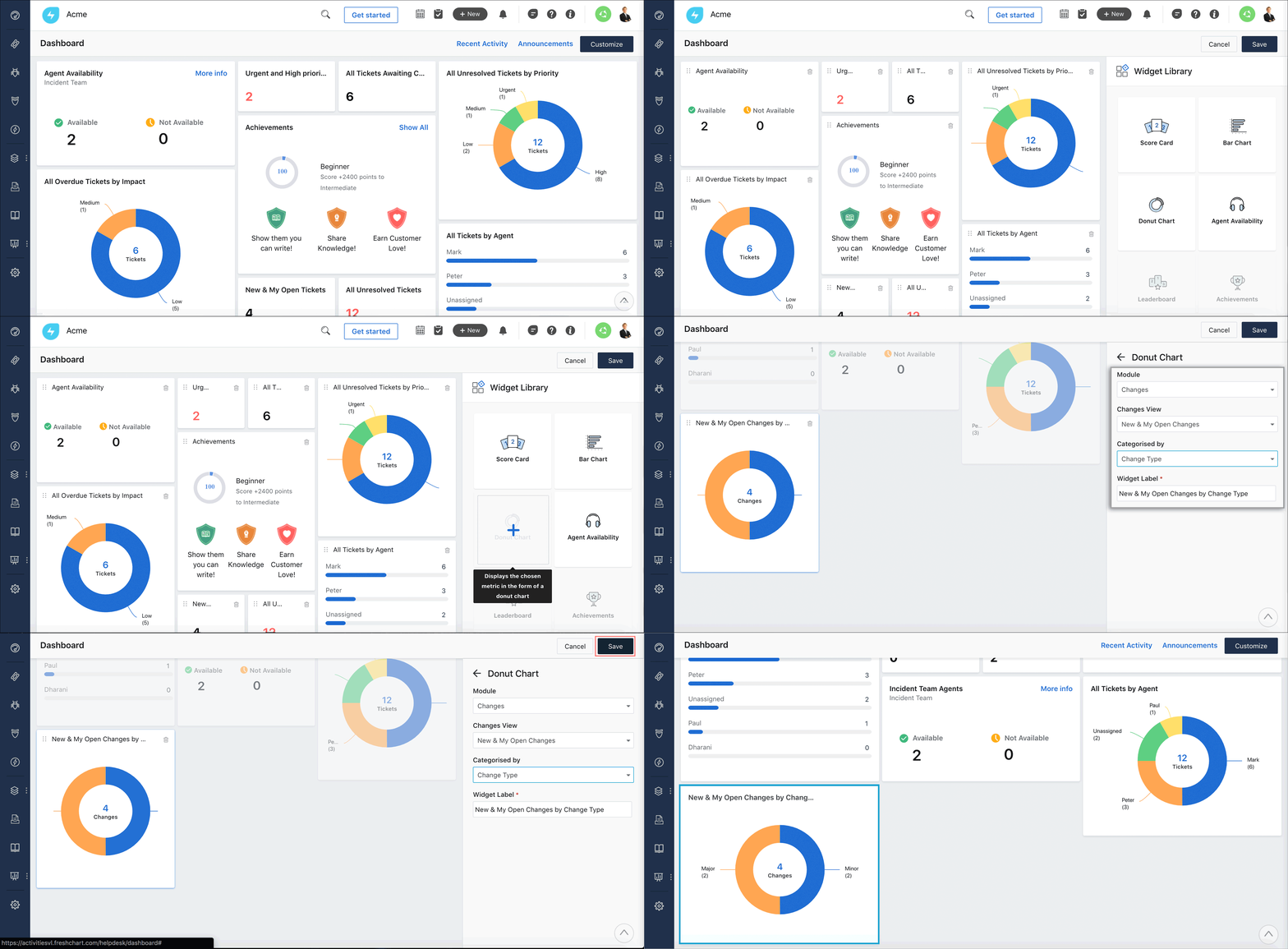
Freshservice stands out due to its ease of use, powerful automation features, and integrated asset management. Its intuitive design makes it accessible for IT teams of all skill levels, while the automation capabilities reduce manual tasks. Freshservice also offers a rich ecosystem of third-party integrations, making it adaptable to existing workflows. Additionally, its robust reporting features provide actionable insights for IT teams to improve service delivery and ensure compliance.
Freshservice Core Features
| Feature | Description |
|---|---|
| Incident Management | Streamlines the resolution of IT issues, ensuring minimal downtime. |
| Change Management | Manages IT changes through structured workflows to minimize risks and ensure smooth transitions. |
| Asset Management | Tracks and manages the entire lifecycle of hardware and software assets. |
| Problem Management | Identifies root causes of recurring incidents and minimizes service disruptions. |
| Service Catalog | Self-service portal that allows users to request IT services, enhancing efficiency. |
| Automations | Automates ticket assignments, approvals, and notifications to streamline IT workflows. |
| CMDB | Configuration Management Database to monitor relationships between IT assets and services. |
| Third-Party Integrations | Integrates with popular business tools like Slack, Microsoft Teams, Jira, and more. |
| Reporting and Analytics | Provides real-time insights and reports on IT performance metrics. |
| Mobile App | Enables IT agents to manage incidents and assets on the go. |
| IT Project Management | Helps manage IT projects with clear timelines, task assignments, and progress tracking. |
| Security and Compliance | Ensures data protection with SSL encryption, role-based access control, and compliance with industry regulations. |
Freshservice Pricing and Plans
| Plan | Starter | Growth | Pro | Enterprise |
|---|---|---|---|---|
| Price | $19 per agent/month | $49 per agent/month | $89 per agent/month | $109 per agent/month |
| Free Trial | 21 days | 21 days | 21 days | 21 days |
Core Features:
| Feature | Starter | Growth | Pro | Enterprise |
|---|---|---|---|---|
| Incident Management | ✔ | ✔ | ✔ | ✔ |
| Knowledge Base | ✔ | ✔ | ✔ | ✔ |
| Service Catalog | ✔ | ✔ | ✔ | ✔ |
| SLA Management | ✔ | ✔ | ✔ | ✔ |
| Asset Management | ✖ | ✔ | ✔ | ✔ |
| Change Management | ✖ | ✔ | ✔ | ✔ |
| Automations | Basic | Advanced | Advanced | Advanced |
| Multi-Language Support | ✖ | ✔ | ✔ | ✔ |
| Custom Workflows | ✖ | ✔ | ✔ | ✔ |
| IT Project Management | ✖ | ✖ | ✔ | ✔ |
| Custom Reports & Dashboards | ✖ | ✖ | ✔ | ✔ |
Security Features
Freshservice provides robust security features to ensure data protection and compliance. It uses SSL encryption to secure data transmission, safeguarding sensitive information from unauthorized access. Role-based access controls allow administrators to assign permissions, ensuring that users only have access to relevant data and features. Freshservice is also compliant with GDPR and other data protection regulations. For advanced security, it offers features like IP whitelisting, audit logs, and multi-factor authentication, adding multiple layers of protection for IT operations.
Setup and Configuration
Freshservice is designed for easy setup and configuration, allowing IT teams to get started quickly. The platform offers a user-friendly interface that simplifies the initial setup process. With step-by-step guides, users can easily configure workflows, define service levels, and import data without the need for extensive technical knowledge. Freshservice also supports customizable workflows, allowing organizations to tailor the system to their specific needs. It integrates seamlessly with third-party apps, further enhancing its flexibility during the setup phase.
Customer Support
Freshservice provides strong customer support to ensure that users maximize the value of the platform. Support is available through multiple channels, including email, phone, and live chat. Users also have access to a comprehensive knowledge base, community forums, and detailed documentation for self-service support. Higher-tier plans offer 24/7 priority support and dedicated account managers for personalized assistance. Overall, Freshservice ensures responsive and reliable help to resolve issues and optimize the platform for IT teams.

Who Is Freshservice Best For?
Freshservice is suitable for organizations of all sizes, especially:
IT Service Providers: Ideal for IT teams managing multiple clients with features like multi-tenancy and custom workflows.
Small to Medium Businesses (SMBs): Offering affordable plans, easy setup, and essential ITSM features for growing companies.
Large Enterprises: With advanced automation, robust reporting, and customization options, Freshservice scales to meet the needs of larger IT teams managing complex IT environments.
What Users Are Saying
Pros:
- User-friendly interface and easy setup.
- Strong asset management capabilities.
- Automation reduces manual work.
- Seamless third-party integrations.
- Responsive customer support.
Cons:
- Reporting features could be more advanced.
- Higher-tier plans required for some key functionalities.
- Limited customization on lower-tier plans.
Overall Impression
Freshservice offers a comprehensive ITSM solution with powerful automation, asset management, and intuitive workflows. While some users suggest more advanced reporting and customization options for lower-tier plans, the software provides a valuable IT service management platform for businesses looking to streamline IT operations.