


Guardio Review 2025: Features, Pros & Cons



updated
|AuthorUpdated: Jan 29, 2025, 1:46 pm
Our Verdict
Our Verdict
Guardio is a browser extension designed to enhance online security by blocking phishing attempts, malicious websites, and harmful browser extensions. It also provides real-time data breach alerts and improves browsing by blocking intrusive ads and pop-ups. Its lightweight, user-friendly design makes it ideal for individuals and families seeking protection from browser-based threats without complex setups. While it lacks offline security and requires Gmail access for phishing detection, even the Basic version offers a solid starting point for online safety, with Premium adding comprehensive features. Guardio is a versatile solution available across all devices, including mobile, making it an excellent choice for anyone looking to enhance their online security and protect against browser-based threats.


Pros
- Simple, user-friendly interface
- Strong feature set
- Effective breach detection
- 24/7 Premium support
- Includes a smartphone app
Cons
- No offline file protection
- Requires email access
- Limited free version
What Is Guardio?
At a glance
Guardio provides a suite of features to safeguard your computer, positioning itself as an antivirus and anti-malware solution designed to defend against a variety of online threats. Unlike traditional antivirus programs, Guardio operates directly within any Chromium-based browser, ensuring it doesn’t consume additional storage space. In brief, the service protects against malware and phishing attacks, alerts you to leaked credentials and data breaches, and prevents the download of potentially harmful files from the internet.
Pricing: Free for the basic version; $14.99/month for Premium; $14.99/person/month for businesses.
Features you’ll love:
- Browsing protection: Guardio prevents you from accessing websites that may pose a threat to your online security. It does so by warning you when you access a suspicious link.
- Prevents phishing: Phishing is one of the most common online attacks, often targeting your passwords and credit card information. Guardio helps protect you by warning you about phishing emails or fake websites designed to impersonate legitimate ones.
- Detects breaches: If your passwords or credit card information have been exposed on the dark web or other platforms, Guardio notifies you immediately and recommends updating your credentials to prevent misuse.
Guardio integrates all these features into a user-friendly extension for any Chromium-based browser. While there are many antivirus solutions available, Guardio stands out for its lightweight design. It operates seamlessly in the background, performing essential security tasks without consuming significant computer resources.
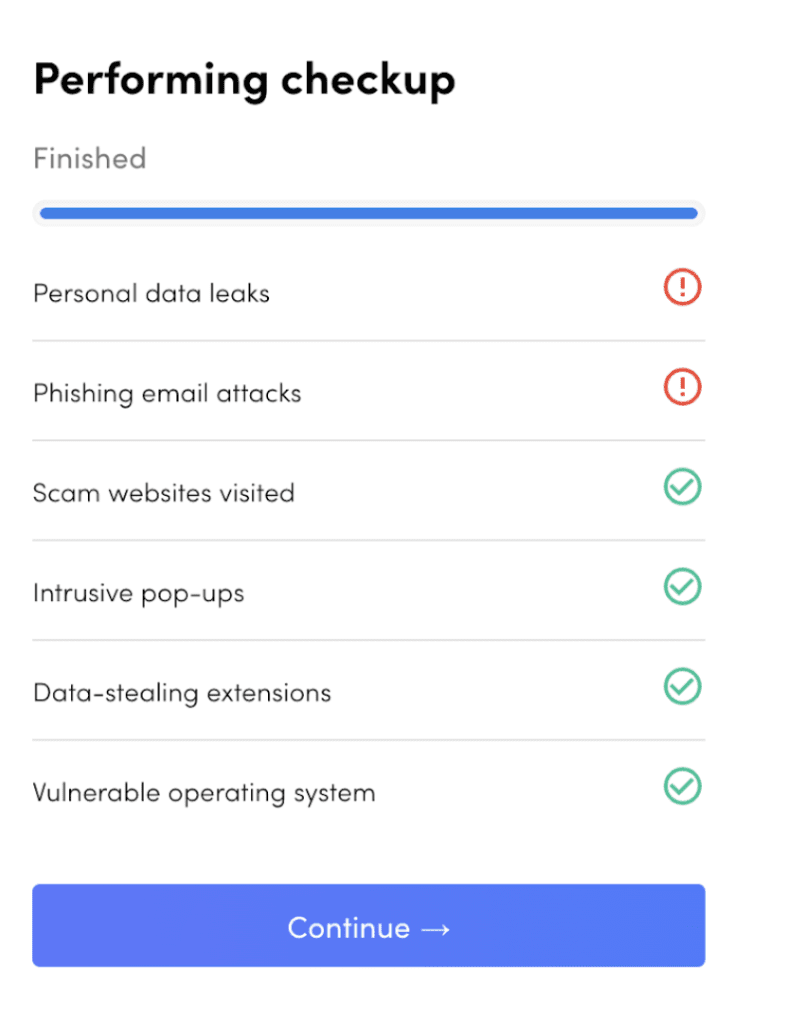
One in every four Americans falls victim to cyber-attacks each year—a staggering figure resulting in billions of dollars in losses. In fact, Americans collectively lost nearly $12.5 billion to these attacks in 2023 alone. Using a service like Guardio can help prevent such monetary losses while offering the peace of mind that comes with safeguarding your online identity.
While protecting personal interests and assets is crucial, it’s equally essential for large organizations and enterprises to secure their data and that of their employees. Data reveals that nearly half of small businesses in the U.S. had their social media accounts hacked in 2022—a startling statistic. Moreover, 55% of these attacks occurred because an employee clicked on a link they shouldn’t have. This is where Guardio for businesses comes into play. Guardio mitigates these risks by warning users about suspicious links and emails, helping to prevent accidental clicks that could lead to security breaches.

In fact, email scams alone cost businesses a staggering $2.9 billion in 2023. Such losses can be devastating, especially for small companies and startups. Guardio’s ability to detect and block suspicious emails provides an essential layer of protection, helping businesses avoid these costly pitfalls.
Who Is Guardio For?
Guardio’s features cater to both individual users and businesses, offering tailored solutions for each. For personal use, Guardio provides robust protection against scams, malware, and other online threats—essential safeguards for anyone who spends time online. After all, we all need protection in today’s digital world, right? Here are the different tiers offered by Guardio:
Basic: The Basic plan of Guardio is completely free of cost. As the name suggests, it offers basic, essential protection for your computer’s browser. This includes alerting you about dangerous sites and the option to manually scan your computer for potential threats. While it’s certainly handy, it’s not the full suite of features you would expect from software meant to protect you. To access those, you’ll need to pay for the next tier.
Premium: If you want additional features like automatically blocking dangerous sites, security against malicious emails, identity and data leak monitoring, apps for your smartphone, and dedicated customer support, you’ll need to opt for the Premium plan. For $14.99 a month, you get comprehensive protection against online scams and hijacking attempts. If you spend a lot of time on the Internet, the Premium plan is highly recommended.
Business: As the name suggests, enterprise users should opt for the Business plan, which covers all employees in your organization. You get all the features of the Premium plan, plus additional user management capabilities. This means everyone in your organization is protected, and you can also set restrictions on what links and sites employees can access on their computers. This helps maintain a high level of safety across the organization. Even with the Business plan, the cost remains $14.99 per month per person.
My Experience Using Guardio
I’ve used a ton of security apps and services over the past two decades – and most of them, while effective – have an extremely cluttered UI. With Guardio, what stood out to me the most was how clean the experience of using the preferences page was. Everything is laid out in an organized fashion with a clear distinction between the various features.
In addition, the service promptly identified my compromised information and provided detailed insights about a data leak. This allowed me to visit the affected websites or apps and update my login credentials. Since this feature is included in the free/basic version of Guardio, it’s accessible to everyone—which is the best part.
What I also appreciate is that the phishing detection and spam email protection features are seamlessly integrated into Gmail. In fact, the integration is so smooth that it feels like a native, first-party feature. This makes the service much more intuitive to use, as it doesn’t feel like an add-on. By contrast, some other antivirus software, like Norton and McAfee, often display pop-ups and alerts that feel intrusive—almost like spam themselves.
What I miss is protection against offline files on my PC. Since Guardio doesn’t offer this feature, I need to use a separate malware protection app or software, which can be a bit inconvenient. However, what offsets this limitation is the ability to share the subscription with up to four friends, who can then use it across all their devices. Hopefully, Guardio will add offline protection capabilities in the future, making the Premium plan even more compelling.
One standout feature Guardio offers that competitors often don’t is one-on-one customer support for resolving issues. Whether you’re struggling to use a specific feature of Guardio or need assistance protecting your device, the support team is readily available to help. This is particularly beneficial for businesses and enterprises looking for a customized plan for their workplace. Employees covered under the plan gain access to all Guardio features, including the dedicated support service.
It’s worth noting, however, that Guardio only works with Chromium-based browsers. If your default browser is something else, you’ll need to switch to a Chromium-based option to use the service.
Core Features
Once you install Guardio on your web browser, you’ll be asked to create an account or sign in. You can also link the service to your Google account—which, by the way, is mandatory for using the email protection features. After entering your credentials, you’ll be directed to the Guardio control panel. Here, you can adjust settings, view security breaches and other data, and manage your plan. Below are the detailed features and options Guardio offers to its users.
1. Scan to Detect Active Threats
The primary job of Guardio is to identify threats and issues on your computer. To do this, you simply click the "Scan Now" button on the Guardio homepage. Scans can be performed regardless of whether you’re using the Basic or Premium version.

The only difference is that the Basic version won’t automatically neutralize detected threats, while the Premium and Business plans will. Even so, it’s a solid starting point for detecting issues and bringing them to your attention.
2. Browsing Protection
Guardio protects your browsing experience by alerting you to sites that may pose potential threats. For instance, if you click on a suspicious link, Guardio will notify you that the site you’re attempting to access isn’t safe.

If you have a Premium or Business subscription, Guardio will automatically block you from opening unsafe sites. This feature is especially useful if you frequently receive emails with random or suspicious links.
3. Malicious Extension Detection
Chromium-based browsers are notorious for malicious extensions that can hijack your browsing experience. From spying on your data to displaying incessant ads, these harmful extensions can significantly disrupt your web browsing.

Don’t worry, though—Guardio has you covered. It provides a dedicated menu that scans your existing extensions and alerts you to any that may pose a threat. From there, you can remove them directly through the Guardio console.
4. Unwanted Notification Cleanup
Many websites exploit Chrome’s notification feature to deliver spam notifications. This can clutter your computer’s taskbar with unwanted and distracting alerts. Thankfully, Guardio’s notification cleaner takes care of these issues. Some websites even push fake notifications about system updates or file downloads, but Guardio ensures you stay protected from such nuisances.
5. Identity Monitoring and Data Theft Protection
Identity theft and compromised credentials are among the most common threats in today’s digital landscape. Unfortunately, it’s now all too common for hackers to access your credentials and sell them on the dark web. This is where Guardio proves invaluable. The program actively scans both the surface web and the dark web for leaked information. If your details are compromised, Guardio provides a detailed list of the affected services along with the specific information that has been exposed.

Guardio provides details about the website involved as well as whether your password, address, or credit card details were compromised. You can then visit the website to delete your credentials or update your password. If Guardio reports that your credit card information has been leaked, you can use this information to contact your bank and block the card to prevent misuse. Best of all, this feature is available in the Basic version, allowing you to detect compromises and identity theft for free.
6. Search Hijacking Correction
Have you ever noticed that when you search for something on Google, you end up with unreliable results or excessive ads? This is likely due to your search being hijacked by malware. Such hijacking can also result in random and unsafe web pages being suggested to you. If you’re dealing with this issue, Guardio’s search hijacking correction feature can be a lifesaver.
7. Malicious Email Alerts
It’s extremely common to receive phishing emails designed to steal your login credentials. Hackers can then use this information to access your private accounts. If you receive such emails, Guardio will flag them instantly, alerting you that the email is unsafe.

If you’re a business or someone with a significant amount of important data stored in online accounts, this feature can be a game-changer. For content creators—whose social media accounts are their livelihood—having a feature like this is essential to protect their login credentials from being compromised.
8. Mobile Security App
If you thought Guardio only keeps your computer safe, you’re wrong. The company recently introduced a smartphone app that works on both Android and iOS. Installing the app gets you browsing protection on your smartphone, real-time notifications of data breaches, and a text messaging filter.

It’s essentially the same as the malicious email alerts but for text messages on your smartphone. With mobile banking on the rise, it’s definitely a useful tool.
What Sets Guardio Apart From the Rest?
Guardio is extremely light on resources since it runs as a browser extension instead of a standalone app. So, you don’t have to keep it open and running in the background at all times. In addition, it works with all Chromium-based browsers.
What’s also noteworthy is that a single Guardio subscription can be shared with up to four other people, such as family members or friends. The best part? Each user can install and use Guardio on an unlimited number of devices. Whether it’s two laptops, two phones, or two desktops per user, you simply log in with the registered email address, and Guardio will work seamlessly across all devices. Unlike many brands that limit the number of devices per subscription, Guardio only caps the number of users.
Finally, the 24/7 human customer support is an absolute godsend in an era where AI is increasingly taking over customer support services. If you’re experiencing issues with Guardio or need assistance securing your accounts, help is just a call away.
Getting Started and Support
Installing Guardio is as simple as visiting guard.io and clicking the "Start for Free" button. You’ll be redirected to the Chrome Web Store, where you can add the extension to your browser. Once added and set up, you can select the subscription plan that best suits your needs.
As mentioned earlier, if you require any sort of support, Guardio has a helpline number to assist you.
Pricing & Plans
There are three subscription plans available to purchase with Guardio.
| Features | Basic | Premium | Business |
| Dangerous site blocks | Alerts only | Yes | Yes |
| Malicious email security | No | Yes | Yes |
| Identity & data leak monitoring | No | Yes | Yes |
| Mobile App (iOS & Android) | No | Yes | Yes |
| 24/7 hotline & human support | No | Yes | Yes |
| User management | No | No | Yes |
| Support SLA | No | No | Yes |
| Security scans | Manual | Automatic | Automatic |
| Price | Free | $14.99 per month | $14.99 per person per month |
Guardio offers a 7-day free trial before requiring a purchase. This allows you to experience the product fully before making a decision.
Alternatives
There are several apps and services catered towards internet security that can give Guardio a run for its money. For example, Bitdefender is an antivirus program that provides similar features as Guardio along with overall protection for your computer, not just when you’re browsing.
Similarly, there’s Norton which also provides a comprehensive security solution. McAfee and Malwarebytes are some other big names in the industry you may have heard of. All of these services protect your computer and scan for viruses/malware on your local drives in addition to internet browsing. That adds an additional layer of security that Guardio doesn’t offer.
However, these apps often consume significant system resources and may have complex user interfaces. Guardio’s control panel is user-friendly and clearly displays all relevant information. Regarding pricing, many larger brands provide separate plans for individuals and enterprises, often including additional services. In contrast, Guardio offers a straightforward pricing structure, with a Premium plan priced at $9.99 per month, allowing sharing with up to four other users.
Final Thoughts
Guardio delivers a no-frills experience with a simple user interface and practical features. It includes most of the essential tools needed to keep you protected while browsing the web. That said, there are a few drawbacks to consider, such as the lack of offline security, the requirement to grant the service access to your Gmail account for phishing detection, and pricing that may feel slightly high for some users. Still, even the Basic version offers valuable protection if your primary goal is to stay safe online.
Sumukh brings over six years of technical expertise with a strong focus on security tools and web privacy. He leverages his background in engineering to simplify complex technologies and help users make informed choices about the tools and gadgets they rely on. His work spans in-depth guides, detailed reviews, and expert opinions for leading publications such as KDnuggets, Guiding Tech, and XDA-Developers.