


Vibe Coding for Business Analytics: Custom CRM Dashboards, Reporting Apps, and AI Agents
Discover how Alaio Vibecode, an AI app builder for Bitrix24, helps teams create custom CRM analytics dashboards, reporting tools, lead scoring apps, and AI agents.
Some of a company's most valuable analytical knowledge never makes it into its software. It lives in spreadsheets, internal documents, or calculations employees have developed through years of experience. A sales team, for example, might use its own scoring model to evaluate opportunities based on account type, engagement patterns, and deal history. The model helps determine which customers deserve attention, but applying it still requires someone to collect the data, run calculations, and organize the results.
What if that scoring model could become an application working directly with the company's CRM data?
This is the kind of specific requirement that Alaio Vibecode, an AI app builder and vibe coding platform for Bitrix24, is designed to address. Teams can describe what they need in natural language and use AI-assisted development to create custom CRM analytics dashboards, reporting applications, lead scoring tools, chatbots, and AI agents.
Bitrix24 brings CRM, projects, tasks, documents, communication, analytics, and automation into one environment. Alaio Vibecode lets businesses build additional applications around their own calculations, processes, and ways of working, without starting a conventional development project.
How to Build Custom CRM Analytics Apps with AI
With Alaio Vibecode, teams can create applications that retrieve relevant Bitrix24 records, apply company-specific logic, and present results in a format suited to a particular decision.
They can build entirely new applications or adapt ready-made solutions. An app can be designed around a particular calculation, workflow, combination of data sources, or business process.
Building a custom app starts with a simple description of what you need. Alaio Vibecode works with AI coding agents such as Claude Code, Cursor, and OpenAI Codex to turn your instructions into an application that connects to your Bitrix24 workspace and works with your business data.
For the sales team using its own scoring model, an initial instruction might look like this:
Build a CRM analytics dashboard that ranks open opportunities by our scoring model. Use account type, days since the last activity, deal amount, and engagement history. Show the score breakdown and let employees open the corresponding CRM records.
The team would still define its calculation rules. For example, it might assign 40% of the score to engagement, 30% to account fit, and 30% to closing potential, with explicit criteria for each component. The application could calculate scores and present relevant deals in a ranked table.
How to Test an AI-Built CRM Scoring App
Before using a custom scoring app with your team, try a decision replay test using historical CRM data:
- Select three past deals: One that closed successfully, one that was lost, and one that stalled.
- Recreate the original situation: Use only information available at the time, not details learned afterward.
- Run the scoring rules: Check how the app would have ranked those opportunities.
- Evaluate the results: Would the rankings have helped your team prioritize more effectively?
The goal isn't just accurate calculations. It's a scoring model that supports better decisions. Use this initial check to identify questionable assumptions, then test the model against a larger, representative set of records.
After testing, the team could adjust weights, introduce filters, or change how results appear. An analytical idea that once required a dedicated development project becomes easier to prototype and evaluate.
Custom CRM Dashboards and Lead Scoring with Alaio Vibecode
Managers frequently need different perspectives on the same business data. A regional sales director might want monthly revenue, pipeline value, conversion rates, and employee assignments in one interface. Another manager could create an AI dashboard focused on opportunities that have stopped progressing.
Applications become more interesting when they go beyond displaying figures. Consider a sales representative who wants a morning briefing: which deals are approaching closing dates, which opportunities have gone quiet, and which new leads require attention. The ready-made solutions in Alaio Vibecode include Daily CRM Digest, designed around this workflow.
Another application, Lead Scoring Board, categorizes open deals as Hot, Warm, or Cold based on factors such as pipeline stage, deal value, and recent activity. Defined scoring rules determine priority, while AI explains the factors behind each result. Teams can investigate individual deals and adjust the scoring logic to reflect their qualification criteria.
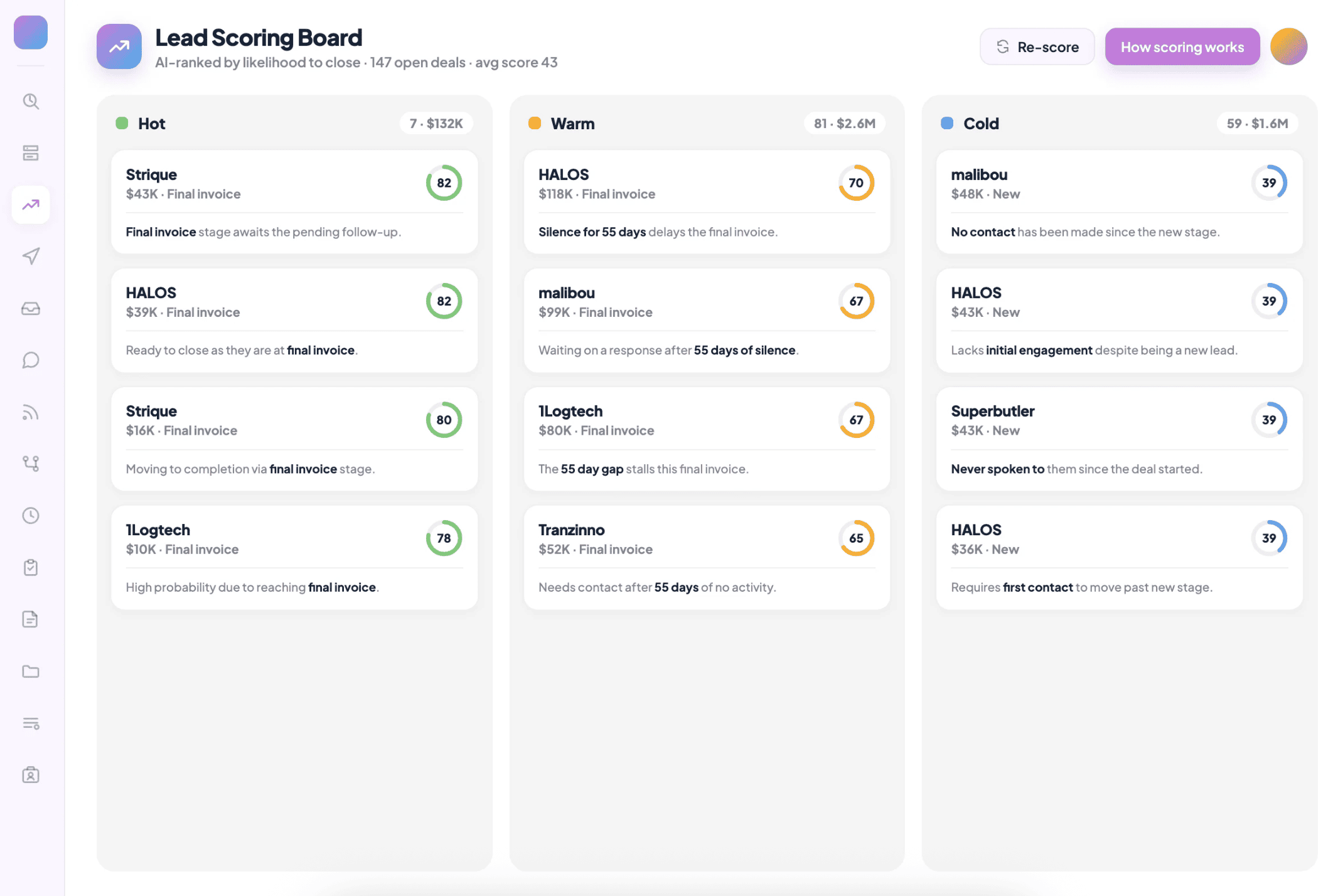
This illustrates a practical principle for AI analytics tools: let code calculate what can be defined precisely, and use AI to explain the results. An application should count inactive deals from actual CRM records rather than asking a language model to estimate them. AI can then summarize the findings and identify records worth investigating.
The distinction matters when comparing performance. A representative managing 80 leads isn't necessarily performing better than someone managing 35. Lead sources, qualification stages, territories, and responsibilities may differ. A custom analytics application can apply comparisons that make sense for the organization.
A chatbot can analyze an exported CRM report, but that export captures a particular moment. A custom application can retrieve current records through an API and apply consistent calculations whenever it runs. Although language models can also access live data when equipped with appropriate tools, a dedicated application makes recurring analysis reusable across a team.
Adding External Context with Deal Radar
A CRM shows what happened with an account, but sales representatives may also need information about recent developments outside it: a product announcement, expanded hiring, or new funding. Such signals can influence the questions worth asking in the next conversation.
Deal Radar combines CRM records with external research. It retrieves a deal and its associated company from Bitrix24, searches for relevant external signals, and generates a briefing with source references and an explanation of why the account may be worth contacting now.
Sources still need checking, and an announcement doesn't automatically make an opportunity more valuable. But Deal Radar assembles context employees would otherwise research manually, illustrating how internal data, external information, and AI-generated interpretation can support a specific business decision.
When the Most Useful Dashboard Isn't a Dashboard
Consider a marketing department coordinating campaigns, content, and design approvals through Bitrix24 Tasks and Projects. Its manager may be less interested in reviewing every assignment than in identifying which tasks need attention first.
A task-monitoring application built with Alaio Vibecode illustrates this approach. Stale Task Monitor calculates a risk score using overdue days, time elapsed since the planned start date, and task priority. It displays the highest-risk tasks in a ranked list, with an AI-generated explanation and suggested next step.
The approach adapts to different workflows. Marketing teams might prioritize overdue campaign approvals; operations departments could focus on assignments affecting upcoming deliveries. Each organization defines what urgency means.
For a manager facing dozens of assignments, five prioritized tasks may be more useful than a dashboard covering every project. The best analytical interface isn't necessarily the one with the most visualizations, but the one that helps someone make the next decision.
Placement matters too. Apps built with Alaio Vibecode can be configured to appear directly in Bitrix24 CRM records, the main menu, or Tasks and Projects. A task-monitoring app, for example, can open from the project environment rather than a separate reporting section.
Conversational Analytics: Another Way to Work with Business Data
Some analytical questions are easier to ask than to explore through charts. A sales manager might need a summary of particular opportunities, while a project coordinator wants to identify overdue tasks before a meeting.
Custom bots and AI agents built with Alaio Vibecode let employees retrieve information and request summaries through natural-language conversations. One example is the preconfigured Hermes AI agent, which can be customized for different business roles to answer questions, prepare reports, and assist with operational tasks. Administrators should limit its permissions to the data and actions required.
A manager might use a CRM dashboard for a weekly pipeline review and later ask a chatbot about an individual deal. The dashboard supports comparison across records; the assistant handles a focused request.
For analytics professionals, the choice depends on how employees need information: as a dashboard, ranked list, reporting assistant, or specialized application.
How to Build Your First AI Analytics App
Start with a recurring analytical question that requires specific data or business rules: perhaps a weekly report assembled manually or a prioritization method employees follow but haven't automated.
Before creating an application, define five things:
- The decision: What should users understand or do after seeing the result?
- The data: Which CRM records, tasks, fields, dates, or statuses are required?
- The logic: How should values be calculated, compared, or prioritized?
- The output: Would a dashboard, table, ranked list, or conversational answer work best?
- The interaction: Should users filter results, investigate records, or take further action?
Compare two instructions. "Build a project dashboard" leaves the AI coding agent guessing what matters. A more useful description would be:
Show overdue tasks in the marketing department, grouped by responsible employee, with upcoming deadlines and a prioritized list of assignments requiring attention.
The second instruction identifies the department, relevant records, and expected result. Once the application works, users can refine its rules, filters, or interface through further natural-language instructions.
Teams can also adapt ready-made solutions by changing scoring rules, activity thresholds, or other details.
Whatever the starting point, validate the results against actual business records. Check calculations, filters, and data permissions. Alaio Vibecode supports read-only API keys for reporting applications and authorization options based on signed-in employees' Bitrix24 permissions.
Security is an important part of the Alaio Vibecode environment. Businesses can build custom apps around data stored in Bitrix24 without moving their CRM records into separate databases. Apps connect to Bitrix24 through permission-controlled access, so teams can limit which information each app can retrieve. For additional protection, apps can run on private Black Hole servers that are not directly accessible from the public internet.
Finally, involve the people who will use the app. Their feedback can reveal missing filters, questionable calculations, or opportunities to make results more useful. AI-assisted development makes iteration easier, but testing remains essential.
Turn One Recurring Business Task into an Application
Your team's next useful application might already exist as a spreadsheet formula, recurring report, or set of rules someone applies every Monday morning.
Start with the smallest useful version. Identify the Bitrix24 data, describe the desired result, and test it with the people who will use it.
Explore Alaio Vibecode, choose a ready-made solution or describe your own idea, and turn one recurring analytical task into an application tailored to your business.