


Creating a Personal Assistant with LangChain
In this article I will show you how to create a personal assistant with LLM facilitated by LangChain.
 Image by Author | Ideogram
Large language models (LLM), such as ChatGPT, have been around for a relatively short amount of time yet have already changed the way we work. With a generative model in hand, many tasks can be automated to help our work.
One thing we can do with an LLM is to develop our own personal assistant, with the generative AI model performing our work, especially the tasks we do often.
In this article I will show you how to create a personal assistant with LLM facilitated by LangChain. Let’s get into it.
Personal Assistant Development with LangChain
First, we need to efficiently structure our project. For our purposes, we will use the following structure:
/personal_assistant_project
│
├── .env
├── personal_assistant.py
├── utils.py
└── requirements.txt
Your directory should consist of four files. Let’s break down each one to understand why it is necessary.
The requirements.txt file will contain the packages necessary for the project. In this case, we would fill them with the following list:
streamlit
langchain
langchain-community
openai
Python-dotenv
These are the packages necessary for our project. Now, fill in the .env file with your OpenAI API key.
OPENAI_API_KEY=”SK-YOUR_API_KEY”
Using a .env file is a standard way to safely secure our API keys for use in the project rather than hard-coding them in our Python file.
With the preparation ready, we would set up the utils.py file, which would become the backbone of our personal assistant project.
Initially, we will prepare all the packages we would use during the project.
import os
from dotenv import load_dotenv
from langchain_community.llms import OpenAI
from langchain.chains import LLMChain
from langchain.prompts import PromptTemplate
from langchain.agents import initialize_agent, Tool, AgentType
Then, we will also prepare the environment by loading the OpenAI API key to the local environment.
load_dotenv()
Next, we will prepare our OpenAI model instance function. Basically, this function will ask the LLM model that we would pass the prompt to act as the personal assistant later.
_llm_instance = None

def get_llm_instance():
    global _llm_instance
    if _llm_instance is None:
        openai_api_key = os.getenv("OPENAI_API_KEY")
        if not openai_api_key:
            raise ValueError("OpenAI API key not found. Please set the OPENAI_API_KEY environment variable.")
        _llm_instance = OpenAI(api_key=openai_api_key)
    return _llm_instance
Now, let’s move on to the central part of personal assistant project development. We will develop a chain that integrates the LLM and the prompt to generate the text.
The chain that we develop is a task that the personal assistant can do. We can create a general, all-purpose personal assistant, but it would be much better if we already set them up to do specific tasks, as it would help the LLM produce standardized results.
For example, the below code would produce a personal assistant task to perform email drafts depending on the context we passed.
def create_email_chain(llm):
    email_prompt = PromptTemplate(
        input_variables=["context"],
        template="You are drafting a professional email based on the following context:\n\n{context}\n\nProvide the complete email below."
    )
    return LLMChain(llm=llm, prompt=email_prompt)
In the code above, we are using LLMChain from LangChain, where the function would return the LLMChain object to which we have passed the LLM model and the prompt that we have specified for creating an email draft.
We can create many additional tasks for LLMChain. You just need to specify the tasks that are vital to you.
For example, I am adding more chains for creating study plans, answering questions, and extracting action items from meeting notes.
def create_study_plan_chain(llm):
    study_plan_prompt = PromptTemplate(
        input_variables=["topic", "duration"],
        template="Create a detailed study plan for learning about {topic} over the next {duration}."
    )
    return LLMChain(llm=llm, prompt=study_plan_prompt)


def create_knowledge_qna_chain(llm):
    qna_prompt = PromptTemplate(
        input_variables=["question", "domain"],
        template="Provide a detailed answer to the following question within the context of {domain}:\n\n{question}"
    )
    return LLMChain(llm=llm, prompt=qna_prompt)


def create_action_items_chain(llm):
    action_items_prompt = PromptTemplate(
        input_variables=["notes"],
        template="Extract and list the main action items from the following meeting notes:\n\n{notes}"
    )
    return LLMChain(llm=llm, prompt=action_items_prompt)
We can run the chain as it is for every task we set, but I want to set up an additional agent that can assess our task needs.
With LangChain, it’s possible to set the LLMChain as a tool that the agent can decide to run or not based on the prompt we pass. The following code would initiate the agent when we decide to run them.
def initialize_agent_executor():
    llm = get_llm_instance()
    tools = [
        Tool(
            name="DraftEmail",
            func=lambda context: create_email_chain(llm).run(context=context),
            description="Draft a professional email based on a given context. This tool is specifically for email drafting."
        ),
        Tool(
            name="GenerateStudyPlan",
            func=lambda topic, duration: create_study_plan_chain(llm).run(topic=topic, duration=duration),
            description="Generate a study plan for a topic over a specified duration."
        ),
        Tool(
            name="KnowledgeQnA",
            func=lambda question, domain: create_knowledge_qna_chain(llm).run(question=question, domain=domain),
            description="Answer a question based on a specified knowledge domain."
        ),
        Tool(
            name="ExtractActionItems",
            func=lambda notes: create_action_items_chain(llm).run(notes=notes),
            description="Extract action items from meeting notes."
        )
    ]

    agent = initialize_agent(tools, llm, agent=AgentType.ZERO_SHOT_REACT_DESCRIPTION, verbose=True, return_intermediate_steps=True)

    return agent
All the LLM tasks are now done; we will then move on to preparing the personal assistant front end. In our case, we would use Streamlit to act as the framework for our application.
In the file personal_assistant.py, we will set up all the necessary functions and the code to running the application. First, let’s import all the packages and set up the LLM tasks.
import streamlit as st
from utils import (
    create_email_chain,
    create_study_plan_chain,
    create_knowledge_qna_chain,
    create_action_items_chain,
    initialize_agent_executor,
    get_llm_instance
)

llm = get_llm_instance()

# Create all chains and the agent executor once to avoid repeated initialization
email_chain = create_email_chain(llm)
study_plan_chain = create_study_plan_chain(llm)
knowledge_qna_chain = create_knowledge_qna_chain(llm)
action_items_chain = create_action_items_chain(llm)
agent_executor = initialize_agent_executor()
Once we have initiated of all the LLMChains and the agent, we will develop the Streamlit front end. As each task requires different input, we would set up each task separately.
st.title("Personal Assistant with LangChain")

task_type = st.sidebar.selectbox("Select a Task", [
    "Draft Email", "Knowledge-Based Q&A",
    "Generate Study Plan", "Extract Action Items", "Tool-Using Agent"
])

if task_type == "Draft Email":
    st.header("Draft an Email Based on Context")
    context_input = st.text_area("Enter the email context:")
    if st.button("Draft Email"):
        result = email_chain.run(context=context_input)
        st.text_area("Generated Email", result, height=300)

elif task_type == "Knowledge-Based Q&A":
    st.header("Knowledge-Based Question Answering")
    domain_input = st.text_input("Enter the knowledge domain (e.g., Finance, Technology, Health):")
    question_input = st.text_area("Enter your question:")
    if st.button("Get Answer"):
        result = knowledge_qna_chain.run(question=question_input, domain=domain_input)
        st.text_area("Answer", result, height=300)

elif task_type == "Generate Study Plan":
    st.header("Generate a Personalized Study Plan")
    topic_input = st.text_input("Enter the topic to study:")
    duration_input = st.text_input("Enter the duration (e.g., 2 weeks, 1 month):")
    if st.button("Generate Study Plan"):
        result = study_plan_chain.run(topic=topic_input, duration=duration_input)
        st.text_area("Study Plan", result, height=300)

elif task_type == "Extract Action Items":
    st.header("Extract Action Items from Meeting Notes")
    notes_input = st.text_area("Enter meeting notes:")
    if st.button("Extract Action Items"):
        result = action_items_chain.run(notes=notes_input)
        st.text_area("Action Items", result, height=300)

elif task_type == "Tool-Using Agent":
    st.header("Tool-Using Agent")
    agent_input = st.text_input("Enter your query (e.g., 'Draft an email thanking the team for their hard work'): ")

    if st.button("Run Agent"):
        try:
            execution_results = agent_executor(agent_input)

            if isinstance(execution_results, dict) and 'intermediate_steps' in execution_results and execution_results['intermediate_steps']:
                final_result = execution_results['intermediate_steps'][-1][1]
            else:
                final_result = execution_results.get('output', 'No meaningful output was generated by the agent.')

            st.text_area("Agent Output", final_result, height=300)

        except Exception as e:
            st.error(f"An error occurred while running the agent: {str(e)}")
That’s all for our Streamlit front end. Now, we only need to run the following code to access our assistant.
streamlit run personal_assistant.py

Your Streamlit dashboard should look like the above image. Try to select any task that you want to run. For example, I am selecting to run the Tool Using Agent task because I want the agent to decide what should be done.
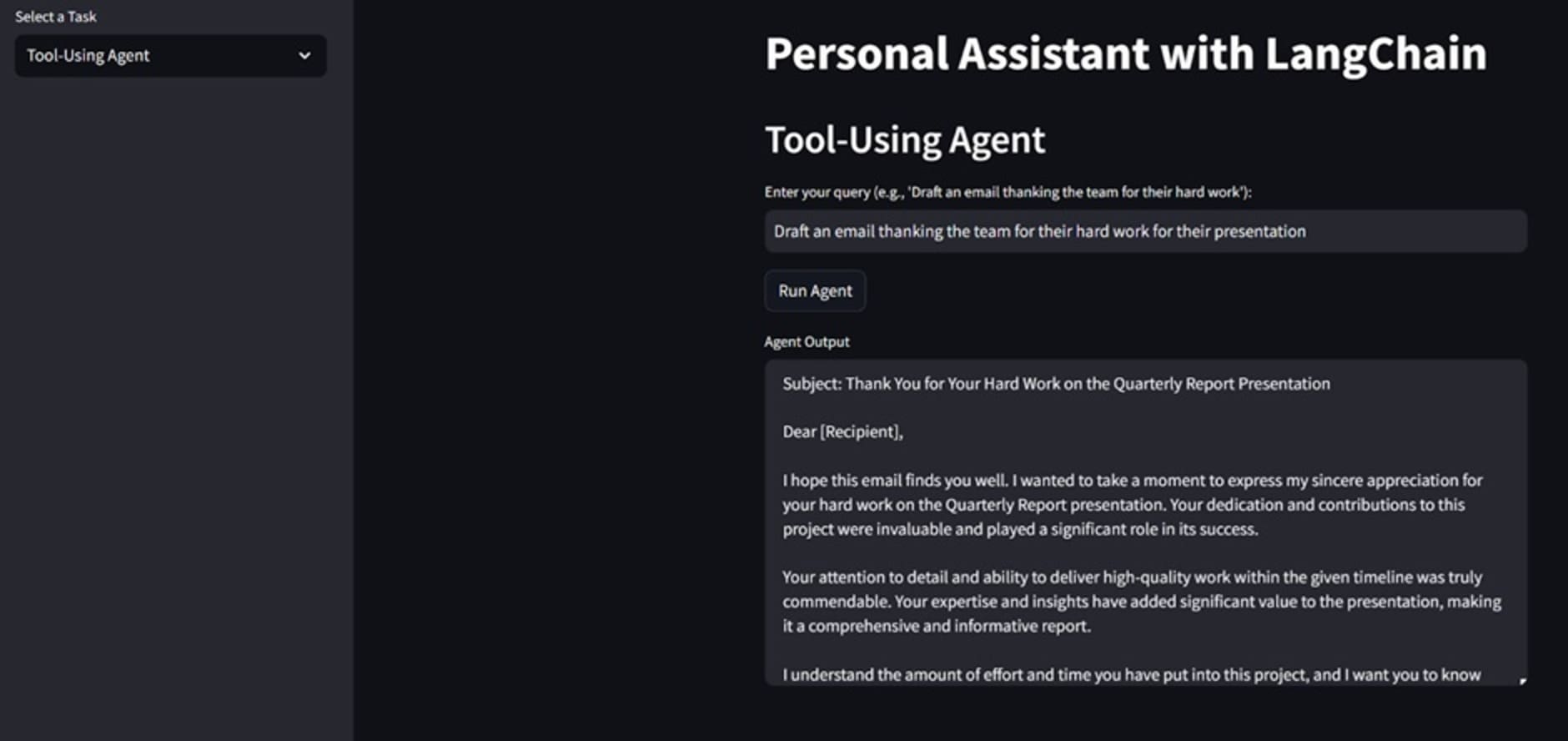
As you can see, the agent is able to develop an email message that we can use to congratulate the team.
Try to develop the tasks necessary for your work and make the personal assistant capable of doing them.
Conclusion
In this article, we have explored how to develop personal assistants with LLMs using LangChain. By setting up each task, LLM can act as an assistant for that specific assignment. Using an agent from LangChain, we can delegate them to select which task appropriate to run according to the context we pass.
I hope this has helped!
Cornellius Yudha Wijaya is a data science assistant manager and data writer. While working full-time at Allianz Indonesia, he loves to share Python and data tips via social media and writing media. Cornellius writes on a variety of AI and machine learning topics.